
How to Repurpose Content Across Multiple Social Media Platforms
Brands that repurpose content across multiple platforms reach up to 300% more people than those producing one-off posts [site: Buffer 2024]. One piece of content — a blog post, video, or podcast — can generate 8 to 10 platform-ready assets without starting from scratch. This guide covers the full content repurposing strategy: how to audit what you have, adapt it to each platform, build a distribution workflow, and measure what works. If you're already managing multiple social media platforms at once, repurposing is the system that makes that sustainable without doubling your workload.
What is content repurposing for social media?
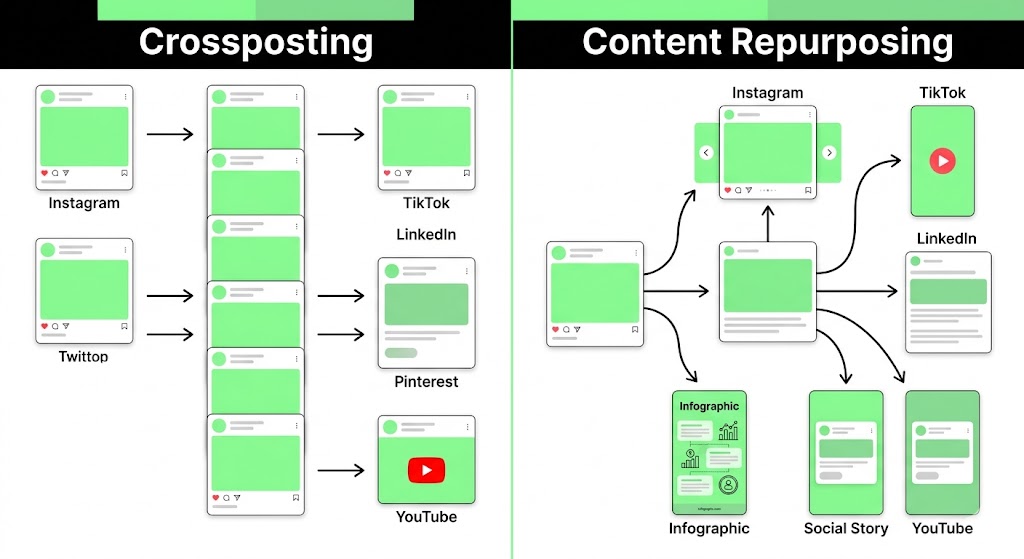
Content repurposing is the process of taking one existing piece of content and adapting it into new formats for different platforms. It involves transforming a blog post into an Instagram carousel, turning a YouTube video into a podcast clip, or converting a webinar into a LinkedIn article. This is not crossposting — crossposting copies and pastes the same content identically. Repurposing adapts the format, tone, and structure to match each platform's native behavior. The core idea stays the same. The delivery changes completely.
Why should you repurpose content across social media platforms?
Repurposing content across social media platforms is valuable because it multiplies your output without multiplying your effort. One original piece produces multiple platform-specific assets that reach different audience segments, build SEO authority, and cut production costs. Three reasons make this strategy worth building into your workflow — time savings, reach expansion, and search visibility.
How does content repurposing save time and reduce creation costs?
Repurposing saves 60–80% of content creation time compared to producing original content for each platform individually [site: Content Marketing Institute 2024]. The model behind this is called COPE — Create Once, Publish Everywhere. You produce one strong piece of content, then extract platform-specific assets from it rather than building each from zero.
A single home decor blog post titled "Living Room Design Trends 2026" can produce: 5 Instagram carousels, 3 TikTok clips, 2 Pinterest infographics, 1 LinkedIn article, and 1 YouTube Short. That is 12 assets from one production session. The writing, research, and core messaging stay the same. Only the format and tone shift per platform.
Teams that batch repurposing into a weekly workflow report cutting content costs by up to 70% [site: HubSpot 2024]. If you've weighed the question of social media management vs doing it yourself, this time saving is one of the strongest arguments for building a system rather than improvising each week.
How does repurposing content increase your reach across platforms?
Systematic repurposing increases content reach by up to 300% by putting your message in front of audience segments that use different platforms [site: Buffer 2024]. A person who never watches YouTube may discover the same idea through a Pinterest infographic. A LinkedIn user who skips TikTok may read your carousel and click through to your site.
Each platform attracts a distinct audience segment. Instagram skews toward visual discovery. LinkedIn attracts professional decision-makers. TikTok reaches younger buyers in the awareness phase. Pinterest captures high-intent searchers planning purchases. Posting across all four means a single idea touches all of those segments simultaneously.
Buffer increased content reach by 400% after implementing a structured repurposing system across its social channels [site: Buffer Case Study 2023]. The gain came not from more content, but from distributing the same content to audiences with different consumption habits.
What SEO advantages does repurposed content give your brand?
Multi-platform content builds topical authority — a signal search engines use to rank sites higher for specific subjects [site: Moz 2024]. When your blog post on "living room design trends" also appears as a YouTube video, a LinkedIn article, and a Pinterest infographic, search engines see a content ecosystem built around one topic. That signals expertise.
Repurposed content also increases backlink potential. When a topic appears in multiple formats across platforms, other sites are more likely to reference at least one version. More external links pointing to your domain raise domain authority over time.
Each platform also indexes differently. Pinterest pins rank in Google Image Search. YouTube videos appear in Google's video carousel. LinkedIn articles index in standard search results. Repurposing across all three creates multiple touchpoints for long-tail keyword coverage without duplicating your original page.
How do you audit your existing content before repurposing it?
Auditing your existing content before repurposing it involves identifying which pieces performed well enough to deserve a second life and which fail the criteria for reuse. The audit has two parts: evaluating content quality and setting repurposing eligibility criteria. Running a full social media audit before you start repurposing gives you the data to make these decisions from evidence, not gut feel. Skipping this step wastes time turning weak content into weak assets on new platforms.
What makes a piece of content worth repurposing?
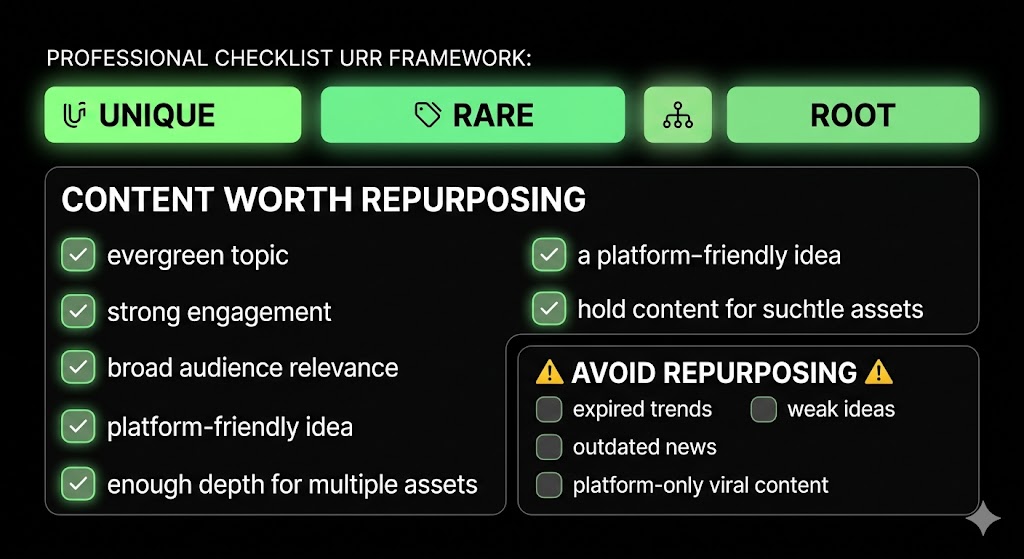
Use the URR framework — Unique, Rare, Root — to evaluate content priority before repurposing it. Unique means the idea is not covered better by a competitor. Rare means the depth or angle is hard to find elsewhere. Root means the content is the original source of an idea in your content library.
Content worth repurposing shares these attributes:
Evergreen topic — stays relevant beyond 6 months without needing updates
Strong original engagement — received above-average likes, shares, saves, or comments
Broad audience relevance — the core idea applies across multiple buyer segments
Platform-agnostic idea — the message works in text, visual, and video formats
Sufficient depth — contains enough substance to extract 5 or more standalone assets
Avoid repurposing: platform-specific viral trends, time-sensitive news that expired, or any post that underperformed because the core idea was weak, not because of timing or distribution problems.
How do you identify your top-performing content for repurposing?
Follow these steps to find content worth repurposing:
Check Google Analytics for blog posts with the highest organic traffic over the past 12 months
Review platform analytics on each social channel for posts with the highest engagement rate
Identify posts with strong saves and shares — these signal that audiences found the content worth returning to
Look at competitor content gaps — find topics where your content outperforms or where rivals have thin coverage
Check posts with high comment volume — comments signal the topic triggered a reaction worth revisiting
Content signals to check before repurposing:
High organic traffic: Search demand exists. Repurpose this content into visual formats, such as carousels, infographics, or short videos.
High saves and shares: The audience found the content useful enough to save or share. Turn it into an Instagram carousel, Pinterest infographic, or LinkedIn document post.
High comments: The topic sparked discussion. Repurpose it as a LinkedIn opinion post, short video response, or FAQ-style social post.
Low engagement with an evergreen topic: The idea may still be useful, but the timing or platform was wrong. Test it in a new format on a different platform.
High traffic with low engagement: The content is informational but not emotionally strong. Add storytelling, examples, or a stronger visual angle before repurposing.
What is the best strategy to repurpose content across platforms?
The best strategy to repurpose content across platforms involves three elements working together: a pillar-cluster content system, format adaptation per platform, and alignment with where buyers are in their decision process. Treating repurposing as a random task instead of a planned system is the main reason brands see inconsistent results from the same content on different channels.
How do you build a content pillar system for multi-platform repurposing?
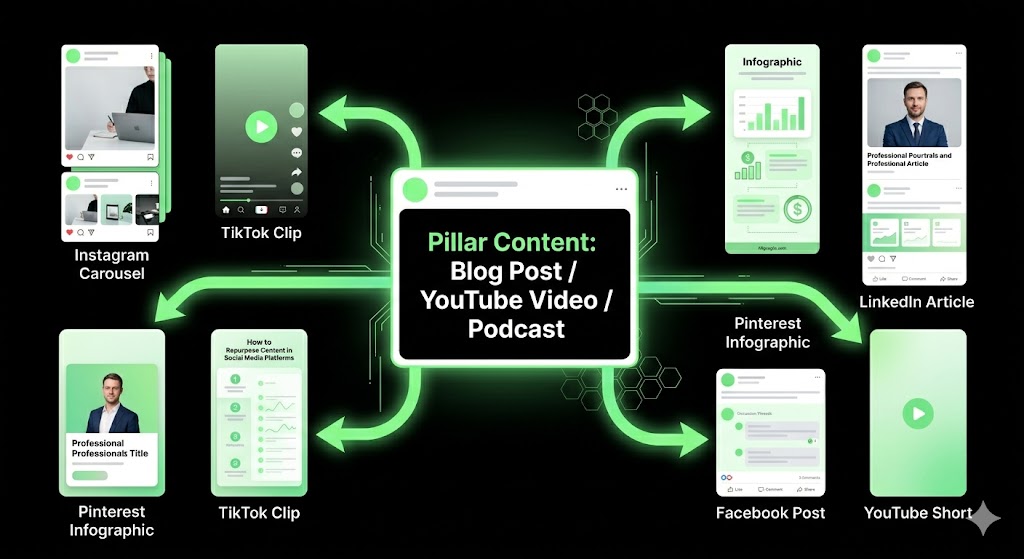
The pillar-cluster model uses one long-form piece as the content source and distributes shorter, platform-adapted assets around it. The pillar is the root. Every cluster asset links back to or derives from it. If you haven't built this foundation yet, understanding what a content pillar strategy is and how to use it for social media is the clearest next step before you repurpose a single piece.
A practical breakdown for a home decor brand:
Pillar: 2,000-word blog post — "Living Room Design Trends 2026"
5 Instagram carousels (one per trend)
3 TikTok clips (before/after visuals, 30–60 seconds each)
2 Pinterest infographics (vertical, 2:3 ratio)
1 LinkedIn article (professional angle on design investment value)
1 YouTube Short (top 3 trends summary, under 60 seconds)
That one pillar generates 12 platform assets. Each asset drives traffic back to the original post, which builds SEO authority for the core topic. The pillar grows stronger every time a cluster asset earns engagement, backlinks, or shares.
For the multi-platform content distribution strategy to work, the pillar must be deep enough. Shallow blog posts produce shallow cluster content. Aim for pillars that exceed 1,500 words with original data, examples, or unique angles.
How do you adapt content format for each social media platform?
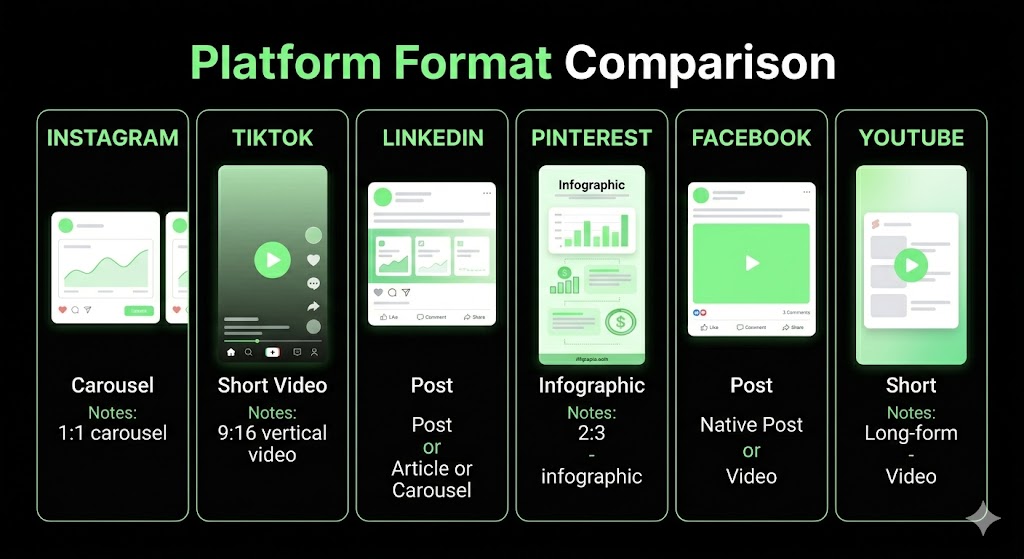
Platform-specific content format adaptations for major social media platforms include:
Instagram — carousels (1:1 square), Reels (9:16 vertical, 15–90 seconds), Stories (9:16, text overlays)
TikTok — vertical video (9:16), 15–60 seconds, captions on-screen, trending audio optional
LinkedIn — long-form articles (1,500–2,000 words), text posts (under 700 characters for full display), carousel PDFs
Pinterest — vertical infographics (2:3 ratio, 1000×1500px), Idea Pins (multi-page), keyword-rich descriptions
Facebook — native video uploads (landscape or square), carousel albums, shared articles with custom thumbnails
Understanding whether static posts or video posts perform better on your specific platforms will sharpen which formats you prioritize when extracting assets from each pillar piece.
Platform-specific content format adaptations include:
Instagram Reels: Use vertical video in a 9:16 ratio. Keep videos up to 90 seconds.
TikTok: Use vertical video in a 9:16 ratio. Keep videos around 15 to 60 seconds.
LinkedIn: Use articles, text posts, or carousel posts. Use 1:1 or 4:5 visuals for carousel content. Long-form articles can reach up to 2,000 words.
Pinterest: Use vertical infographics in a 2:3 ratio. A common size is 1000 × 1500 pixels.
Facebook: Use native videos, carousel albums, or shared articles with custom thumbnails. Use 16:9 or 1:1 visuals depending on the post format.
How do you align repurposed content with different stages of the buyer journey?
Buyer journey alignment means distributing repurposed assets to platforms where buyers in each decision stage actually spend time. Ignoring this produces content that talks to the wrong person at the wrong moment. A documented social media strategy for small businesses maps this funnel before repurposing begins, so every asset has a defined role.
TOFU (Top of Funnel — awareness): TikTok short clips and Pinterest pins reach people who do not yet know they need your product. These formats are discovery-driven and algorithm-fed.
MOFU (Middle of Funnel — consideration): Instagram carousels and YouTube tutorials reach people comparing options. These formats explain, demonstrate, and build trust.
BOFU (Bottom of Funnel — conversion): LinkedIn case studies and Facebook testimonial videos reach buyers ready to decide. These formats prove results and reduce purchase hesitation.
Most brands repurpose without funnel logic — they post the same asset everywhere and wonder why conversion stays flat. Funnel-specific repurposing is the gap most competitors have not closed. Matching asset type to buyer stage makes each piece of content work harder at exactly the right moment.
How do you repurpose long-form content into social media posts?
Repurposing long-form content into social media posts involves breaking down a large piece — a blog post, YouTube video, or podcast episode — into shorter, platform-ready assets that each deliver one clear idea. The long-form piece acts as the source. Every social post extracts one slice of it without duplicating the full piece across channels.
How do you repurpose a blog post into social media content?
Six ways to repurpose a blog post into social media content:
Extract key statistics as quote graphics — pull one strong data point, design it as a branded image, post to Instagram and LinkedIn
Turn listicles into carousel posts — each list item becomes one carousel slide, ending with a CTA back to the full post
Summarize the article into a Twitter/X thread — one tweet per main section, with the first tweet stating the core insight
Create a Pinterest infographic from the main steps or tips in a vertical 2:3 format with keyword-rich alt text
Record a TikTok or Reel summarizing the top 3 points in under 60 seconds using talking-head format or text overlay
Write a LinkedIn article that expands one section of the blog post into a 1,200-word standalone piece
Recommended Video: Search YouTube for "how to repurpose a blog post into social media content step by step" to watch a visual guide on the full extraction process.
How do you turn a YouTube video into assets for multiple platforms?
Six ways to repurpose a YouTube video into platform assets:
Extract 15–60 second key moments for TikTok and Instagram Reels using a tool like Descript or CapCut
Transcribe the video and convert it into a blog post — add headers, clean up the language, and embed the original video
Pull key quotes for Twitter/X and LinkedIn text posts — one quote per platform, with a link back to the full video
Compile highlights into a YouTube Shorts reel — under 60 seconds, vertical crop, captions on screen
Turn the main tips into a Pinterest infographic with a link to the full video in the pin description
Strip the audio and publish as a podcast episode or audiogram — use Anchor or Buzzsprout for distribution
How do you repurpose a podcast episode across social media platforms?
Six ways to repurpose a podcast episode across social media:
Create audiogram clips for Instagram and LinkedIn — 60-second audio clips with animated waveform and subtitle overlay
Transcribe the episode into a blog post or newsletter — use Descript or Otter.ai, then edit for reading flow
Extract key quotes as branded graphic posts — pull 3–5 strong statements and design them as shareable image cards
Cut 60-second highlight clips for TikTok and Reels — focus on the moment with the strongest reaction or insight
Summarize episode takeaways as a LinkedIn text post — 5 bullet points, one per key lesson, with a link to the full episode
Design a Pinterest pin with key stats from the episode — include the episode title, a strong stat, and the podcast name
How do you repurpose content for each social media platform?
Repurposing content for each social media platform requires adapting your message to match the format, tone, and audience behavior specific to that platform. The same content performs differently on each channel because each platform rewards different content types with algorithmic reach. Native-feeling content — content built for the platform, not pasted into it — earns more distribution. Platform-specific repurposing is not optional; it is the difference between reach and invisibility.
How do you repurpose content for Instagram?
Ways to repurpose content for Instagram:
Convert blog posts to carousels at 1:1 ratio — one key point per slide, with a "save this" CTA on the last slide
Turn video clips to Reels at 9:16 vertical format, 15–90 seconds, with on-screen captions for muted viewing
Use Story slides for quick tips or polls — pull one stat or question from your original content and post as an interactive Story
Create branded quote graphics from key insights — use Canva templates with your brand colors and post to the feed
Post UGC (user-generated content) as social proof in feed posts or Highlights when repurposing customer reviews
Remove TikTok watermarks before posting clips to Instagram Reels. Instagram's algorithm deprioritizes content with a visible TikTok logo — a tool like SnapTik or Qoob Stories removes the watermark before export. For a full breakdown of what an Instagram management service for small businesses covers across these formats, that reference outlines every deliverable in detail.
How do you repurpose content for TikTok?
Ways to repurpose content for TikTok:
Extract 15–60 second key moments from long-form videos and crop them vertically before uploading
Add trending TikTok audio to repurposed clips — use the platform's native sound library to boost discoverability
Turn blog tips into talking-head or text-overlay videos — film yourself explaining the tip or use CapCut's text-to-video tool
Use before/after visuals for home decor transformations — this format consistently earns high completion rates
Repurpose FAQ answers as quick tip videos — one question per video, answer in under 30 seconds
Avoid repurposing platform-specific TikTok trends that will not translate. A TikTok audio meme loses all context on LinkedIn and looks out of place on Pinterest. Extract the underlying idea from a trend-based post and repurpose that idea in an evergreen format instead.
How do you repurpose content for LinkedIn?
Ways to repurpose content for LinkedIn:
Expand a blog section into a long-form LinkedIn article — aim for 1,200–1,800 words, add original commentary, and publish natively
Summarize a webinar into a key lessons post — use 5–7 bullet points with a link to the full recording
Turn case study data into a carousel post — one data point per slide, with a conclusion slide and a CTA to your website
Repost a podcast episode as a text summary — write 400 words covering the top 3 takeaways and embed the Spotify link
Share quote graphics from original content with professional commentary — add 2–3 sentences of your own analysis above the image
LinkedIn rewards original insights and a professional tone. Casual video content that performs on TikTok earns less engagement here. For small businesses and professionals building authority on the platform, LinkedIn management covers exactly how to adapt content for that audience without losing your brand voice.
How do you repurpose content for Pinterest?
Ways to repurpose content for Pinterest:
Convert blog step lists into vertical infographics at 2:3 ratio (1000×1500px) with clear section headers and branded colors
Turn home decor room inspiration photos into Idea Pins — multi-page format with one image per design tip
Create "top tips" pin graphics from listicle articles — pull 5 tips, design one pin per tip with keyword-rich alt text
Use product photos with keyword-rich descriptions as standard pins — include the product name, material, and use case in the description
Repurpose carousel content as multi-image pins — upload the carousel slides as a single Pinterest multi-image post
Pinterest functions as a visual search engine. Pin titles and descriptions should include exact search phrases — not hashtags. A pin titled "Living Room Design Ideas 2026 | Minimalist Decor" outperforms "Check This Out" in Pinterest search results by a wide margin.
How do you repurpose content for Facebook?
Ways to repurpose content for Facebook:
Share blog articles with custom thumbnails and lead-in copy — write 2–3 sentences that tease the article's key insight before the link
Repurpose customer reviews into testimonial graphics for Facebook Albums — design 5–10 review cards in a branded style and post as a single album
Upload before/after photos as carousel albums — Facebook carousel albums earn higher organic reach than single image posts
Upload YouTube videos natively — download the video file and re-upload directly to Facebook for better algorithmic reach than an external YouTube link
Turn long-form posts into Facebook Group discussions — paste a condensed version of a blog post as a discussion prompt in a niche group
Facebook's audience skews toward 35–65 year-olds [site: Statista 2024]. A practical guide to Facebook management for small businesses outlines how to structure this mix of visual and long-form content across a monthly calendar. Mix casual visual content with in-depth link posts to serve both the casual scroller and the reader who wants depth.
How do you maintain brand consistency when repurposing content?
Maintaining brand consistency when repurposing content means applying the same visual identity, voice, and core message across every adapted asset — even when the format changes completely. Three pillars hold this together: visual identity (colors, fonts, logo placement), brand voice (tone and language style), and message hierarchy (the core value proposition stays unchanged across formats). A brand style guide serves as the anchor document all repurposed assets are checked against before publishing.
How do you adapt your brand voice and tone for different social media platforms?
Five steps to adapt your brand voice for different social media platforms:
Define your core brand voice in 3–5 adjectives — for example: clear, direct, warm, expert, practical
Create a platform-specific tone variation guide — LinkedIn = professional and measured, TikTok = conversational and fast, Pinterest = aspirational and specific
Use the same terminology and branded phrases across all platforms — if you call your product a "design system," never switch to "design tool" mid-campaign
Apply consistent visual templates with color and font variations per platform — same brand palette, adjusted for each platform's display specs
Review every repurposed asset against your brand guidelines before scheduling — a one-minute check prevents months of off-brand content accumulating in your feed
Brand consistency does not mean identical posts. It means a reader who follows you on both Instagram and LinkedIn recognizes the same brand behind both accounts — even if the tone shifts from aspirational to analytical. Writing social media captions that drive engagement while keeping your voice consistent across platforms is one of the clearest tests of whether your brand guide is specific enough to be useful.
Which tools help you repurpose content across social media platforms?
The tools that help you repurpose content across social media platforms fall into two categories: AI-powered repurposing tools that transform content from one format to another, and scheduling platforms that distribute repurposed assets across multiple channels from one dashboard. Using both categories together creates a full repurposing pipeline from content creation to publishing.
Which AI tools are most effective for content repurposing?
The most effective AI tools for content repurposing are:
Repurpose.io — automatically distributes video content across TikTok, YouTube Shorts, Instagram Reels, and Facebook with one upload
Descript — transcribes video and audio files, then lets you edit content by editing the text transcript directly
ContentFries — extracts short clips from long videos and adds auto-generated captions formatted for each platform
Canva AI — generates visual assets, carousels, and infographics from written content using AI-powered design templates
ChatGPT / Claude — rewrites the same content in platform-native formats: LinkedIn article tone, TikTok caption style, Pinterest description language
Which scheduling tools support multi-platform content repurposing?
Scheduling tools that support multi-platform content repurposing include:
Buffer — schedules repurposed posts across 6+ platforms with platform-specific customization per post
Hootsuite — supports bulk scheduling and lets teams customize captions per channel from a single content library
Later — offers a visual content calendar built for Instagram-first repurposing with a drag-and-drop interface
Planable — provides team collaboration and approval workflows so repurposed content is reviewed before it publishes
Vista Social — includes AI-powered scheduling with content optimization suggestions per platform
Pairing any of these tools with data on the best times to post on Instagram, Facebook, and LinkedIn in 2026 means your repurposed assets go out at the exact windows when each platform's algorithm is most likely to distribute them.
How do you measure the performance of your repurposed content?
Measuring the performance of repurposed content means tracking how each adapted asset performs relative to your original content and your platform benchmarks. Performance measurement is the link between execution (repurposing) and optimization (improving the multi-platform content distribution strategy over time). Without it, you repeat what feels right instead of what the data confirms is working.
Which metrics matter most for evaluating repurposed content?
Key metrics for evaluating repurposed content performance:
Engagement rate per platform — likes, comments, shares, and saves relative to reach; understanding what your social media engagement rate benchmark should be per channel tells you whether a repurposed asset is outperforming or underperforming
Reach and impressions vs original post — tells you whether the repurposed format reached more or fewer people than the source piece
Click-through rate to website — measures whether the repurposed asset drove traffic back to the original content or product page
Follower growth attributed to repurposed assets — track whether specific content types accelerate audience growth on a given platform
Content-specific conversion rate — email sign-ups, product page visits, or purchases that trace back to a repurposed asset
Algorithm boost signals — saves and shares on Instagram, watch time on YouTube, and repin rate on Pinterest indicate the platform is distributing your content actively
Learning how to measure social media ROI for your small business connects these individual content metrics to actual revenue impact — which is the number that justifies the repurposing investment to stakeholders.
How do you use analytics to improve your repurposing strategy?
Five steps to use analytics for improving your content repurposing strategy:
Review platform analytics weekly to identify which repurposed posts outperformed your channel average for that week
Compare repurposed vs original content engagement to find format lift — if a carousel outperforms the blog post it came from, that tells you the format works better than the original delivery
Double down on content types with the highest save and share rate — saves signal utility, shares signal reach potential
Retire formats that consistently underperform after 4–6 posts — not every format works on every platform for every brand
Update and re-repurpose posts that drove high traffic but have staled — refresh the statistics, update the visuals, and re-distribute as a "2026 update" version
If you're newer to reading platform data, understanding how long it takes to see results from social media management sets realistic expectations for how long repurposed content needs to run before its performance data becomes actionable.
How do you build a content repurposing workflow and calendar?
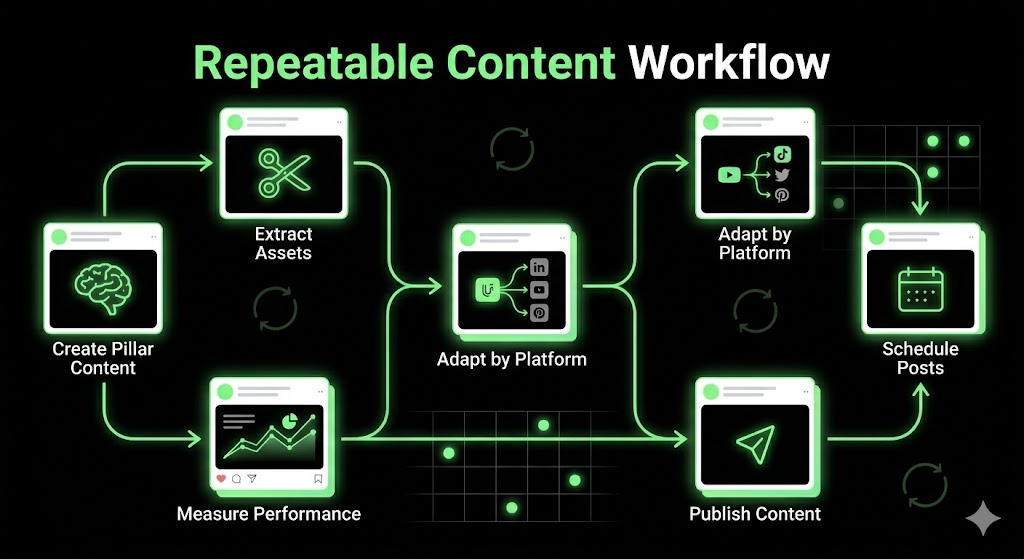
Building a content repurposing workflow and calendar involves turning repurposing from a reactive, ad hoc task into a scheduled, repeatable system. Brands that treat repurposing as something done "when there's time" produce inconsistent output and miss the compounding reach benefits of regular multi-platform distribution. A documented system removes the guesswork and makes repurposing a default part of your content calendar — not an afterthought.
How do you create a content repurposing schedule that works consistently?
Five steps to create a consistent content repurposing schedule:
Assign one fixed day per week as "repurposing day" — batch all asset creation in one session instead of spreading it across the week
Batch-create 5–10 repurposed assets per original piece — use templates in Canva and scripts in Descript to move fast
Map each asset to a platform slot in your social media content calendar — assign specific assets to specific publish dates before the week starts
Use a scheduling tool to pre-schedule all assets 2–4 weeks ahead — Buffer, Later, or Hootsuite let you queue an entire month in one session
Rotate content across platforms with a 2–3 week stagger — avoid publishing the same idea on all platforms in the same week to prevent audience overlap fatigue
Knowing how many times per week your business should post on social media per platform helps you decide how many repurposed assets to produce from each pillar piece before the next one is ready.
When should you update and re-repurpose older social media content?
Content decay — the natural drop in reach and engagement an older post experiences — signals when re-repurposing is needed. Five signals that indicate it is time to refresh and re-distribute:
Engagement drops below your channel average rate for two consecutive weeks on a post that previously performed well
The original post is 6–12 months old and contains statistics or recommendations that have since been updated
Statistics in the content are now outdated — a 2024 data point in a 2026 article reduces credibility
The topic has re-entered trend cycles — seasonal content (holiday decor, spring refresh guides) earns re-repurposing annually
New platform features make the content format improvable — a blog post that could not become a Reel in 2023 may now work as one in 2026
What common content repurposing mistakes hurt your results?
The common content repurposing mistakes that hurt your results are actions that feel efficient but damage reach, credibility, or platform algorithmic performance. Seven content repurposing mistakes to avoid:
Posting identical captions across platforms — each platform reads differently; copy-pasted captions signal low effort and underperform algorithmically
Keeping TikTok watermarks on Reels — Instagram's algorithm deprioritizes Reels with a visible TikTok logo, reducing organic reach
Repurposing low-performing original content — weak ideas produce weak assets regardless of format
Ignoring platform-specific format requirements — a horizontal video posted to a vertical-native platform loses most of its frame
Repurposing without updating outdated information — old statistics reduce trust and can trigger corrections in the comments
Over-repurposing from the same source — posting 10 assets from one blog post in the same week signals spam behavior to algorithms
Skipping performance tracking on repurposed assets — without data, you repeat failures and miss what actually works
Should you repurpose content that originally underperformed?
Generally no — unless the underperformance came from timing, platform mismatch, or a low follower count at the time of publishing, not from a weak core idea.
The distinction matters. Content that failed because the idea was thin will fail again in a new format on a new platform. Content that failed because it launched on the wrong platform, at the wrong time, or when your audience was too small is a different case entirely.
Use a two-criteria check before repurposing underperformed content: Did it earn at least moderate engagement from the people who saw it? Does the core idea still hold relevance in 2026? If both answers are yes, the content is worth repurposing. If either answer is no, build something new instead.
Should you repurpose platform-specific trends or viral content?
No — platform-specific trends, audio memes, and viral formats tied to one platform do not translate across channels.
A TikTok audio trend loses all meaning when exported to LinkedIn. A meme format that went viral in January looks stale and algorithm-unfriendly by March. Posting it weeks later signals poor content timing to both the platform and the audience.
The better move: extract the underlying insight or idea from the trend-based post and rebuild it as an evergreen asset native to the target platform. If a TikTok trend sparked strong engagement because it touched on a real pain point — say, small living room storage problems — turn that pain point into a Pinterest infographic or LinkedIn tip post. The trend is disposable. The insight is the repurposable asset.
Content repurposing strategy works when the source is strong, the format is native, and the distribution is planned. Repurpose content across multiple platforms with a system, not guesswork, and the reach compounds over time.