
Managing Multiple Social Media Platforms: How It Works and What It Costs
Businesses that post on 3 or more social media platforms generate 67% more leads than those using just one [HubSpot, 2025]. But running those platforms without a system burns time, money, and brand consistency fast. Managing multiple social media platforms means coordinating content, scheduling, engagement, and reporting across every channel — all from one place. This guide breaks down exactly how the system works, what tools it needs, and what it costs in 2026.
What does managing multiple social media platforms involve?
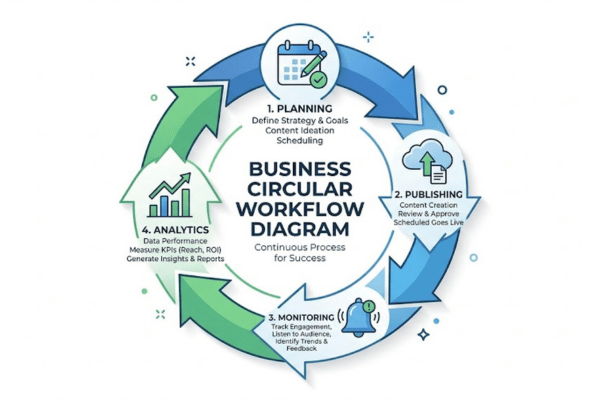
Managing multiple social media platforms involves planning, publishing, monitoring, and analyzing content across two or more channels from a centralized workflow. The process includes scheduling posts, responding to comments, tracking performance, and keeping brand voice consistent on every network.
Freelancers, small businesses, agencies, and enterprise teams all manage multiple accounts. Each group uses different tools and different workflows. A solo freelancer might juggle 3 client accounts on Buffer. A large agency might run 50+ accounts on Sprout Social. The core job is the same: reach the right audience on each platform without losing quality or consistency.
Multi-platform content management is not just scheduling. It is a full operational system — one that covers creation, distribution, engagement, and measurement all at once.
How do social media management platforms connect multiple accounts?
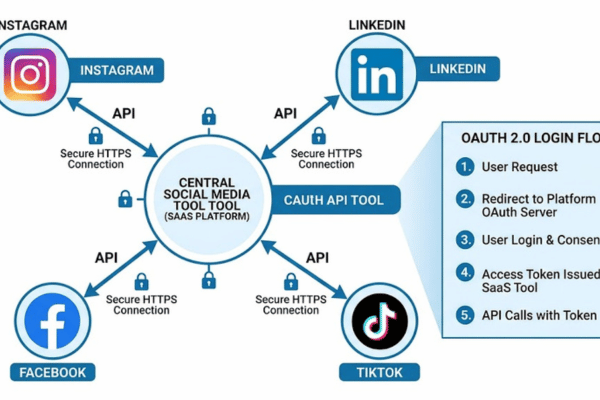
Social media management platforms connect multiple accounts by using API (Application Programming Interface) connections — direct links between the management tool and each social network. An API is a set of rules that lets two software programs share information.
When you connect Instagram or LinkedIn to a tool like Hootsuite, you authorize it through OAuth — a secure login process that lets the tool act on your behalf without sharing your password. The tool gets permission to publish posts, read comments, and pull analytics data directly from each network.
Posts go out through approved applications, not manual logins. This process is more stable and more secure than logging into each platform separately every day.
What core features does a multi-platform management system include?
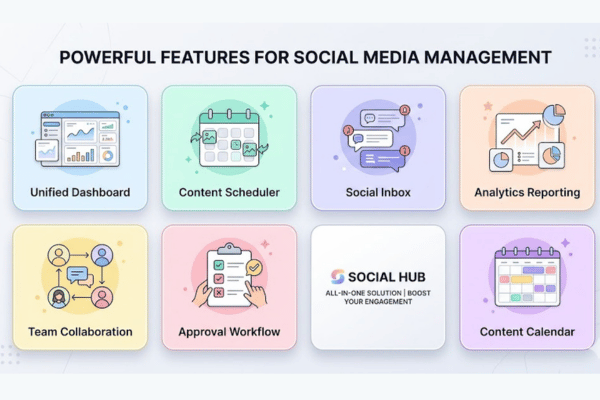
Core features of a multi-platform social media management system include the following:
Unified dashboard — View and manage all connected accounts from one screen without switching tabs or logging in separately to each platform.
Content scheduler — Set exact publish times for posts across every platform, days or weeks in advance.
Social inbox — See all comments, messages, and mentions from every platform collected into one single feed.
Analytics reporting — Track reach, engagement rate, follower growth, and clicks across all platforms in one view.
Team collaboration tools — Assign tasks, leave feedback on drafts, and approve posts before they go live.
Post approval workflow — Route drafts through a review chain so nothing publishes without sign-off from the right person.
Content calendar — See all scheduled content for every platform laid out in a single visual calendar view.
How does managing multiple social media platforms work step by step?
Managing multiple social media platforms works by following a structured process that moves from planning to publishing to performance review. Each step connects to the next. Skipping one creates gaps — missed posts, off-brand content, or wasted spend.
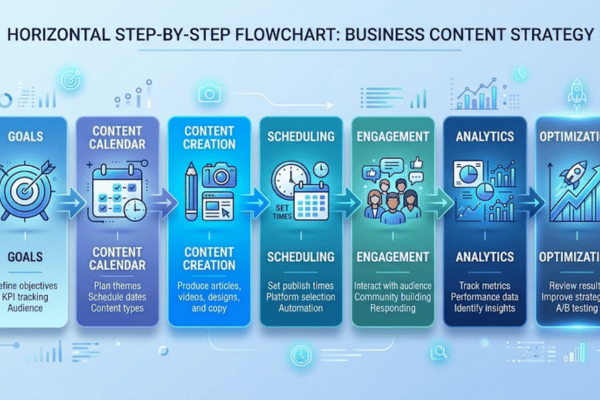
7 key steps for managing multiple social media platforms are outlined below:
Set platform goals — Define what each platform should achieve: leads, web traffic, brand awareness, or community growth.
Build a content calendar — Plan posts by platform, date, format, and topic at least 2 weeks ahead.
Create platform-specific content — Write captions, resize images, and edit videos to each platform's exact technical specs.
Schedule posts — Load content into a management tool and set publish times aligned with peak audience activity hours.
Monitor engagement — Check comments, messages, and mentions daily and respond within 24 hours.
Track performance — Review weekly metrics: reach, engagement rate, CTR (click-through rate), and follower growth.
Adjust strategy — Use performance data to cut what does not work and repeat what does.
How do content calendars work for multi-platform scheduling?
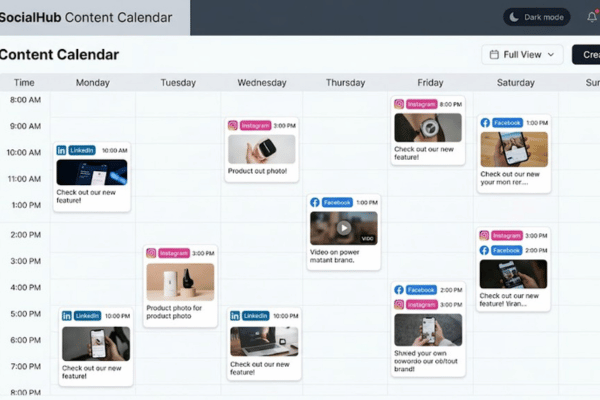
A content calendar works for multi-platform scheduling by organizing every post by platform, date, format, and topic in one shared view. It removes guesswork and prevents gaps in the publishing schedule.
Teams use spreadsheets, Notion boards, or built-in calendars inside tools like Buffer and Later. Planning 2 to 4 weeks ahead creates enough buffer to produce content without rushing. Each row or card in the calendar shows the platform, caption copy, visual asset, and scheduled publish time.
For a full explanation of how to build and use one, the guide on what a social media content calendar is and why your business needs one covers setup, tools, and planning windows in detail.
Example: A bakery plans 3 Instagram posts, 2 Facebook posts, and 1 LinkedIn post per week. Their calendar maps every post's image, caption, and time — all planned on Monday for the next 14 days. Nothing gets forgotten.
How does cross-posting and content repurposing work across platforms?
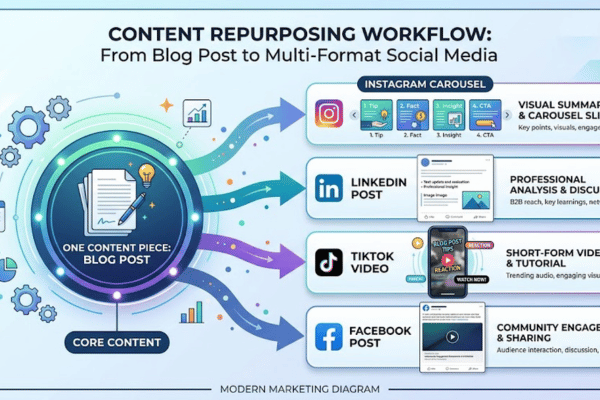
Cross-posting and content repurposing across platforms work by adapting a single core piece of content into multiple platform-specific formats, rather than building everything from scratch for each channel.
Cross-posting means sharing the same message on multiple platforms. Repurposing means reformatting it — same idea, different shape. A blog post becomes a LinkedIn summary, an Instagram carousel, and a Facebook link post. A short video gets posted as a TikTok, an Instagram Reel, and a YouTube Short.
Each platform enforces different rules. Instagram captions allow 2,200 characters. Twitter/X caps at 280. LinkedIn allows 3,000. Repurposing reduces content creation workload by up to 60% [Content Marketing Institute, 2024] while keeping every active platform fed with fresh content.
How do automation workflows operate in multi-platform management?
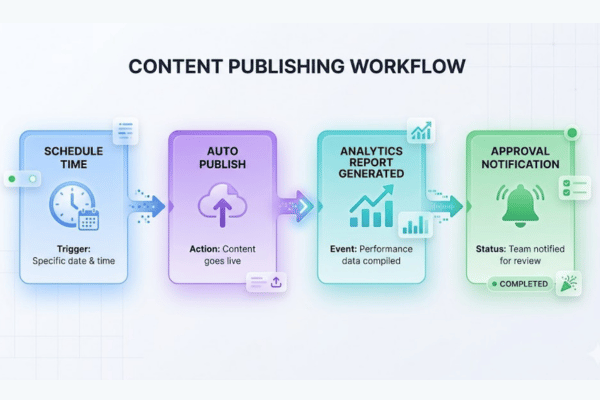
Automation workflows in multi-platform management operate by using pre-set schedules and trigger-based rules to publish, report, and route content without manual action. The tool handles the repetitive tasks.
Scheduling tools like Hootsuite, Buffer, and Publer auto-publish posts at set times. AI caption tools generate draft copy from a short text prompt. Analytics tools run weekly reports automatically without anyone clicking export. Approval workflows send draft posts directly to a reviewer when a team member marks them ready.
Automation removes the need to log into each platform manually every day. It eliminates missed posts during busy weeks. One social media manager running automation tools can handle 10 to 15 accounts — a workload that would be impossible to manage manually.
What tools are used to manage multiple social media platforms?
The tools used to manage multiple social media platforms include scheduling software, analytics dashboards, content creation apps, and team workflow platforms. Each category solves a different part of the management problem.
The most widely used tools for managing multiple social media platforms are listed below:
All-in-one schedulers — Hootsuite, Buffer, Sprout Social, Later. Schedule posts, monitor mentions, and view cross-platform analytics from one dashboard.
Visual content tools — Canva, Adobe Express. Create platform-sized graphics and video assets quickly using pre-built templates.
AI writing assistants — Jasper, Copy.ai. Generate captions, ad copy, and post drafts from short prompts in seconds.
Analytics platforms — Google Analytics 4 (GA4), Iconosquare. Track traffic, conversions, and cross-platform performance data.
Team collaboration tools — Trello, Asana, Notion. Manage content workflows, assign tasks, and track production deadlines.
Social listening tools — Brand24, Mention. Monitor brand mentions and competitor activity across platforms in real time.
🔹 Social Media Management Tools (2026)
Hootsuite
Best for: Agencies and teams
Starting price: $99/month
Platforms: Instagram, Facebook, LinkedIn, X, Pinterest, TikTok
Buffer
Best for: Small businesses
Starting price: $6/month per channel
Platforms: Instagram, Facebook, LinkedIn, X, TikTok
Sprout Social
Best for: Enterprise teams
Starting price: $249/month
Platforms: Instagram, Facebook, LinkedIn, X, Pinterest
Later
Best for: Visual-first brands
Starting price: $25/month
Platforms: Instagram, TikTok, Pinterest, LinkedIn, Facebook
Publer
Best for: Budget-conscious teams
Starting price: $12/month
Platforms: Instagram, Facebook, LinkedIn, TikTok, Pinterest, X
How do social media management APIs connect multiple platforms?
Social media management APIs connect multiple platforms by creating a direct data channel between a third-party tool and each social network's server. This channel handles publishing, data reading, and engagement monitoring without any manual login.
When a tool like Buffer publishes a post to Instagram, it sends the content through Instagram's official Graph API. The API checks the authorization, accepts the request, and publishes the post — all in seconds. No manual login to Instagram is needed.
API-based tools are more stable and secure than browser-automation tools, which mimic human clicks and break whenever a platform updates its interface. Official API connections follow each platform's terms of service, which reduces the risk of account suspension significantly.
How do team collaboration features work in multi-platform tools?
Team collaboration features in multi-platform social media tools typically include the following:
Role-based access control — Assign editor, viewer, or admin roles so each team member only accesses what their job requires.
Shared content calendar — All team members see every scheduled post across every connected platform in real time.
Post approval workflow — Drafts route to a designated approver before publishing. No post goes live without sign-off.
Internal draft comments — Leave feedback on a post draft without the comment appearing publicly on the platform.
Task assignments — Assign specific posts or campaigns to individual team members with clear due dates attached.
Version history — See every edit made to a post draft and revert to any earlier version if a change creates a problem.
Which social media platforms are worth managing together?
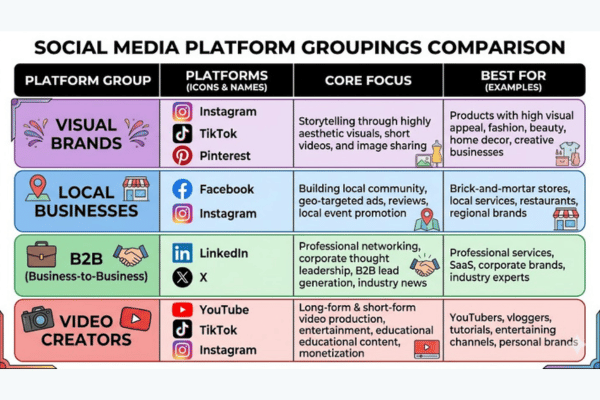
The social media platforms most worth managing together are those that share your target audience, support your primary content format, and connect directly to your business goals. Not every business needs every platform.
Evaluate each platform on three questions: Who uses it? What content format does it reward? Does your audience make buying decisions there?
Platform groupings that work well together:
Instagram + TikTok + Pinterest — Visual content brands, e-commerce, food, fitness, fashion
Facebook + Instagram — Local businesses, service providers, community-based brands
LinkedIn + X (Twitter) — B2B companies, consultants, thought leaders, SaaS products
YouTube + Instagram + TikTok — Video-first creators and product-led brands
Managing 2 to 3 platforms well outperforms managing 6 platforms poorly every time. Thin content spread across too many networks reduces quality and engagement on all of them simultaneously.
For businesses focused on professional audiences, LinkedIn management for small businesses and professionals covers how to build a consistent presence on the platform most small businesses underuse — with specific tactics for content, connection growth, and lead generation.
How do platform algorithm differences affect a multi-platform strategy?
Platform algorithm differences affect a multi-platform strategy by requiring different content signals to earn reach on each network. What works on one platform rarely transfers directly to another without adjustment.
TikTok's algorithm prioritizes watch time and video completion rate above all other signals. Instagram rewards saves and shares more heavily than likes. LinkedIn favors posts that generate comments and back-and-forth conversation within the first 60 minutes of posting. Facebook deprioritizes external link posts and boosts native video and group content.
A video that earns 10,000 views on TikTok might get 200 views posted directly to LinkedIn. The content is identical — but each algorithm reads engagement signals differently. Multi-platform content strategy requires platform-specific optimization, not just cross-posting.
How does content format variation impact multi-platform management workload?
Content format variation impacts multi-platform management workload by multiplying production tasks for every piece of content that must be resized or reformatted per platform. One source video can require 4 separate exports.
Each platform enforces different technical specs. Instagram Reels perform best at 9:16 vertical (1080x1920px). LinkedIn images display best at 1200x627px. Twitter/X images render at 16:9. Facebook covers require 820x312px. Video length limits range from 60 seconds on Instagram Reels to 10 minutes on LinkedIn to 60 minutes on YouTube.
Managing these differences without pre-built templates adds 2 to 4 hours per week to a small team's workload [Hootsuite State of Social Media Report, 2025]. Canva templates pre-sized for each platform cut that time by up to 70%.
How do you maintain brand consistency across multiple social media platforms?
Maintaining brand consistency across multiple social media platforms requires a documented brand guide, a library of pre-approved templates, and an approval workflow that every post passes through before it publishes.
Brand consistency means the same logo, color palette, fonts, tone of voice, and core messaging appear on every platform. A customer who finds you on LinkedIn and then visits your Instagram should recognize the same brand without hesitation.
Brand drift happens when different team members post without shared guidelines. One person writes in a casual tone. Another uses formal language. A third posts off-brand visuals. The result is a fragmented brand that loses audience trust faster than a dormant account would.
Three tools prevent brand drift: a brand style guide (defines voice, visual rules, and approved messaging), a content template library (pre-sized assets for every platform), and a post approval workflow (nothing publishes without review from an authorized person).
Understanding how a social media content service structures content production can help small businesses build the same consistency systems that managed services use internally — without starting from zero.
How does unified analytics reporting work across multiple platforms?
Unified analytics reporting across multiple platforms works by pulling performance data from every connected account into one dashboard so all results are visible without switching between native platform apps.
Management tools like Sprout Social, Hootsuite, and Buffer consolidate key metrics: engagement rate (likes + comments + shares ÷ reach), reach, CTR, follower growth, and conversion events. Each metric is pulled through the platform's API and updated on a set schedule — some in real time, others daily.
Unified reporting reveals which platforms drive the most ROI (return on investment). If LinkedIn drives 40% of website traffic and Instagram drives 8%, that data tells you exactly where to invest more content budget. Without cross-platform reporting, those patterns stay invisible and budget decisions become guesswork.
Example: A SaaS company uses Sprout Social's unified dashboard to discover that LinkedIn posts generate 5x more demo requests than Facebook posts. They shift 60% of their content budget to LinkedIn and reduce Facebook posting to 2x per week — total output stays the same, results improve.
Recommended Video
Recommended Video: Search YouTube for "how to manage multiple social media accounts with one tool 2026" to watch a step-by-step walkthrough of connecting accounts, scheduling content, and reading cross-platform analytics inside a management dashboard.
What makes managing multiple social media platforms expensive or affordable?
What makes managing multiple social media platforms expensive or affordable depends on three variables: the tools you select, the number of platforms you run, and whether management stays in-house or gets outsourced.
Tool pricing scales with features and the number of user seats. Buffer starts at $6 per channel per month. Sprout Social starts at $249 per month for one user. That gap is significant — and the right choice depends on team size, platform count, and the features the workflow actually needs.
Each additional platform increases the workload directly. Managing 2 platforms takes roughly 5 hours per week. Managing 5 platforms takes 12 to 15 hours without automation [Hootsuite, 2025]. In-house management adds salary costs. Outsourcing adds agency or freelancer fees. The full cost picture includes tool subscriptions, labor, content creation, and paid ad spend — not just the software bill.
For a full breakdown of what each approach costs, the guide on how much social media management costs in 2026 covers pricing ranges for tools, freelancers, and agencies by tier.
How much does it cost to manage multiple social media platforms?
The cost to manage multiple social media platforms ranges from $0 per month for DIY free tools to $10,000+ per month for full-service agency management. The right number depends on team size, platform count, and content volume.
Free tools like Buffer's free plan and Meta Business Suite handle basic scheduling at no cost. Mid-tier paid tools like Hootsuite and Later run $25 to $150 per month. Full agency retainers start at $1,000 per month and scale with deliverable scope.
Freelance social media managers charge $500 to $3,000 per month for multi-platform management, depending on experience and platform count. In-house social media managers in the United States earn $45,000 to $75,000 per year [Bureau of Labor Statistics, 2025], plus benefits and tool costs.
What is the average monthly cost of social media management tools?
The average monthly cost of social media management tools by tier is outlined below:
Tier
Example Tools
Monthly Cost (2026)
Best For
Free
Buffer Free, Meta Business Suite
$0
Solo users, 1–2 platforms
Basic
Buffer Essentials, Later Starter
$6–$25/month
Freelancers, small businesses
Professional
Hootsuite Professional, Later Growth
$49–$149/month
Growing teams, 3–5 platforms
Agency/Team
Sprout Social Advanced, Hootsuite Team
$249–$599/month
Agencies, 10+ accounts
Enterprise
Sprout Social Enterprise, Khoros
$1,000+/month
Large brands, 50+ accounts
Annual billing reduces most paid plans by 15 to 25% compared to monthly rates. Prices above reflect 2026 publicly listed pricing across each tool's official site.
How much does hiring a social media manager for multiple platforms cost?
Hiring a social media manager for multiple platforms typically costs $500 to $10,000 per month, depending on whether you hire in-house, use a freelancer, or contract with an agency.
In-house social media managers earn $45,000 to $75,000 per year ($3,750 to $6,250 per month) plus benefits, tool licenses, and paid leave. Freelance managers charge $500 to $3,000 per month for multi-platform packages. Rates increase with platform count, weekly post volume, and the manager's experience level.
Agencies charge $1,000 to $10,000+ per month on retainer. Higher retainers include strategy development, content creation, paid ad management, and monthly performance reporting — not just post scheduling.
Factors that drive cost higher: managing 4+ platforms simultaneously, producing original video content, running paid ads alongside organic posts, and requiring same-day response management for incoming messages.
What are the hidden costs of managing multiple social media platforms?
The hidden costs of managing multiple social media platforms include the following:
Per-seat pricing fees — Most professional tools charge per user account. Adding a second team member to Sprout Social adds $199+ per month per seat.
Overage charges — Some tools cap monthly post count or number of connected profiles. Exceeding those limits triggers per-post or per-profile fees that are not in the base price.
Content creation costs — Tool subscriptions do not include graphic design, video editing, or copywriting. Canva Pro adds $15 per month. A freelance designer adds $50 to $150 per hour on top of scheduling costs.
Paid ad spend — Organic reach on Facebook and Instagram has dropped below 5% for most business pages [Meta Business Insights, 2025]. Boosting posts adds $100 to $1,000+ per month on top of management fees.
Tool add-on upgrades — Features like social listening, competitor tracking, and advanced analytics are often sold as paid upgrades inside the same platform at an additional monthly cost.
Time cost — Managing 3 platforms manually takes 10 to 15 hours per week. At a $50 per hour rate, that is $500 to $750 per week in time value that does not appear on any invoice.
How do free vs. paid social media management tools compare in cost?
Free and paid social media management tools compare in cost by offering basic scheduling at no charge versus advanced automation, team workflows, and analytics at $6 to $599 per month. The right choice depends on platform count, post frequency, and team size.
Free tools handle 1 to 3 platforms with a capped number of scheduled posts. Buffer's free plan allows 3 channels and 10 scheduled posts per channel. Meta Business Suite manages Facebook and Instagram only — but at no cost with no post cap.
Paid tools add bulk scheduling, team approval systems, cross-platform analytics, and social inbox management. The upgrade point is clear: when you manage 3+ platforms, post more than 10 times per week, or need a second team member on the account, a paid plan saves more time than it costs in subscription fees.
For businesses weighing the full trade-off between DIY and paying for managed services, the social media management vs DIY comparison breaks down exactly where each approach wins and where each one fails by business size and content volume.
What does DIY multi-platform management cost in time per week?
DIY multi-platform management costs approximately 10 to 20 hours per week when handled manually across 3 to 5 platforms without scheduling or automation tools.
Time breaks down by task: content creation takes 4 to 6 hours per week (writing captions, designing graphics, editing short videos). Scheduling takes 1 to 2 hours. Engagement monitoring and responding takes 3 to 5 hours. Reporting and performance analysis takes 1 to 2 hours.
At a $50 per hour opportunity cost, 15 hours per week equals $750 in time value — every single week. Over 12 months, that is $39,000 in time cost. A scheduling tool at $50 per month that saves 5 hours per week pays back its annual cost more than 60 times over.
Example: A restaurant owner spends 3 hours every Sunday creating and scheduling content for Instagram and Facebook. Adding TikTok pushes that to 5 hours weekly. At that point, a $25 per month scheduling tool becomes an easy financial decision with a clear return.
How does agency social media management pricing compare to in-house costs?
Agency social media management pricing compares to in-house costs by offering lower upfront commitment at a higher per-deliverable rate versus a full-time hire's fixed annual salary with broader daily availability.
A full-time in-house social media manager costs $50,000 to $75,000 per year in salary, plus $10,000 to $20,000 in benefits, tools, and onboarding — totaling $60,000 to $95,000 annually. A mid-tier agency retainer costs $1,500 to $6,000 per month, or $18,000 to $72,000 per year.
Agencies make financial sense for businesses posting on 3+ platforms that do not have consistent 40-hour-per-week content demands. In-house managers make more sense when content volume is high, response time must stay under 1 hour, and deep brand knowledge is a daily requirement.
Before committing to an agency, the guide on how to choose a social media management company lists 10 questions every business should ask to evaluate fit, pricing structure, and deliverable clarity before signing a contract.
Should you outsource managing multiple social media platforms?
Outsourcing the management of multiple social media platforms makes sense when your internal team lacks the time, tools, or expertise to maintain consistent output across every active channel at the quality your audience expects.
Three clear signals point toward outsourcing: content quality is declining because of time pressure, engagement metrics are flat or falling despite consistent posting, or the person managing social media is also doing 3 other jobs simultaneously. Any one of those conditions has a cost.
Keeping it in-house makes sense when brand voice requires deep institutional knowledge, response time must stay under 1 hour, or the business operates in a regulated industry where legal review is required before every post goes live.
The decision is operational, not just financial. Outsourcing works best when the business can provide a clear brief, review and approve content efficiently, and trust an external team to represent the brand without daily supervision. Without those conditions, outsourcing creates more friction than it removes.
Understanding what a social media package includes before signing with any provider sets realistic expectations around deliverables, revision rounds, and what the fee actually covers month to month.
When does hiring a social media management agency make financial sense?
Hiring a social media management agency makes financial sense when the following conditions apply:
Content volume exceeds internal capacity — You need 15+ posts per week across 3+ platforms and one person cannot produce that volume at consistent quality within their available working hours.
Social media ROI is measurable — If social content drives leads or sales directly, a $2,000 per month agency fee that generates $10,000 in revenue has a clear and defensible return.
In-house hiring costs more than the retainer — When a full-time salary, benefits, and tools exceed $70,000 per year, an agency at $2,000 to $4,000 per month is the lower-cost option for the same output.
Strategy expertise is missing internally — An agency brings platform knowledge, content strategy, copywriting, and performance optimization that an untrained internal hire cannot match in their first 6 to 12 months.
Multiple platforms need simultaneous management — Running LinkedIn, Instagram, Facebook, and TikTok at full capacity requires a team, not one person. Agencies provide that team at a fraction of the cost of building it internally.
Time cost exceeds the agency fee — If the business owner is spending 15+ hours per week on social media management, that time carries a dollar value that an agency can replace more cost-effectively.
Managing multiple social media platform accounts successfully comes down to one principle: the right system beats the right effort every time. Platform management tools, a clear content calendar, consistent brand guidelines, and accurate cross-platform analytics reporting make the difference between a social media presence that grows and one that stalls. Whether you manage it in-house or outsource it, the system matters more than the budget.