
What Is a Social Media Audit and How to Do One for Your Business?
Brands that audit their social media every quarter see 23% higher engagement rates than those that never review their accounts [site: Sprout Social, 2025]. Most businesses post content, track likes, and move on — never stopping to ask if any of it actually works. A social media audit changes that.
A social media audit is a full review of every account your brand owns across every platform. It checks what is working, what is not, and where your strategy has gaps. This guide walks through the entire process — from finding every account to building an action plan your leadership team will understand.
What is a social media audit?
A social media audit is a structured review of your brand's presence across all active social media platforms. It covers profile accuracy, content performance, audience data, engagement results, and how your brand compares to competitors. Think of it as a health check for your social media strategy.
It is not just a vanity metrics check. A real audit connects platform data to business outcomes — leads, traffic, and revenue. Without it, businesses spend time and money on content that reaches the wrong people on the wrong platforms.
What does a social media audit include?
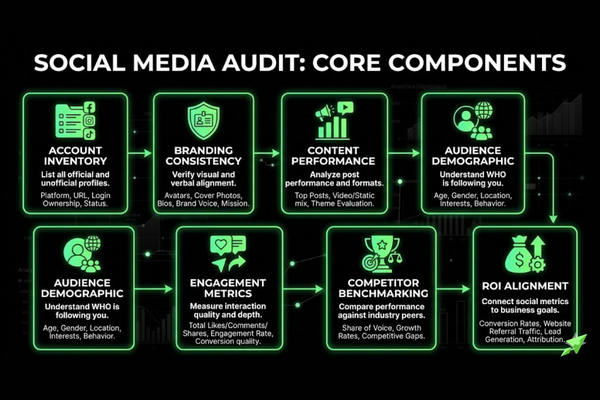
A social media audit includes these core components:
Profile and account inventory — A full list of every account your brand owns or has ever owned, including forgotten or inactive ones
Branding consistency review — A check that your logo, bio, colors, and tone match across every platform
Content performance analysis — Data on which post types, topics, and formats drive the most engagement and reach
Audience demographics assessment — Age, location, gender, and behavior data pulled from the native platform analytics
Engagement metrics review — Likes, comments, shares, saves, and click-through rates measured against platform benchmarks
Competitive benchmarking — A comparison of your performance against 3–5 direct competitors on the same platforms
Goal and ROI alignment check — A test of whether your social activity actually supports your business objectives
Social Media Audit Checklist for Small Businesses
A social media audit checklist helps small businesses review every active profile, post type, audience signal, performance metric, and business goal in one place. It turns scattered platform data into a clear action plan.
Use this checklist during your audit:
- Review every active and inactive social media profile.
- Check profile names, bios, links, logos, and cover images.
- Compare brand voice, visuals, and messaging across platforms.
- Measure reach, engagement, clicks, saves, shares, and conversions.
- Identify top-performing posts by platform and format.
- Review audience age, location, gender, and active times.
- Compare your performance against 3 to 5 competitors.
- Connect social activity to website traffic, leads, or sales.
- Create a 30-day action plan from the audit findings.
What are the key benefits of a social media audit for your business?
A social media audit gives your business these key benefits.
Clear performance snapshot across platforms. You see exactly how every account performs, not just your best one
Identification of what content and platforms drive results. You stop guessing and start making decisions based on real data
Brand consistency assurance. Every profile looks and sounds like the same company, which builds trust with new followers
Alignment of social activity with business objectives. Your content strategy connects to revenue, leads, or traffic goals, not just impressions
Discovery of fake or dormant accounts. Impostor accounts and inactive profiles damage brand credibility and confuse customers
Competitive positioning insights. You see where competitors are winning and find the gaps your brand can fill
Data-driven foundation for future strategy. Your next campaign starts with evidence, not assumptions
How do you conduct a social media audit for your business?
To conduct a social media audit for your business, you gather data from every platform, compare it to your goals, and build a clear action plan. Follow these steps to conduct a social media audit for your business.
List and verify every social media account your brand owns
Evaluate branding consistency across all profiles
Analyze content performance by platform and format
Assess audience demographics against your target customer profile
Run a competitive benchmarking comparison
Review metrics and connect them to business goals
Build a prioritized action plan with deadlines
Each step builds on the last. Skipping one creates blind spots that reduce the audit's value.
How do you list and verify all your social media accounts?
Follow these steps to list and verify every social media account during an audit.
Search your brand name on every major platform. Check Instagram, Facebook, LinkedIn, TikTok, X (formerly Twitter), Pinterest, and YouTube for any accounts using your name
Record the URL, username, creation date, and follower count for each profile you find, active or not
Classify each account as active, inactive, or fraudulent. Active means posted in the last 30 days; inactive means no recent posts; "fraudulent" means someone else runs it using your name
Note who manages each account. Document the team member or agency responsible for every login
Flag any impostor or unauthorized accounts for reporting. Each platform has a formal process for reporting fake brand accounts; start it immediately
Example: A regional bakery chain might search their brand name and find three Instagram accounts — one official, one a fan page, and one a fake account collecting followers. The audit reveals that risk before it becomes a customer service problem.
How do you evaluate branding consistency across social platforms?
Check these branding elements across every social platform.
Profile picture and logo uniformity — The same logo version appears on every platform, not three different crops or outdated versions
Cover and banner image alignment — Header images reflect the current campaign or brand identity, not a promotion from two years ago
Bio and description voice and tone — Every bio sounds like the same brand, uses consistent language, and includes the same core value statement
Username and handle consistency — Ideally, your handle is identical or very close across all platforms to make your brand easy to find
Brand colors and visual identity — Post design, fonts, and color choices match your brand guidelines across every feed
Link in bio accuracy — Every link points to a live, relevant page — not a 404 or an old landing page
Call-to-action alignment across profiles — Every platform points visitors toward the same next step your business wants them to take
Example: A fitness brand might discover their Instagram bio says "DM for coaching" while their LinkedIn says "Visit our website." That mismatch sends different signals to different audiences and reduces conversion on both platforms.
How do you analyze content performance during a social media audit?
You analyze content performance during a social media audit by pulling performance data for each post type — video, carousel, image, and text — over a defined period, usually the last 90 days. Start with the platform's native analytics. Export the data into a spreadsheet so you can sort and compare.
Identify the top 10 highest-performing posts per platform by engagement rate, not just likes. Look for patterns. Did video posts get 3× more reach than image posts? Did posts published on Tuesday mornings outperform Friday afternoon posts? Did product content underperform compared to educational content?
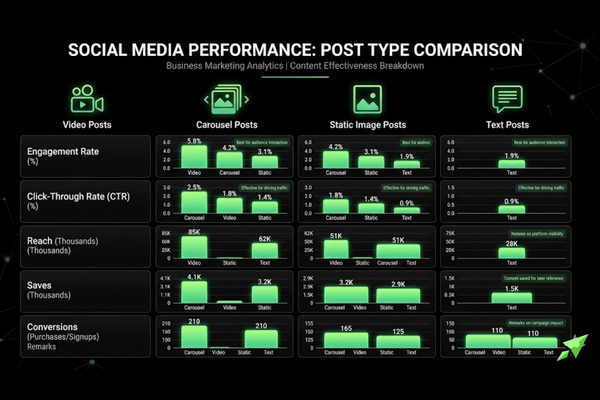
Evaluate each content format separately. Which format generates the highest engagement? Which drives the most saves? Which produces the most click-throughs to your website? These are different signals. A post can get 500 likes but zero clicks, which tells you the content entertained but did not motivate action. If you want a detailed breakdown of how these two formats compare head-to-head, this guide on static posts vs. video posts on social media covers performance data across platforms.
Example: A software company might find that short tutorial videos on LinkedIn generate 4× the click-through rate of static infographics, even though the infographics get more likes. That data tells them to shift their LinkedIn budget toward video production.
How Do You Audit Each Social Media Platform?
You audit each social media platform by checking the metrics, content formats, and audience behavior that matter most on that channel. Instagram, Facebook, LinkedIn, TikTok, and Pinterest do not measure success the same way.
How Do You Audit Instagram?
You audit Instagram by reviewing Reels, carousels, Stories, saves, shares, profile visits, website clicks, and follower growth. Check which content creates the strongest engagement and which posts move users toward your website or offer.
How Do You Audit Facebook?
You audit Facebook by reviewing page reach, post engagement, link clicks, comments, reviews, events, and local audience activity. Local businesses should also check whether Facebook content supports community trust and customer questions.
How Do You Audit LinkedIn?
You audit LinkedIn by reviewing impressions, clicks, comments, follower growth, profile visits, and lead actions. B2B businesses should focus on posts that attract decision-makers, website visits, and conversation-ready prospects.
How Do You Audit TikTok?
You audit TikTok by reviewing video views, watch time, completion rate, shares, comments, profile visits, and follower growth. Short videos need strong hooks, clear topics, and repeatable formats to perform well.
How Do You Audit Pinterest?
You audit Pinterest by reviewing impressions, saves, outbound clicks, board quality, pin design, and keyword use. Pinterest works best when content connects search intent with useful visual ideas.
How do you assess audience demographics in a social media audit?
You assess audience demographics in a social media audit by accessing the native analytics tool on each platform directly. Instagram Insights, Meta Business Suite, LinkedIn Analytics, and TikTok Analytics all provide free demographic breakdowns inside the app.
Collect the following data for each platform: age range, gender split, top cities, top countries, and most active hours. Save this in your audit spreadsheet. Then compare it to your actual target customer profile.
If your product targets women aged 30–45 in urban areas, but your TikTok audience is 60% male and aged 18–24, that is a serious mismatch. Either your content is attracting the wrong audience, or TikTok is the wrong platform for your business. The audit tells you which problem you have.
Most active hours data is also useful. Post when your real audience is online, not when it is convenient for your team to schedule content. For platform-specific timing data, this resource on the best times to post on Instagram, Facebook, and LinkedIn in 2026 gives current benchmarks by platform.
Recommended Video: Search YouTube for "how to read Instagram Insights for business 2026" to watch a step-by-step walkthrough of the native analytics dashboard.

How do you conduct competitive benchmarking as part of a social media audit?
You conduct competitive benchmarking as part of a social media audit by selecting 3–5 direct competitors and collecting their public social data. Pull their follower count, estimated posting frequency, and average engagement rate from each platform they use. Tools like Sprout Social or Semrush automate this process, but you can also do it manually using native platform data.
Note which platforms your competitors are most active on and which ones they appear to be winning on. A competitor with 20,000 LinkedIn followers and high post engagement is signaling that LinkedIn works for your shared audience.
Identify content themes they use that you do not. If a competitor posts weekly case studies and gets strong engagement, that is a content gap your brand can fill. Look for formats they use effectively — short video, polls, carousels — and compare those to your own format mix.
The goal is not to copy competitors. It is to find the gaps they have left open and the platforms where you can outperform them with better, more targeted content.
Example: A B2B accounting firm doing a social media audit might find that no competitor produces video explainers on tax deadlines. That gap is a real content opportunity with a ready audience.
What metrics should you track in a social media audit?
The metrics you track in a social media audit should match your business goals and platform priorities. Vanity metrics — follower counts, total likes — tell you almost nothing about business impact. Metric selection should align with what your business is actually trying to achieve.
Track these key metrics in your social media audit.
Engagement rate — Measures how actively your audience interacts with your content as a percentage of reach
Reach and impressions — Shows how many unique accounts saw your content and how many total times it appeared
Follower growth rate — Tracks whether your audience is expanding, flat, or shrinking over the audit period
Click-through rate (CTR) — Measures how many people clicked a link in your post or bio out of everyone who saw it
Conversion rate — The percentage of social visitors who completed a desired action, like signing up or buying
Video completion rate — Shows what percentage of viewers watched a video to the end, which signals content quality
Saves and bookmarks — Indicates content users want to return to, which is a strong quality signal on Instagram and Pinterest
What engagement metrics matter most in a social media audit?
Focus on these engagement metrics during your audit.
Engagement rate — Calculated as total interactions (likes, comments, shares, saves) divided by reach, then multiplied by 100; the industry average across platforms is 1–3% [site: Hootsuite, 2025]
Reach and impressions — Reach counts unique viewers; impressions count total views including repeat views from the same person; high impressions with low reach means your audience is seeing the same content repeatedly
Follower growth rate — Measured as new followers minus lost followers divided by total followers, multiplied by 100; a flat or declining rate signals a content or posting frequency problem
Click-through rate — Strong CTR on LinkedIn averages 0.4–0.6% [site: LinkedIn Marketing Solutions, 2025]; anything below 0.2% signals a weak call-to-action
Shares and reposts — The strongest organic reach signal; a share means a follower found the content valuable enough to put their own name on it
Video completion rate — A completion rate above 50% is strong for videos under 60 seconds; below 20% means the hook or opening is not holding attention
Saves and bookmarks — Saves on Instagram are a higher-value signal than likes because they indicate intent, not just a passive reaction
Understanding what these numbers mean for your business starts with knowing what social media engagement rate is and why it matters — especially how to benchmark your rate against industry averages.
How do you measure platform ROI during a social media audit?
You measure platform ROI during a social media audit by connecting social media data to actual business outcomes, such as website traffic, leads, and sales. Start by calculating cost-per-result for paid content: total ad spend divided by the number of actions (clicks, sign-ups, purchases). For organic content, calculate value-per-result by assigning a dollar value to each action based on your average customer lifetime value.
UTM parameters are short tracking codes added to URLs in your social posts. They tell Google Analytics which platform, campaign, and post drove each website visit. Without UTM parameters, all your social traffic appears as a single source, and you lose the ability to compare platforms.
Connect your social platform analytics to Google Analytics 4 (GA4). In GA4, navigate to Acquisition → Traffic Acquisition → Source/Medium. Filter by social to see which platforms drive the most sessions, the lowest bounce rates, and the highest conversion rates. For a full walkthrough of this process, this guide on how to measure social media ROI for your small business covers the attribution setup from start to finish.
Example: A law firm might find that LinkedIn drives 15% of their website traffic but 40% of their contact form submissions. Instagram drives 30% of traffic but 5% of form submissions. That data tells them LinkedIn is far more valuable per visit — and their budget should reflect that.
LinkedIn
Traffic Share: 15%
Conversion Rate: 6.2%
Priority: High
Instagram
Traffic Share: 30%
Conversion Rate: 1.1%
Priority: Medium
Facebook
Traffic Share: 10%
Conversion Rate: 0.8%
Priority: Low
TikTok
Traffic Share: 5%
Conversion Rate: 0.4%
Priority: Review
How Do You Audit Social Media Traffic in GA4?
You audit social media traffic in GA4 by checking which platforms send visitors, leads, and sales to your website. GA4 means Google Analytics 4. It shows whether social traffic creates business value after users leave the platform.
Check these GA4 areas:
- Open Reports.
- Click Acquisition.
- Open Traffic Acquisition.
- Filter by session source/medium.
- Review traffic from Instagram, Facebook, LinkedIn, TikTok, and Pinterest.
- Compare engagement rate, conversions, and revenue.
- Check which platform sends the highest-quality visitors.
Use UTM links for cleaner tracking. UTM links tell GA4 which post, platform, and campaign sent each visitor.

How does a social media audit connect to your business goals and ROI?
A social media audit connects to your business goals and ROI by mapping every platform's performance data to the specific outcome that platform was supposed to drive. Social media activity without goal alignment is just noise.
A social media audit connects to business goals and ROI in these ways.
Brand awareness goals — Measure reach growth, impressions, and share-of-voice compared to competitors over the audit period
Lead generation goals — Track form submissions, email sign-ups, and DM inquiries that originated from social platforms
Website traffic goals — Use GA4 and UTM data to see which platform sends the most qualified visitors with the lowest bounce rate
Conversion goals — Measure the percentage of social visitors who completed a purchase, booking, or registration
Customer retention goals — Monitor community engagement, response rate, and returning visitor data to assess loyalty signals
Every platform in your audit should map to at least one of these goals. If it does not, that platform is either mismanaged or irrelevant to your business — and the audit tells you which one. This is also where a defined small business social media strategy becomes essential — without one, there is no benchmark to audit against.
How do you evaluate which social media platforms are worth keeping for your business?
You evaluate which social media platforms are worth keeping for your business by applying a simple four-factor test to each one. Compare the platform's engagement rate, follower growth trend, traffic referral volume, and lead or conversion contribution side by side.
A platform worth keeping contributes meaningfully to at least one core business objective. A platform with low engagement, flat follower growth, no traffic referrals, and zero conversion contribution is a candidate for exit — not more investment.
Consolidating platforms is a strategic move, not a failure. Running three platforms well produces better results than running six platforms poorly. Businesses that focus on 2–3 platforms consistently [site: HubSpot State of Marketing, 2025] report higher ROI per post than those spreading effort across five or more. If your audit reveals you are stretched too thin, this guide on managing multiple social media platforms explains how to structure that workload — and what it realistically costs.
Example: A B2C fashion brand might find Pinterest drives strong website traffic but no follower growth, while TikTok drives rapid follower growth but no traffic. Both are worth keeping — but for different reasons, and with different content strategies.
Instagram
Engagement Rate: 3.1%
Follower Growth: +4% monthly
Traffic Contribution: 22% of sessions
Verdict: Keep
Facebook
Engagement Rate: 0.6%
Follower Growth: -1% monthly
Traffic Contribution: 8% of sessions
Verdict: Review
Pinterest
Engagement Rate: 1.8%
Follower Growth: +1% monthly
Traffic Contribution: 31% of sessions
Verdict: Keep
X
Engagement Rate: 0.3%
Follower Growth: -2% monthly
Traffic Contribution: 2% of sessions
Verdict: Exit
How do you link social media audit findings to revenue and business growth?
You link social media audit findings to revenue and business growth by tracing the full attribution chain: social post → click → landing page → lead → sale. Each step must be trackable. Without tracking, you can only guess which platform contributes to revenue.
UTM parameters connect post clicks to specific GA4 sessions. GA4 goal completions connect sessions to leads. CRM data — from tools like HubSpot, Salesforce, or Pipedrive — connects leads to closed deals. When these systems are linked, you can calculate exactly how much pipeline each social platform generated during the audit period.
When reporting to leadership, translate social metrics into revenue language. Do not say "LinkedIn engagement was up 18%." Say "LinkedIn generated 42 inbound leads last quarter at a cost per lead of $14, contributing an estimated $67,000 in pipeline." That framing earns budget, not just approval.
What social media audit tools should your business use?
Social media audit tools help small businesses collect platform data, website traffic data, and competitor insights. The main tool groups include native analytics, social media management platforms, social listening tools, and analytics integrations. No single tool covers everything. Most businesses need at least two, one native and one third-party.
Use these tool types during a social media audit.
Native analytics tools — Free data directly inside each platform (Instagram Insights, Meta Business Suite, LinkedIn Analytics, TikTok Analytics)
Social media management platforms — Tools like Sprout Social and Hootsuite that centralize data from multiple platforms into one dashboard
Social listening tools — Tools like Brand24 and Brandwatch that track brand mentions, sentiment, and conversations happening outside your owned accounts
Analytics integrations — Google Analytics 4 (GA4) and UTM parameters that connect social traffic to website behavior and conversions
What free tools are available for small business social media audits?
Small businesses can start with these free audit tools.
Instagram Insights — Shows reach, impressions, follower demographics, and post performance directly inside the Instagram app at no cost; accessible to any business or creator account
Meta Business Suite — Manages and reviews performance data for both Facebook and Instagram in one dashboard; includes audience insights, post reach, and ad summary reporting
LinkedIn Analytics — Provides follower demographics, post impressions, click-through rates, and page traffic data for any LinkedIn Company Page; available free to all page administrators
TikTok Analytics — Offers video views, profile reach, follower growth, and audience demographic breakdowns; access requires switching to a free TikTok Business account
Pinterest Analytics — Tracks impressions, saves, outbound clicks, and audience data for business Pinterest accounts; useful for brands in food, home, fashion, and DIY categories
Google Analytics 4 (GA4) — The free Google tool that tracks website traffic by source; set up UTM parameters on every social link to see exactly which platforms send the most valuable visitors
Google Sheets or Microsoft Excel — Use either to build your own audit template; free, flexible, and sufficient for audits covering fewer than five platforms
What paid social media audit tools offer the most business value?
These paid tools offer stronger audit reporting and competitor research.
Sprout Social — An all-in-one platform that provides cross-platform analytics, competitor benchmarking, post scheduling, and downloadable audit reports; best suited for teams managing three or more active accounts simultaneously
Hootsuite — A multi-platform management tool with built-in analytics dashboards and team collaboration features; its audit reporting function exports platform data into formatted PDF or CSV reports
Semrush — Best known as an SEO tool, but its Social Media Tracker module compares your post performance, follower growth, and engagement rates directly against competitor accounts on the same platforms
Brand24 — A social listening platform that monitors brand mentions, hashtag usage, and online sentiment in real time; catches conversations about your brand that happen outside your own posts
Brandwatch — An enterprise-grade social analytics tool with AI-powered sentiment analysis, audience intelligence, and historical data access; suited for large brands with significant online conversation volume
How should your business build an action plan from a social media audit?
Your business should build an action plan from a social media audit by treating audit findings as raw material — not a final answer. Data without action changes nothing.
Follow these steps to turn audit findings into an action plan.
Prioritize findings by business impact — Rank every finding by how much it affects revenue, leads, or brand risk; fix the highest-impact issues first
Define SMART goals for each priority — Each goal must be Specific, Measurable, Achievable, Relevant, and Time-bound; "improve engagement" is not a goal; "increase Instagram engagement rate from 1.2% to 2.5% by September 30, 2026" is
Assign ownership and timelines — Every action item needs one owner and one deadline; shared ownership means no ownership
Set KPIs to track progress — Decide in advance how you will measure success for each action item before you start executing
Schedule the next audit date — Book the next audit before closing this one; consistency is what turns a one-time review into a compounding strategy advantage
Example: After an audit reveals that LinkedIn drives 40% of form submissions on 15% of total social traffic, the action plan might include: increase LinkedIn posting frequency from 2× to 4× per week, assign a dedicated writer for LinkedIn content, and set a goal to increase LinkedIn-attributed leads by 30% within 90 days. Before setting that frequency, it helps to review how many times per week a business should post on social media to set realistic, platform-specific targets.

How often should your business perform a social media audit?
Your business should perform a social media audit at least once per quarter if you publish content regularly and run paid social campaigns. Quarterly audits give you enough data to spot trends and enough time to act before the next cycle.
Smaller businesses managing one or two platforms can audit semi-annually — every six months — without falling too far behind. Enterprise brands with large content teams, multiple market segments, and significant ad spend benefit from a full annual audit supported by lighter monthly check-ins.
The right social media audit frequency depends on two factors: how fast your social platforms change (algorithm updates, audience shifts) and how fast your business changes (new products, new markets, new competitors). The faster either factor moves, the more frequently you need to audit.
When should a business conduct a social media audit more frequently?
Run a social media audit more often in these situations.
Before a major product launch — Verify that all profiles are updated, branding is consistent, and your audience demographics match the product's target customer
After a rebrand — Check every platform immediately after a rebrand to catch old logos, outdated bios, and incorrect links before customers notice
Following a significant algorithm change — Platform algorithm shifts can dramatically change reach and engagement; an immediate audit reveals which content types are now rewarded
During a brand reputation crisis — A crisis audit identifies what is being said across platforms, which accounts are amplifying negative content, and where your response should focus
When entering a new market or audience segment — Audit your current audience demographics to confirm whether your existing platforms can reach the new audience or whether new platforms are needed
When significantly scaling social media ad spend — Before increasing budget, audit current performance to ensure you are scaling what works — not what looks good
How do you use a social media audit template for your business?
You use a social media audit template for your business by setting it up before the audit begins and filling it in as you collect data from each platform. A template ensures that every audit you run covers the same data points in the same order, which makes quarter-over-quarter comparison accurate.
Without a template, audits become inconsistent. One audit might record follower count but miss engagement rate. The next audit reverses that. You end up with data that cannot be compared, which defeats the purpose of running regular audits.
Set up the template once, then reuse it every cycle. Update the date fields, clear the data columns, and carry forward only the historical comparison rows. Share the template with anyone who contributes to the audit to keep data entry consistent. A well-designed template also becomes the foundation for stakeholder reports — the same data, just formatted differently for a leadership audience. To organize your content planning alongside audit data, a social media content calendar lets you track what was published, when, and on which platform — making post-level performance review far faster.
What should a social media audit template include?
A useful social media audit template should include these components.
Profile inventory tab — Platform name, profile URL, username, follower count, account status (active/inactive/fraudulent), and account owner for every account found
Branding checklist — A row for each platform with columns to check logo, banner image, bio copy, handle, link accuracy, and call-to-action alignment
Content performance table — Post type, publish date, reach, impressions, engagement rate, clicks, and saves for every post in the audit period
Audience demographics section — Age range, gender split, top locations, primary language, and most active hours pulled from native analytics for each platform
Competitor benchmarking table — Competitor name, platform, follower count, average engagement rate, posting frequency, and top content format for each competitor reviewed
Platform ROI summary — Traffic contribution, lead volume, conversion rate, and estimated revenue attribution per platform
Goals and KPI alignment section — Each active platform mapped to the business goal it supports, the KPI used to measure progress, and the current result versus target
Action plan and next steps — Prioritized list of findings, assigned owner, deadline, and success metric for every action item
How do you present social media audit results to business stakeholders?
You present social media audit results to business stakeholders by framing every finding in terms of business outcomes — not social media performance alone. A stakeholder who manages revenue does not care that your reach increased by 12%. They care that social media generated 38 qualified leads last quarter at a lower cost per lead than paid search.
Use these steps to present audit results to business stakeholders.
Open with business context — Remind stakeholders of the goals social media was meant to support during the audit period; set the benchmark before showing results
Present performance highlights — Lead with the two or three strongest outcomes: the platform with the highest ROI, the content format with the strongest CTR, or the audience segment that converted at the highest rate
Share key findings — Present what the data reveals about gaps, risks, and misaligned activity; be direct about what is not working and why
Deliver recommended actions — Show a prioritized list of next steps with expected outcomes, owners, and timelines; this moves the meeting from a report to a decision
Never open a stakeholder presentation with platform-level vanity metrics. Start with the business result, then trace it back to the social activity that drove it.
What key findings should a social media audit report highlight for business stakeholders?
A social media audit report should highlight these key findings for stakeholders.
Top-performing platform by engagement and ROI — Identify the single platform that delivered the highest return on time and budget invested during the audit period, and state the result in revenue or lead terms
Underperforming platforms recommended for consolidation — Name the platforms where investment exceeds return and make a specific recommendation to exit, reduce, or restructure activity there
Best-performing content format — State which format — video, carousel, image, text — drove the highest engagement rate and click-through rate across all platforms reviewed
Audience demographic summary and target market alignment — Confirm whether the audience your content is actually reaching matches your business's target customer profile, and flag any significant mismatches
Competitive positioning and benchmark comparison — Show how your engagement rate, follower growth, and content output compare to 3–5 competitors on the platforms you share
Social media contribution to traffic, leads, and conversions — Report the exact number of website sessions, form submissions, and revenue-attributed conversions that originated from social media during the audit period
Priority action items with expected business impact — List the top three to five changes the business should make, ranked by expected impact on leads, traffic, or revenue — not by ease of execution
What common mistakes do businesses make during a social media audit?
Avoid these common social media audit mistakes.
Auditing only active platforms and ignoring dormant or unofficial accounts — Forgotten accounts with old branding or outdated contact information still appear in search results and damage brand credibility with every visitor who finds them
Focusing on follower count rather than engagement quality — An account with 50,000 followers and a 0.3% engagement rate performs worse than an account with 8,000 followers and a 4.1% engagement rate by every business measure
Failing to connect audit findings to business goals — Reporting that "reach increased by 18%" means nothing if the audit does not show whether that reach contributed to leads, traffic, or sales
Not benchmarking against competitors — Without competitive data, you have no way to know whether your performance is strong, average, or trailing — and no basis for strategic prioritization
Skipping audience demographics analysis — Publishing content without knowing who is actually seeing it means your messaging, timing, and format choices are based on assumptions rather than evidence
Treating the audit as a one-time event rather than a recurring process — A single audit produces a snapshot; regular audits produce a trend line that shows whether your strategy is improving over time
Not building an actionable plan after completing the audit — An audit that produces a report but no actions is a research exercise, not a strategy tool; every finding should drive at least one specific, owned, deadline-bound action
Should your business hire a professional to perform a social media audit?
Your business should hire a professional to perform a social media audit when your internal team lacks the tools, time, or expertise to produce accurate, actionable results.
DIY audits work well for small businesses managing one or two platforms with an in-house marketing person who understands analytics. Native platform data and a Google Sheets template are enough to run a solid quarterly audit at that scale. For a direct comparison of the two approaches, this breakdown of social media management vs. DIY covers the trade-offs in time, cost, and output quality.
Professional audit services make more sense when you manage five or more active platforms, have no dedicated social media analyst on staff, are recovering from a rebrand or public reputation event, or are scaling paid social spend above $5,000 per month. At that scale, the cost of making decisions without accurate data exceeds the cost of the audit itself.
Agencies and freelance social media consultants typically deliver deeper competitive analysis, sentiment monitoring, and full revenue attribution that most in-house teams cannot replicate without enterprise-level tools. For brands in competitive markets, that depth is the difference between a directional guess and a confident strategy. If you are evaluating agency options, this list of questions to ask a social media management company helps you assess whether a provider can deliver the audit depth your business actually needs.
What does a professional social media audit service include?
A professional social media audit service usually includes these components.
Full account inventory and discovery of unauthorized profiles. A professional audit searches beyond the accounts you know about, identifying any impostor, fan, or legacy accounts that could damage brand trust if left unmanaged
Advanced competitive benchmarking. Data pulled from premium tools like Sprout Social, Semrush, or Brandwatch compares your performance against competitors across follower growth, engagement rate, posting frequency, and content format mix
Social listening and brand sentiment analysis monitors conversations happening about your brand outside your owned accounts, including mentions without tags, review platforms, and industry forums
ROI and conversion attribution analysis connect social activity to CRM pipeline data using UTM parameters and GA4 to show which platforms and post types generate measurable revenue
Content strategy gap analysis identifies topics, formats, and platforms your brand is not using, but your audience and competitors signal are high-value opportunities
Platform-specific recommendations: Detailed guidance tailored to each platform's algorithm, audience behavior, and content format best practices as of the audit date
A formal audit report with an executive summary and action plan. A structured document including key findings, platform scorecards, competitive positioning, and a prioritized list of recommended changes with expected outcomes, formatted for both marketing teams and leadership review
A social media audit process, when done consistently, turns scattered platform activity into a focused business strategy. Whether you run it internally or hire a professional, the audit gives your brand a clear answer to the question that matters most: is your social media actually working?
Need help turning your audit into a posting plan? Social Lift Off packages include consistent content support, access to the HPMG Social Portal, static posts, video posts, and a no-contract monthly service.