
Instagram Reels for Business: How to Use Short-Form Video to Grow Your Brand
Instagram Reels for Business: How to Use Short-Form Video to Grow Your Brand
Businesses that post Reels reach 3x as many non-followers as those relying on static posts alone [site: Meta, 2024]. Instagram Reels strategy is no longer optional for brands that want organic growth — it's the primary discovery engine on the platform. This guide covers every part of Reels for business: what they are, how the algorithm works, what content drives results, how to generate leads, how to measure ROI, and which mistakes to avoid.
Short-form video marketing has shifted how audiences find and trust brands. A 30-second Reel can reach 50,000 people who have never heard of the business. A static post reaches a fraction of existing followers. That gap in distribution is real — and consistent.
What are Instagram Reels for business?
Instagram Reels for business are short-form vertical videos, up to 90 seconds long, that businesses use to reach new audiences, build trust, and drive measurable outcomes. They appear in the Reels tab, Explore feed, home feed, and the business's profile grid — giving each video multiple entry points to new viewers.
Unlike personal Reels, business Reels connect directly to brand goals. They include a clear topic, a specific call to action (CTA — a prompt telling the viewer what to do next), and a link to an offer, service, or product. The goal is not just views. It's reach, profile visits, DMs, website traffic, leads, and sales.
The full-screen vertical format matches how most people hold their phones. That match between format and natural behavior is why Reels hold attention longer than landscape video. Instagram's own data shows Reels drive more interactions per reach than any other content format on the platform [site: Meta Business, 2024].
A business that consistently uses Reels builds Instagram brand awareness without paid ads. Each Reel acts as a public piece of content that non-followers can find, watch, save, and share. That organic distribution is the core advantage of Reels over every other Instagram format.
How do Reels differ from posts, Stories, and TikTok?
Reels differ from posts, Stories, and TikTok because each format has a different discovery path, lifespan, and business role.
Format: Reels
Discovery Path: Reels tab, Explore, Feed
Lifespan: Days to weeks
Interaction Style: Saves, shares, replays, comments
Business Role: Awareness and reach
Format: Feed Posts
Discovery Path: Home feed, profile grid
Lifespan: 24–48 hours
Interaction Style: Likes, comments
Business Role: Announcements, brand proof
Format: Stories
Discovery Path: Followers-only feed
Lifespan: 24 hours
Interaction Style: Taps, DMs, polls
Business Role: Daily updates, offers
Format: TikTok
Discovery Path: For You Page
Lifespan: Days to months
Interaction Style: Duets, stitches, shares
Business Role: Viral reach, trend-based content
Format: YouTube Shorts
Discovery Path: YouTube search, Shorts tab
Lifespan: Weeks to months
Interaction Style: Subscriptions, likes
Business Role: Long-term discoverability
Reels are the only Instagram format that consistently reaches non-followers without paid promotion. Stories disappear in 24 hours and only show to followers. Feed posts sink within 48 hours. TikTok's algorithm is broader but lacks Instagram's shopping and DM infrastructure for social video marketing. YouTube Shorts have longer shelf life but require building a separate audience from scratch.
Why do Instagram Reels matter for brand growth?
Instagram Reels matter for brand growth because they help businesses reach non-followers through short, shareable video content.
Key reasons Instagram Reels support brand growth are listed below.
Reels appear in the Explore tab, where 500 million accounts browse daily [site: Meta, 2024] — giving brands visibility with people who have never encountered them.
Saves signal high content value to the algorithm, which then pushes the Reel to a broader audience automatically.
Shares extend reach beyond the algorithm — viewers forward Reels directly to friends via DMs and Stories without being asked.
Profile visits increase after a strong Reel, giving the business a real chance to convert attention into followers.
Repeated visibility builds trust — audiences who see a brand three or more times are significantly more likely to buy [site: Nielsen, 2023].
Local discovery works through location tags, helping nearby customers find a business organically in location-based searches.
Product discovery happens inside Reels — product tags route viewers directly to the shop without extra navigation steps.
What business goals should Instagram Reels support?
Instagram Reels should support awareness, engagement, trust, lead generation, sales, bookings, retention, and community growth.
Ecommerce brands use Reels to showcase products, run limited-time promotions, and send traffic directly to product pages.
Local businesses use Reels to build neighborhood recognition, drive foot traffic, and generate community reviews.
Service businesses use Reels to explain their process, answer common questions, and generate consultation bookings.
Coaches and consultants use Reels to demonstrate expertise, share client results, and attract ideal clients at the awareness stage.
Agencies use Reels to prove results, attract new business, and show company culture to potential recruits.
Restaurants use Reels for menu reveals, seasonal specials, event announcements, and direct reservation links.
Fitness studios use Reels for class previews, trainer introductions, transformation stories, and trial sign-up offers.
Creator-led brands use Reels to grow community, launch products, and drive affiliate and brand partnership revenue.
Every Reels content strategy should connect to at least one of these goals. Posting without a defined goal produces views — not business outcomes.
Which businesses benefit most from Instagram Reels?
Businesses that benefit most from Instagram Reels have visual services, teachable topics, strong customer stories, or products that need demonstration.
Business Type: Ecommerce brands
Why Reels Work: Products are visual; demos build buying confidence
Best Content Type: Product demos, unboxing, before-after
Business Type: Local businesses
Why Reels Work: Location-based discovery drives foot traffic
Best Content Type: Behind-the-scenes, team clips, local events
Business Type: Real estate
Why Reels Work: Property walkthroughs generate qualified inquiries
Best Content Type: Listing tours, neighborhood guides, buyer tips
Business Type: Restaurants
Why Reels Work: Food visuals drive reservations and delivery orders
Best Content Type: Menu reveals, chef content, event announcements
Business Type: Beauty brands
Why Reels Work: Transformation content performs strongly across Explore
Best Content Type: Tutorials, before-after, ingredient explainers
Business Type: Fitness studios
Why Reels Work: Movement content and social proof attract sign-ups
Best Content Type: Class clips, member stories, challenge content
Business Type: Coaches
Why Reels Work: Authority content builds trust before the sale
Best Content Type: Tips, myth-busting, student results
Business Type: SaaS companies
Why Reels Work: Feature explainers reduce onboarding friction
Best Content Type: Screen demos, use case walkthroughs
Business Type: Nonprofits
Why Reels Work: Story-driven content drives donations and awareness
Best Content Type: Impact stories, volunteer content, cause updates
How does the Instagram Reels algorithm work?
The Instagram Reels algorithm ranks videos based on user interest, watch behavior, engagement, content signals, and creator signals. Instagram does not show every Reel to every user. It predicts what each person wants to see next — then tests that prediction with a small initial audience before deciding how far to distribute the content.
Watch time is the strongest signal in the system. A Reel watched fully — or replayed — tells the algorithm the content is worth showing to more people. A Reel swiped away in the first two seconds does the opposite.
The algorithm does not just count views. It measures completion rate (the percentage of viewers who watch to the end), shares, saves, comments, and profile visits triggered by the video. Each action sends a different signal about the content's value.
Content signals also feed the ranking. Captions with clear topic keywords, relevant hashtags, and trending audio help Instagram understand what the Reel is about and which users to show it to. Original audio performs well because Meta (Instagram's parent company) rewards content created natively on the platform.
Creator signals include posting consistency, past engagement rates, and account history. New accounts can still reach large audiences — the algorithm rewards content quality, not follower count.
The distribution process works in three stages. Instagram first shows the Reel to a small test group. It measures early signals — especially saves and shares in the first hour. Strong early signals trigger wider distribution to a much larger audience pool.
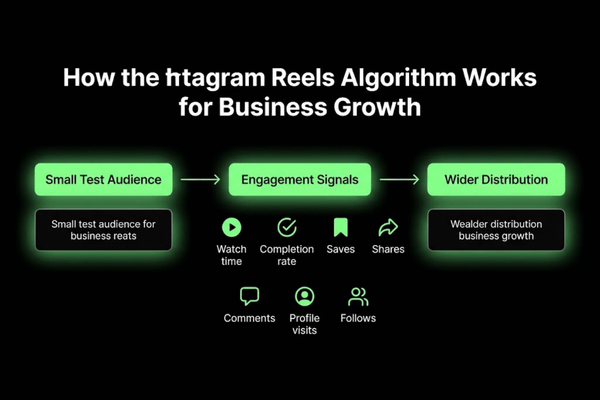
Which signals affect Reels' reach?
Signals that affect Reels reach include watch time, completion rate, replays, shares, saves, comments, profile actions, originality, and relevance.
Viewer Signals
Watch time — seconds a viewer watches before swiping away
Completion rate — percentage of viewers who finish the full Reel
Replays — viewers who watch the same Reel more than once
Profile visits — viewers who tap through to the account after watching
Content Signals
Caption keyword relevance to the Reel's stated topic
Hashtag specificity and niche alignment
Audio type — original, trending, or licensed
On-screen text reinforcing the main message
Video originality — not reposted from TikTok with visible watermarks
Creator Signals
Posting consistency — how regularly the account publishes Reels
Past engagement rates on previous content
Account type — business, creator, or personal
Engagement Signals
Shares via DM or Stories — the strongest reach multiplier
Saves — viewers bookmarking the Reel for later
Comments — especially questions and direct reactions to the content
Follows triggered immediately after watching a specific Reel
How do hooks and watch time affect retention?
Hooks and watch time affect retention by deciding whether viewers stop, continue watching, replay, or swipe away in the first 3 seconds of the video.
The first three seconds are the most critical window in any Reel. If the opening does not create immediate curiosity, tension, or clear value, most viewers swipe. That swipe registers as a negative signal with the algorithm and limits further distribution.
Three hook types that hold attention:
Text hook — on-screen words that state a problem or bold claim before the audio starts. Example: "You're losing bookings because of this one mistake."
Visual hook — an unexpected image, fast cut, or movement that forces immediate attention. Example: A before-after transformation shown in the opening two seconds.
Problem statement — a spoken question the viewer is already thinking. Example: "Why aren't your Reels getting any reach?"
After the hook, pacing determines whether viewers stay. Short clips, fast cuts, and quick payoffs keep viewers engaged. A loop ending — where the video ends in a way that connects back to the beginning — increases replays. Replays send one of the strongest signals to the Reels ranking system.
How do saves, shares, and comments improve performance?
Saves, shares, and comments improve performance by showing Instagram that a Reel is useful, relatable, or worth spreading — each from a different angle.
Engagement Type: Saves
User Intent: "I want to find this again."
Algorithm Signal: High content value, reference material
How to Earn It: Tips, checklists, how-to breakdowns
Engagement Type: Shares
User Intent: "My friend needs to see this."
Algorithm Signal: Relatability or strong utility
How to Earn It: Relatable scenarios, bold opinions, entertaining formats
Engagement Type: Comments
User Intent: "I want to respond or ask more."
Algorithm Signal: Community engagement, topic resonance
How to Earn It: Question CTAs, opinion prompts, debate-worthy content
Saves are the most underrated signal for Reels' reach. A Reel saved 500 times from 2,000 views tells Instagram the content has strong reference value — that triggers extended distribution. Comment prompts like "Drop a 🙋 if this happened to you" directly increase comment volume and improve algorithm placement.
How do captions, hashtags, and audio support discovery?
Captions, hashtags, and audio support discovery by giving Instagram more context about the Reel's topic, audience, and trend fit — helping the platform match each video to the right viewer.
Captions: Write captions with natural keyword phrases the target audience actually searches. Instagram reads caption text to classify content and match it to viewer interests. Niche-specific terms ("email deliverability strategy" vs. "marketing tip") place the Reel in front of a tighter, more relevant audience. Put the main keyword in the first sentence.
Hashtags: Use 3–5 targeted hashtags per Reel. Mix one broad tag (#instagramreels) with niche-specific tags (#fitnesscoachingtips) and a location tag for local businesses. Niche hashtags reach smaller but more relevant audiences. Instagram's own guidance confirms that dumping 30 generic hashtags no longer improves Reels reach [site: Instagram Creator, 2023].
Audio: Trending audio gives Reels placement on the audio's browse page — a separate discovery channel with its own traffic. Original audio builds brand identity over time. Instagram removes Explore distribution from Reels that repost TikTok-watermarked clips.
Checklist:
[ ] Caption leads with a topic keyword in the first sentence
[ ] 3–5 relevant hashtags added — niche-specific, not generic
[ ] Audio is original, trending, or licensed — never TikTok-watermarked
[ ] On-screen text reinforces the core message without cluttering the frame
[ ] Location tag added for local businesses
What should an Instagram Reels strategy include?
An Instagram Reels strategy should include audience definition, business goal, content pillars, hook style, posting cadence, CTAs, a production workflow, and a measurement plan. Random posting is not a strategy. A strategy is a repeatable system that connects every Reel to a specific business outcome.
Start with the buyer journey. Every viewer sits at a different stage — some have never encountered the brand, others are comparing options, and others are ready to act. A Reels content strategy maps content to each stage: awareness Reels for new audiences, trust Reels for warm followers, and conversion Reels for buyers.
Brand voice defines how the business communicates — direct, educational, entertaining, or behind-the-scenes. Staying consistent with that tone builds recognition faster than switching styles week to week.
A content calendar organizes topics, hooks, CTAs, and publish dates in advance. Batch filming — recording multiple Reels in one session — eliminates daily production pressure and keeps content flowing without disruption.
Repurposing extends every piece of content. One blog post becomes five Reels. One FAQ becomes ten short-answer videos. One client story becomes a testimonial Reel, a process clip, and an educational explainer. Short-form video marketing becomes sustainable when repurposing is built into the plan.
Testing is part of the strategy from the start. Every Reel tests something: a new hook style, a different CTA, a new topic format. Monthly analytics review shows which content drives profile visits, DMs, and leads. That data shapes the next planning cycle.
Checklist:
[ ] Audience and buyer stage defined per content type
[ ] Business goal assigned to each content pillar
[ ] 3–5 content pillars chosen and documented
[ ] Hook style selected for each pillar
[ ] Posting cadence set based on team capacity — not based on what seems impressive
[ ] CTA matched to the business goal per Reel
[ ] Editing and publishing workflow documented
[ ] 30-day analytics review scheduled
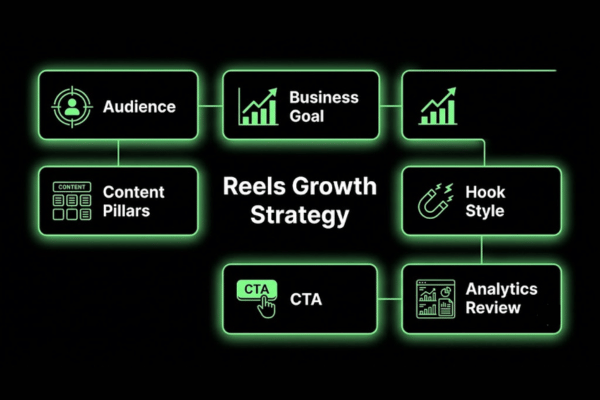
How do businesses define audience and intent?
Businesses define audience and intent by matching each Reel topic to the viewer's specific problem, awareness level, and most likely next action.
Persona: First-time visitor
Awareness Stage: Unaware
Pain Point: Does not know the solution exists
Content Intent: Educational — introduce the problem
Business Offer: Awareness Reel
Persona: Warm follower
Awareness Stage: Problem-aware
Pain Point: Knows the problem, comparing options
Content Intent: Trust — results, process, proof
Business Offer: Service or product Reel
Persona: Ready buyer
Awareness Stage: Solution-aware
Pain Point: Knows what they want, needs confidence
Content Intent: Conversion — CTA, offer, social proof
Business Offer: Direct offer or booking Reel
Persona: Existing customer
Awareness Stage: Loyal
Pain Point: Wants more value, community
Content Intent: Retention — tips, loyalty offers
Business Offer: Upsell or community Reel
What content pillars work for business Reels?
The best content pillars for business Reels are education, entertainment, product proof, behind-the-scenes, customer stories, offers, and community content.
Business Reels content pillars are listed below.
Education: Answers customer questions directly. Builds authority before the sale. Example: "3 reasons your skincare routine isn't working."
Entertainment: Makes the brand easier to watch and share without a hard sell. Example: Relatable founder frustration clips the audience instantly recognizes.
Product proof: Shows the product working in real conditions. Reduces purchase hesitation. Example: A before-after transformation with the product named and tagged.
Behind-the-scenes: Shows team, process, and values. Builds trust with viewers who have not yet bought. Example: Packaging a customer order start to finish.
Customer stories: Turns real results into social proof. Drives interest from similar buyers. Example: 30-second client win with a specific, named outcome.
Offers and promotions: Creates urgency for warm audiences. Converts engaged followers into buyers. Example: "This week only — 20% off all bookings."
Community content: Celebrates the audience. Builds long-term loyalty without a sale. Example: User-generated content repost with credit and a genuine comment.
How should brands plan a Reels calendar?
Brands should plan a Reels calendar by mapping weekly videos to content pillars, active campaigns, current offers, trending topics, and the most common customer questions.
Set publishing dates for the full month — assign specific days to each content pillar, not just "post when ready."
Write hooks before filming — a pre-written hook gives each video a clear purpose and cuts filming time significantly.
Match each CTA to a business goal — one specific next step per Reel: save, DM, click link in bio, or book now.
Block campaign weeks for product launches, seasonal content, and promotions — these replace pillar content for that period.
Reserve 1–2 slots per week for trend content — trending audio and formats work best when acted on within 24–48 hours of the trend appearing.
Schedule a review checkpoint at month-end — assess what hit its goal and revise the next cycle.
Batch-write captions and CTAs in advance — writing captions mid-filming wastes time and produces weaker copy.
How often should businesses post Instagram Reels?
Businesses should post Instagram Reels often enough to test ideas, stay visible, and protect content quality — not just to fill a schedule.
Business Type: Small business (solo owner)
Recommended Cadence: 2–3 per week
Reasoning: Limits burnout while maintaining visibility
Business Type: Local business
Recommended Cadence: 3–4 per week
Reasoning: Frequency drives local discovery and community trust
Business Type: Ecommerce brand
Recommended Cadence: 4–5 per week
Reasoning: Product variety supports consistent content output
Business Type: Service business
Recommended Cadence: 2–3 per week
Reasoning: Depth and authority matter more than raw frequency
Business Type: Team with editor support
Recommended Cadence: 5–7 per week
Reasoning: Volume enables faster testing and faster data
Posting 7 low-quality Reels per week produces weaker results than posting 3 strong ones. Content quality, watch time, and save rate matter more than volume. Review 30-day analytics before deciding to increase posting frequency.
What content works best for Instagram Reels?
The best content for Instagram Reels includes educational videos, entertaining clips, product demos, service explainers, customer stories, behind-the-scenes videos, and trend-based posts.
High-performing Instagram Reels content types are compared below. Here:
Content Type: Educational
Primary Goal: Authority, trust
Best CTA: "Save this"
Best Business Type: Coaches, consultants, service businesses
Content Type: Entertainment
Primary Goal: Reach and share
Best CTA: "Follow for more."
Best Business Type: Restaurants, beauty brands, creator brands
Content Type: Product demo
Primary Goal: Purchase confidence
Best CTA: "Shop now / Link in bio."
Best Business Type: Ecommerce, beauty, food
Content Type: Service explainer
Primary Goal: Lead generation
Best CTA: "Book a call / DM to start."
Best Business Type: Agencies, coaches, local services
Content Type: Customer story
Primary Goal: Social proof
Best CTA: "DM me / Read more."
Best Business Type: All business types
Content Type: Behind-the-scenes
Primary Goal: Brand trust
Best CTA: "Follow to see more."
Best Business Type: Local businesses, small brands
Content Type: Trend-based
Primary Goal: New audience reach
Best CTA: "Follow / Share this"
Best Business Type: All types — when brand-relevant
How do educational Reels build authority?
Educational Reels build authority by answering common customer questions in a short, clear, and useful format that positions the brand as the trusted source in its niche.
A business that consistently addresses the questions its audience is already searching for becomes the go-to reference in that space. This is the foundation of Reels content strategy for coaches, consultants, and service businesses competing on expertise rather than price.
Formats that build authority fast:
How-to videos: Step-by-step breakdowns of a process. Example: "How to write a Reels hook in 60 seconds."
Common mistakes: The errors the audience is already making. Example: "5 Instagram mistakes killing your reach right now."
Myth-busting: Challenges false beliefs in the niche. Example: "No, you don't need 10,000 followers to make sales on Instagram."
Checklists: Short visual lists viewers save for later. Example: "Instagram bio checklist — 7 things to fix today."
Before-and-after explanations: Shows the difference between doing something right vs. wrong. Example: A weak caption side-by-side with a strong rewrite.
Expert commentary: Reacts to industry news or bad advice with a clear, confident perspective.
How do entertaining Reels increase reach?
Entertaining Reels increase reach by making brand content easier to watch, share, and remember — removing the friction between a viewer and a voluntary share.
Entertainment does not mean unrelated comedy. It means making the brand interesting enough that viewers pass the content on without being prompted. A relatable scenario, a well-timed moment, or a trending format applied to the brand's niche all work without a hard sell.
Examples that perform:
Relatable scenarios: "Every client who says 'just make it pop'" — works immediately for design agencies whose audience lives this daily.
Trending audio with a brand twist: Apply a popular sound to a behind-the-scenes moment that connects to the business.
Brand personality clips: Show the human side of the business without a direct pitch — low pressure, high engagement.
Cultural moments: React to industry news or seasonal events when they connect directly to the brand's niche.
Entertaining Reels work best alongside educational or product Reels. Pure entertainment without a business connection attracts an audience that watches but never buys.
How do product and service demos drive action?
Product and service demos drive action by showing how something works, who it helps, and what result the buyer can realistically expect — removing the uncertainty that stops purchases.
Demo Type: Product feature demo
What It Shows: Specific function or use case
Best CTA: "Shop now / Link in bio"
Example: Skincare product applied to show texture and finish
Demo Type: Use case demo
What It Shows: Who uses it and how
Best CTA: "DM me to learn more"
Example: Fitness equipment used in a real home gym
Demo Type: Before-after demo
What It Shows: Problem vs. result
Best CTA: "Get yours / Book now"
Example: Before-and-after a professional cleaning service
Demo Type: Service process demo
What It Shows: What happens step by step
Best CTA: "Book a call / DM to start"
Example: 60-second client onboarding walkthrough
Demo Type: Comparison demo
What It Shows: This option vs. alternatives
Best CTA: "See the difference"
Example: Two products tested side-by-side with a clear result shown
Buyers need to believe the product will work for them specifically — not just in general. Demo Reels showing a real person in a real situation with a visible result close that gap faster than any caption ever can.
How do behind-the-scenes Reels build trust?
Behind-the-scenes Reels build trust by showing the people, process, values, and effort behind a brand — replacing polished marketing language with visible, real evidence.
Viewers buy from people they trust. Behind-the-scenes content creates that trust by showing what actually happens, not just the final result. This is especially effective for small businesses competing against larger, more polished competitors.
Examples that build trust quickly:
Team clips: Introduce staff by name and role — immediately humanizes the brand for a first-time viewer.
Packaging clips: Show an order being packed carefully — signals that quality and care are real, not claimed.
Service delivery: Film the actual service being performed — a haircut, a consultation, a repair job in progress.
Founder content: The owner explains why they started the business — creates direct emotional connection.
Quality control: Show the internal process that ensures every product or service meets the brand's stated standard.
Customer prep: Show how the team prepares before a customer arrives — restaurant setup, studio cleaning, property staging before a viewing.
How do Instagram Reels turn viewers into customers?
Instagram Reels turn viewers into customers when the video creates attention, builds trust, delivers a clear next step, and routes viewers into a sales path. No single Reel closes most sales alone. The Reel's job is to move the viewer one step forward along a defined path.
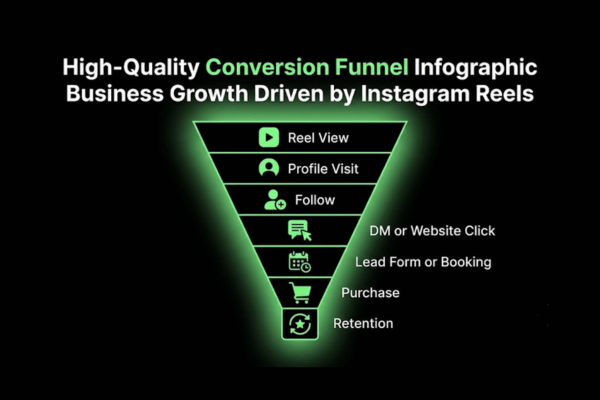
The conversion funnel works like this:
Reel view → profile visit → follow → DM or website click → lead form or booking → purchase → retention
A first-time viewer needs awareness. A warm follower needs trust. A buyer-stage viewer needs a CTA that removes friction. Each stage requires different content and a different action prompt.
Product tags allow viewers to go from Reel to product page in one tap — removing every extra step between discovery and purchase. Lead magnets (free guides, templates, or audits) capture email addresses directly via DM or a link-in-bio page. Booking links route interested viewers to a calendar without a phone call. Retargeting ads (paid ads shown to people who already watched a Reel) re-engage viewers who showed interest but did not act.
How should Reels use CTAs?
Reels should use CTAs that match the viewer's awareness stage, content type, and business goal—a mismatched CTA loses the conversion even when the Reel itself is strong.
Viewer Stage: Cold audience
Content Type: Educational
CTA: "Save this for later."
Goal: Save — signals value, extends reach
Viewer Stage: Cold audience
Content Type: Entertainment
CTA: "Share this with a friend"
Goal: Share — multiplies distribution
Viewer Stage: Warm audience
Content Type: Product proof
CTA: "Comment 'INFO' for details"
Goal: DM trigger — starts a conversion conversation
Viewer Stage: Warm audience
Content Type: Service explainer
CTA: "Book a free call — link in bio"
Goal: Website click — booking intent
Viewer Stage: Ready buyer
Content Type: Offer or promo
CTA: "Shop now — link in bio"
Goal: Product page click — direct purchase
Viewer Stage: Any stage
Content Type: FAQ or tip
CTA: "Follow for more like this"
Goal: Follow — builds a retargetable audience
One CTA per Reel. Multiple CTAs in one video split the viewer's attention and reduce the probability they take any action at all.
How do Reels support lead generation?
Reels support lead generation by attracting qualified viewers and moving them toward a form, DM, calendar booking, download, or offer through a defined sequence.
Create a Reel that solves one specific problem the target buyer has — qualified viewers self-select by watching through to the end.
Add a lead magnet CTA — "Comment 'FREE' and I'll DM you the checklist" or "Download the free guide — link in bio."
Route the viewer to a landing page via a link-in-bio tool (Linktree, Later Pages, or a branded page).
Capture the email or DM — a free resource, audit offer, or consultation prompt starts the lead relationship.
Follow up immediately — an email sequence, DM response, or retargeting ad continues the conversation after the first touchpoint.
Track lead sources — add UTM parameters (tracking codes appended to URLs) to the link-in-bio destination to measure exactly how many leads Reels generate each month.
Instagram Reels lead generation works best when the Reel, the landing page, and the follow-up all address the same specific problem the viewer came in with.
How should brands move users from Reels to conversion?
Brands should move users from Reels to conversion by aligning the Reel, profile, link-in-bio page, landing page, and follow-up message into one unbroken path.
Conversion checklist:
[ ] Profile bio states the offer — not just the brand name, but what it does for the customer specifically
[ ] Pinned posts include the top-performing Reel, a social proof post, and a clear trust signal
[ ] Highlights cover common objections, FAQs, and real customer results
[ ] Link-in-bio page routes to 2–3 specific destinations: product page, booking link, and free resource
[ ] Landing page matches the Reel's exact message — same offer, same tone, same CTA
[ ] Email or DM follow-up continues the conversation after the first click
[ ] Retargeting ad re-engages viewers who visited but did not complete an action
[ ] CRM tag marks Reels-sourced leads separately for accurate revenue attribution
How should businesses measure Instagram Reels performance?
Businesses should measure Instagram Reels performance by tracking reach, retention, engagement, profile actions, leads, sales, bookings, and ROI — not just view count.
There are two metric types: platform metrics (what Instagram reports) and business metrics (what the business actually earns). Most businesses track only platform metrics — views, likes, and follower count — and miss the connection to revenue entirely.
Platform metrics come from Instagram Insights and Meta Business Suite. Business metrics connect to UTM-tagged links in Google Analytics, CRM records, product sales data, and lead form completions.
A Reel with 50,000 views and zero DM inquiries is weaker than a Reel with 3,000 views and 40 qualified DMs from potential buyers. Volume does not equal value.
Review Reels performance every 30 days. Compare retention rates, save rates, and profile visit percentages across content types and pillars. The patterns reveal which hooks, topics, and CTAs drive real business outcomes — not just impressions.
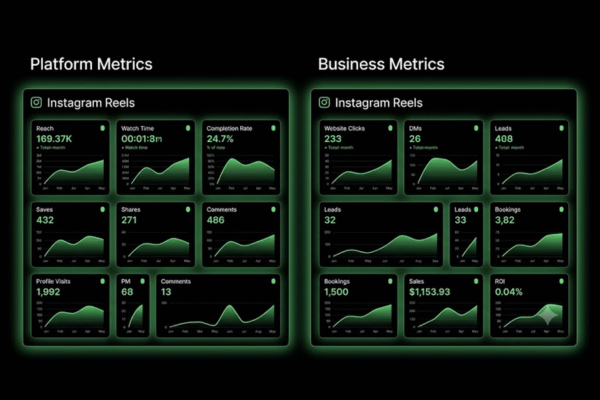
Which Reels metrics matter beyond views?
Reels metrics beyond views include watch time, retention rate, completion rate, saves, shares, comments, profile visits, follows, website clicks, and leads — each measuring a different stage of the business impact.
Metric: Watch time
What It Measures: Total seconds watched across all views
Business Decision It Informs: Hook and pacing quality
Metric: Retention rate
What It Measures: Percentage who watch past the midpoint
Business Decision It Informs: Content structure and value delivery
Metric: Completion rate
What It Measures: Percentage who watch the full Reel
Business Decision It Informs: Overall video quality
Metric: Saves
What It Measures: Bookmarks by viewers
Business Decision It Informs: Educational content value and utility
Metric: Shares
What It Measures: Forwarded via DM or Stories
Business Decision It Informs: Relatability and practical utility
Metric: Comments
What It Measures: Replies and direct reactions
Business Decision It Informs: Topic engagement, community strength
Metric: Profile visits
What It Measures: Viewers who tapped through to the account
Business Decision It Informs: Content-to-profile conversion rate
Metric: Website clicks
What It Measures: Clicks on link-in-bio from the profile
Business Decision It Informs: Traffic generation effectiveness
Metric: Leads
What It Measures: Form completions, DM inquiries, bookings
Business Decision It Informs: Direct business impact
How do businesses measure ROI from Reels?
Businesses measure ROI from Reels by connecting content performance directly to leads, revenue, bookings, sales, customer lifetime value, and production cost.
ROI formula: (Revenue from Reels-sourced customers − Production cost) ÷ Production cost × 100 = ROI %
Example: A fitness studio spends $400/month on Reels production (editing tools and filming time). Reels generate 8 new trial sign-ups per month. Average customer value = $200. Monthly revenue = $1,600. ROI = ($1,600 − $400) ÷ $400 × 100 = 300% return on production spend.
Tracking methods:
UTM links: Tracking codes added to the link-in-bio URL show Google Analytics exactly how many sessions came from Instagram.
Coupon codes: A Reels-specific discount code (e.g., "REELS20") tracks direct purchases attributed to a specific Reel.
Lead source field: Adding "How did you find us?" to inquiry forms captures self-reported attribution from Reels viewers.
CRM tags: Marking Reels-sourced leads in the CRM (Customer Relationship Management system) tracks their lifetime revenue contribution.
Call tracking: A dedicated phone number on the Instagram profile identifies inbound calls originating from Reels viewers.
What analytics tools support Reels tracking?
Analytics tools that support Reels tracking include Instagram Insights, Meta Business Suite, Google Analytics, social media schedulers, UTM builders, CRM reports, and e-commerce dashboards.
Tool: Instagram Insights
What It Tracks: Views, reach, saves, shares, profile visits
Best For: All businesses — free baseline data
Cost (2026): Free
Tool: Meta Business Suite
What It Tracks: Cross-platform performance, audience demographics
Best For: Businesses using Facebook + Instagram together
Cost (2026): Free
Tool: Google Analytics
What It Tracks: Website sessions from Instagram, conversion tracking
Best For: Businesses with a website or landing page
Cost (2026): Free
Tool: Later
What It Tracks: Scheduling + detailed Reels performance by post
Best For: Small-to-mid teams
Cost (2026): From $25/month
Tool: Hootsuite
What It Tracks: Multi-account tracking + engagement reports
Best For: Agencies managing multiple clients
Cost (2026): From $99/month
Tool: Shopify / WooCommerce
What It Tracks: Revenue by traffic source
Best For: Ecommerce brands tracking Reels-to-sale
Cost (2026): Included with plan
Tool: HubSpot / CRM
What It Tracks: Lead source tracking, customer journey mapping
Best For: Service businesses tracking deals from Reels
Cost (2026): From $0/month
How should teams manage Instagram Reels production?
Teams should manage Instagram Reels production with content pillars, scripts, batch filming, editing templates, approval steps, scheduling, and monthly analytics reviews — run as a repeatable system, not a reactive process.
This section bridges strategy and execution. Knowing what to post solves half the problem. Having a workflow that produces consistent Reels without delays or quality drops solves the other half.
Roles in a functional Reels production system:
Strategist: Owns content pillars, hook selection, and the monthly calendar.
Scriptwriter: Writes outlines or full scripts for each Reel before any filming begins.
On-camera talent: Records the video — the founder, a staff member, or a contracted creator.
Editor: Cuts, captions, formats, and exports the finished Reel.
Approver: Reviews content before publishing — checks brand voice, factual accuracy, and any compliance requirements.
Scheduler: Uploads and queues Reels via Meta Business Suite, Later, or Hootsuite.
Analyst: Reviews monthly performance data and feeds insights back to the strategist.
In solo businesses, one person handles all of these roles. The workflow still applies — just compressed into fewer sessions each week.
How can brands keep Reels consistent?
Brands keep Reels consistent by using repeatable formats, visual standards, tone rules, hook templates, caption structures, and publishing schedules — applied the same way in every Reel.
Define brand colors and fonts for on-screen text — save them as an editing template so every Reel starts from the same visual base.
Build 3–5 hook templates — reusable opening structures the team fills in per topic. Example: "Stop doing [X] if you want [Y]."
Set a cover image standard — consistent cover frames make the profile grid look intentional rather than random.
Lock tone rules in writing — formal or casual? First-person or second-person? Educational or entertaining? Document the decision and enforce it.
Standardize caption structure — hook sentence, 2–3 value lines, one CTA. Same structure every single Reel.
Set an editing pace rule — fast cuts (under 3 seconds per clip) for entertainment, slower pacing for tutorials.
Batch content approvals — review the full week's Reels in one session, not one at a time on the day of publishing.
How can one idea become multiple Reels?
One idea can become multiple Reels by changing the hook, angle, format, target audience, CTA, or platform version — each variation is a new Reel with no duplicate content penalty from the algorithm.
Source Content: Blog post
Number of Reels Possible: 5–7 Reels (one per section or key tip)
Hook Variation Example: Problem angle, solution angle, myth-busting angle
Source Content: Customer FAQ list
Number of Reels Possible: 10+ Reels (one question per video)
Hook Variation Example: "You asked: [question]" format
Source Content: Webinar or podcast
Number of Reels Possible: 4–8 clips (highlight quotes, key moments)
Hook Variation Example: Quote graphic + matching audio clip
Source Content: Testimonial
Number of Reels Possible: 3 Reels: full story, result highlight, product demo
Hook Variation Example: "Here's what happened when [client] started [offer]"
Source Content: Product page
Number of Reels Possible: Demo, comparison, use case, objection response
Hook Variation Example: Problem-focused hook vs. result-focused hook
Content repurposing is the most time-efficient part of a Reels workflow. One 30-minute webinar clip session produces 6–8 Reels with different hooks — covering two weeks of a content calendar in a single sitting.
What workflow improves Reels production speed?
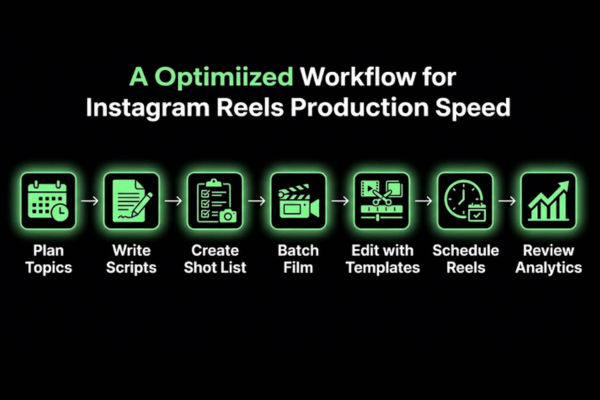
A faster Reels workflow uses topic planning, script batching, shot lists, filming blocks, editing templates, scheduling tools, and monthly analytics review — run in sequence, not all at once.
A simple Reels production workflow is listed below.
Plan topics for 4 weeks — assign each Reel to a content pillar, hook style, and CTA before any filming begins.
Batch-write scripts for all planned Reels in one dedicated session — 2–4 hours of scripting covers a full month of outlines.
Build shot lists before filming — every clip listed in advance removes guesswork during the filming session.
Film in time blocks — all talking-head clips for the week in one setup; all b-roll footage in a separate block.
Edit with saved templates — CapCut or Adobe Premiere templates start each Reel with correct format, fonts, and pacing already in place.
Schedule 3 days in advance — upload finished Reels to Meta Business Suite or Later well before the publish date.
Review analytics every 30 days — pull data, identify top-performing hooks and topics, update the next planning cycle accordingly.
Recommended Video
Recommended Video: Search YouTube for "Instagram Reels batch filming workflow for small business 2024" to watch a step-by-step visual guide on producing a full month of Reels in a single day.
What tools support Instagram Reels creation?
Tools that support Instagram Reels creation include editing apps, design platforms, AI tools, scheduling tools, analytics platforms, and asset storage systems — each solving a different part of the production process.
Tool: Instagram Editor
Category: Built-in editing
Best For: Quick cuts, captions, in-app music
Cost (2026): Free
Tool: Meta Edits
Category: Advanced mobile editing
Best For: Multi-clip editing, transitions
Cost (2026): Free
Tool: CapCut
Category: Video editing
Best For: Templates, auto-subtitles, effects
Cost (2026): Free / $7.99/month Pro
Tool: Canva
Category: Design + video
Best For: Branded templates, cover graphics
Cost (2026): Free / $14.99/month Pro
Tool: Adobe Express
Category: Design + short video
Best For: Branded Reels formats
Cost (2026): Free / $9.99/month
Tool: Descript
Category: AI-assisted editing
Best For: Auto-captions, script-based editing
Cost (2026): $12/month
Tool: Later
Category: Scheduling + analytics
Best For: Content calendar, auto-publish
Cost (2026): From $25/month
Tool: Hootsuite
Category: Multi-account scheduling
Best For: Agencies, multi-brand management
Cost (2026): From $99/month
Tool: Buffer
Category: Simple scheduling
Best For: Solo owners, small businesses
Cost (2026): Free / $6/month
Tool: Notion
Category: Content planning
Best For: Script bank, workflow docs, calendar
Cost (2026): Free / $8/month
Which editing tools help businesses create Reels?
Editing tools help businesses create Reels by cutting clips, adding captions, improving audio, applying brand templates, and reducing the time between filming and publishing.
Tool: Instagram Editor
Best Feature: Built-in, no export needed
Skill Level: Beginner
Cost: Free
Tool: Meta Edits
Best Feature: Advanced mobile multi-clip editing
Skill Level: Beginner–Intermediate
Cost: Free
Tool: CapCut
Best Feature: Auto-captions, trending templates
Skill Level: Beginner
Cost: Free / $7.99/month
Tool: Canva
Best Feature: Drag-and-drop branded Reel templates
Skill Level: Beginner
Cost: Free / $14.99/month
Tool: Adobe Express
Best Feature: Professional formats, brand kit integration
Skill Level: Beginner–Intermediate
Cost: Free / $9.99/month
Tool: Descript
Best Feature: Script-based editing, automatic filler-word removal
Skill Level: Intermediate
Cost: $12/month
CapCut and Meta Edits are the two most-used tools among small business Reels creators in 2026 [site: Social Media Today, 2025]. Both are free and mobile-first — matching the phone-based filming workflow most business owners already use.
How can AI support Reels production?
AI can support Reels production by generating ideas, hooks, scripts, captions, shot lists, auto-subtitles, and repurposed clips — reducing time spent on content creation without removing human judgment from the process.
AI does not replace the person on camera or the brand's voice. It speeds up the parts that do not require creative judgment: first drafts, caption variations, hook options, and subtitle generation.
Use cases:
Hook generation: Input the Reel topic and prompt for 10 hook options — select and refine the strongest one.
Script drafting: AI writes a first version; a human edits for brand voice, accuracy, and tone.
Auto-captions: Descript and CapCut generate subtitles automatically — always require a human review pass before publishing.
Caption writing: AI drafts 3–5 caption variations per Reel; the team selects and lightly edits the best one.
Clip repurposing: Tools like Opus Clip or Descript identify the strongest 60-second moment in a longer video automatically.
Shot list creation: Input the script and prompt for a visual shot list — saves 20–30 minutes per Reel in pre-production planning.
Do not input customer names, private data, or unreleased product details into AI tools without reviewing each platform's data retention policy first.
Which scheduling tools help publish Reels consistently?
Scheduling tools help businesses publish Reels consistently by planning topics, setting optimal publish times, organizing drafts, and tracking post-level results in one place.
Tool: Meta Business Suite
Auto-Publish: Yes
Analytics: Yes (basic)
Multi-Account: Yes (Meta only)
Best For: All businesses using Facebook + Instagram
Tool: Later
Auto-Publish: Yes
Analytics: Yes (detailed)
Multi-Account: Yes
Best For: Small-to-mid teams, visual calendar workflows
Tool: Hootsuite
Auto-Publish: Yes
Analytics: Yes (advanced)
Multi-Account: Yes
Best For: Agencies managing multiple client accounts
Tool: Buffer
Auto-Publish: Yes
Analytics: Yes (basic)
Multi-Account: Yes
Best For: Solo owners wanting a simple, low-friction system
Tool: Sprout Social
Auto-Publish: Yes
Analytics: Yes (enterprise)
Multi-Account: Yes
Best For: Larger teams with multi-step approval workflows
Should businesses DIY or outsource Instagram Reels?
Businesses should choose DIY or outsourced Reels based on time, skill level, content volume, consistency requirements, budget, and growth goals — not on cost alone.
Model: Owner-led DIY
Best For: Solo founder, early-stage brand
Pros: Authentic, full control, low cost
Cons: Time-intensive, editing inconsistency
Monthly Cost Range: $0–$100 (tools only)
Model: Staff-led
Best For: Growing teams with internal creators
Pros: Brand-consistent, faster output
Cons: Requires training and management time
Monthly Cost Range: $0 (existing staff cost)
Model: Freelance editor
Best For: Businesses with footage but no editing time
Pros: Affordable, scalable
Cons: Coordination required, less strategic
Monthly Cost Range: $300–$1,500
Model: Freelance strategist + editor
Best For: Businesses needing direction and execution
Pros: Strategy and production combined
Cons: Dependency on one person
Monthly Cost Range: $800–$2,500
Model: Agency
Best For: Scaling brands integrating Reels with paid ads
Pros: Full-service, measurable results
Cons: Higher cost, less direct brand intimacy
Monthly Cost Range: $2,000–$8,000
Model: Creator partnership
Best For: Product brands, B2C businesses
Pros: Authentic reach, lower production cost
Cons: Less brand control, variable quality
Monthly Cost Range: $200–$3,000/project
When does DIY Reels creation work?
DIY Reels creation works when the business has clear content ideas, a simple visual offer, basic editing ability, and enough time to film, edit, and post on a consistent schedule.
DIY works well when:
[ ] The founder or a staff member is the natural face of the brand and comfortable on camera
[ ] The product or service is simple enough to explain in 30–60 seconds without complex production
[ ] The business is in early stages where authentic, unpolished content builds trust faster than high production value
[ ] Filming happens on a smartphone — modern phones produce Reel-quality footage without additional equipment
[ ] Budget is limited and free tools like CapCut or Meta Edits cover the editing requirements
DIY stops working when the owner's time is worth more than the cost of outsourcing, when editing creates a backlog that breaks posting consistency, or when the Reels content strategy requires expertise the owner does not currently have.
When should businesses hire Reels help?
Businesses should hire Reels help when consistency, editing quality, strategy depth, content volume, paid ad integration, or conversion tracking becomes too complex to manage internally without dropping performance.
Hire a video editor when filming happens regularly but an editing backlog delays publishing and breaks consistency.
Hire a social media manager when the business needs consistent publishing, caption writing, and basic monthly reporting.
Hire a Reels content strategist when Reels generate views but not leads, bookings, or sales — the strategy is the gap, not the production.
Hire an agency when Reels need to connect with paid ads, landing pages, email sequences, and CRM tracking in one managed system.
Partner with a creator when the brand needs external audience reach or authentic user-generated content at scale.
Hire an ad manager when Reels are being used as paid ad creative and need performance optimization beyond organic posting.
How much does Instagram Reels management cost?
Instagram Reels management cost depends on posting volume, filming complexity, editing depth, strategy scope, ad management, and reporting requirements.
Service Type: DIY tools only
Monthly Cost Range: $0–$100
What's Included: Editing apps, scheduling subscriptions
Service Type: Freelance video editor
Monthly Cost Range: $300–$1,500
What's Included: Editing raw footage, captions, export formatting
Service Type: Freelance strategist + editor
Monthly Cost Range: $800–$2,500
What's Included: Strategy, scripting, editing, scheduling
Service Type: Social media manager
Monthly Cost Range: $1,000–$3,500
What's Included: Full content management, publishing, monthly reporting
Service Type: Mid-level agency
Monthly Cost Range: $2,000–$5,000
What's Included: Strategy, production, analytics, ad integration
Service Type: Full-service agency
Monthly Cost Range: $5,000–$10,000+
What's Included: End-to-end Reels plus paid ads and conversion tracking
Costs vary by industry, content volume, and whether paid ad management is part of the engagement. Businesses that actively track Reels-sourced leads and revenue make faster, more confident decisions about which investment tier delivers positive returns.
What mistakes reduce Instagram Reels performance?
Mistakes that reduce Instagram Reels performance include weak hooks, slow pacing, unclear topics, vague captions, mismatched trends, missing CTAs, and no analytics review — each cutting into reach, trust, or conversion.
Every mistake fits one of four impact categories:
Reach mistakes: Content that triggers early swipes, reducing algorithm distribution before the Reel finds its audience.
Retention mistakes: Poor pacing, slow intros, or unfocused content that loses viewers before the CTA.
Trust mistakes: Off-brand content or trend-chasing that confuses existing followers and dilutes the brand signal.
Conversion mistakes: No CTA, a broken link, an unclear offer, or no follow-up system for interested viewers.
Why do some Reels fail to get reach?
Some Reels fail to get reach because viewers swipe away early, the topic does not match audience interest, or the algorithm identifies the content as low-quality based on poor early engagement signals.
Diagnostic list:
Weak first 3 seconds: A slow open, a generic greeting ("Hey guys…"), or no immediate hook — viewers swipe before the message starts.
Low completion rate: The content does not deliver on what the hook promised — viewers drop off before the end of the video.
Poor audio quality: Background noise, low mic volume, or muffled speech causes immediate viewer disengagement.
Too much text on screen: Cluttered overlays compete for attention and push viewers away from the core message.
Low topic relevance: The Reel topic does not match the account's established niche — confuses the algorithm about who to show it to.
Recycled content: TikTok watermarks, low-resolution reposts, or content clearly not filmed for Instagram lose Explore distribution automatically.
Inconsistent posting: Long gaps between Reels reduce algorithm momentum — the system deprioritizes accounts that appear inactive.
Which Reels mistakes hurt business growth?
Reels mistakes hurt business growth when content gets views but fails to generate trust, leads, or any measurable action — the disconnect between reach and revenue is always caused by one of these specific gaps.
Mistake: No clear offer
What It Causes: Viewers enjoy content but never connect it to a product or service
Fix: Include an offer mention in 1 of every 3 Reels
Mistake: No CTA
What It Causes: Viewers watch but do not know what to do next
Fix: End every Reel with one specific, direct action
Mistake: Broken or vague link in bio
What It Causes: Interested viewers click through and immediately leave
Fix: Update link-in-bio weekly; route to a branded landing page
Mistake: Off-brand trend content
What It Causes: Attracts wrong audience; existing followers disengage
Fix: Filter trends through brand voice and audience fit before using
Mistake: Irrelevant audience reach
What It Causes: High views but low conversion — wrong viewer type entirely
Fix: Adjust content topics to attract buyer-intent viewers
Mistake: No follow-up system
What It Causes: DM and click-through leads go cold without timely response
Fix: Build a DM response template or automated email welcome sequence
How can businesses recover weak Reels performance?
Businesses can recover weak Reels performance by auditing hooks, topics, retention data, CTAs, posting cadence, and 30-day analytics patterns — then testing specific changes, not rebuilding the entire approach at once.
Recovery checklist:
[ ] Pull 30 days of Reels data from Instagram Insights — sort by completion rate, saves, and profile visits to find the real performance picture
[ ] Identify the bottom 3 Reels — find the shared weakness across them: hook, topic, CTA, pacing, or audio quality
[ ] Test 3 new hook styles across the next 10 Reels — problem statement, bold question, and surprising factual claim
[ ] Cut all intros shorter — remove any opening that takes more than 2 seconds to deliver the core message
[ ] Rewrite underperforming captions with topic keywords, 2–3 value lines, and one direct CTA
[ ] Repost a top-performing Reel — a strong older Reel can reset momentum when current content is underperforming across the board
[ ] Adjust posting cadence — if posting daily and quality is dropping, cut to 3–4 Reels per week and rebuild from a stronger base
Instagram Reels for Business FAQs
Instagram Reels for business FAQs answer the direct questions business owners ask before committing time, budget, or staff to a Reels content strategy.
Are Reels better than static posts?
Reels outperform static posts for reach and discovery. Static posts work better for simple visuals, announcements, and grid-based brand proof. Reels reach non-followers through the Explore tab and Reels feed; static posts primarily reach existing followers. For any business focused on Instagram business growth and audience expansion, Reels generate broader organic distribution without paid promotion behind them.
Do businesses need to post Reels daily?
No. Daily posting is not required and often reduces content quality below the threshold that drives reach. Businesses posting 3–4 well-planned Reels per week consistently outperform those posting 7 low-effort Reels. Watch time, completion rate, and save rate matter more than volume. Start at a cadence that matches team capacity, review 30-day analytics, then adjust frequency based on what the data shows — not what feels like enough.
How long does it take Instagram Reels to work?
Early engagement signals appear within 2–4 weeks of consistent posting. Measurable increases in profile visits and DM inquiries follow within 60 days for most businesses. Leads and sales require a working funnel — the Reel, the profile, the CTA, and the follow-up system must all be in place. Businesses with no conversion path extend the result timeline significantly, regardless of how often they post.
Is Instagram Reels marketing worth it?
Yes — when Reels connect to a clear goal, a specific CTA, and a defined conversion path. Short-form video marketing drives reach, trust, website traffic, and Instagram lead generation at a lower cost than paid ads for most small and mid-size businesses. Strategy, consistency, and follow-up determine the return. Businesses that track Reels-sourced leads, bookings, and sales consistently report positive ROI within 90 days of structured, goal-driven posting.