
Social Media Management for Nonprofits: Complete Growth Guide
Social media management for nonprofits is not about posting random updates. It is about using social platforms to grow trust, reach donors, recruit volunteers, share impact, and support a mission with clear content.
Nonprofit social media management includes platform planning, content creation, community replies, campaign tracking, tool setup, paid promotion, and compliance. A strong nonprofit social media strategy connects mission-driven content with real outcomes like donor acquisition, volunteer engagement, cause awareness, and board-level reporting.
In 2026, nonprofits need more than likes. They need a social media plan that shows who they help, why the mission matters, what action people should take, and how each platform supports that action.
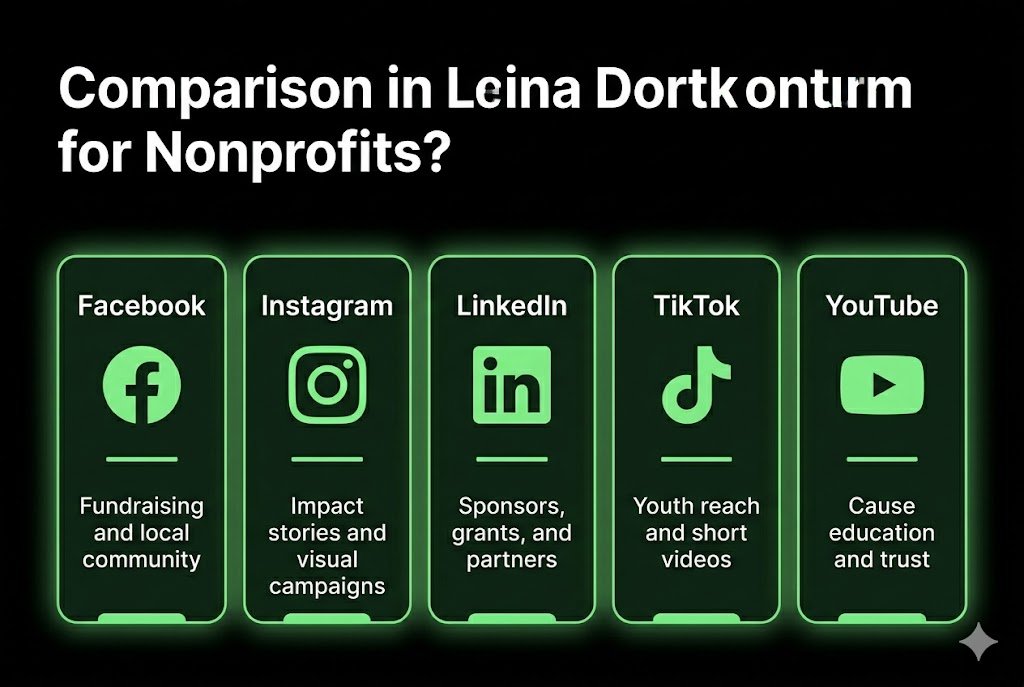
Example: A food bank can use Facebook for local donations, Instagram for impact storytelling, LinkedIn for sponsor outreach, TikTok for younger supporters, and YouTube for cause education.
What is social media management for nonprofits?
Social media management for nonprofits is the planned work of managing a nonprofit’s social channels to support its mission.
It includes content, community, and tracking. A nonprofit team uses social media to post updates, tell impact stories, answer comments, share donation links, recruit volunteers, and measure results. Analytics means simple data that shows what worked.
This work differs from business social media because the main goal is mission impact, not product sales. A nonprofit wants people to donate, volunteer, join a campaign, attend an event, share a cause, or trust the organization more.
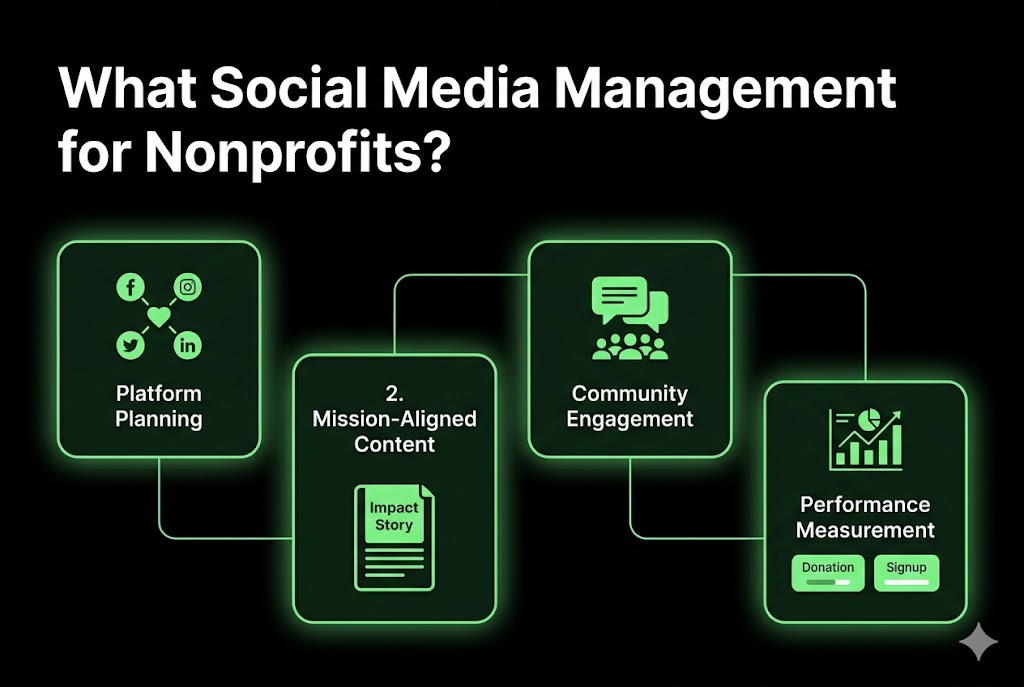
Social media management for nonprofits has 4 core parts:
Planning the right platforms, such as Facebook, Instagram, LinkedIn, TikTok, and YouTube
Creating mission-aligned content, such as impact stories, donation posts, volunteer spotlights, and event updates
Managing community engagement, such as comments, messages, donor replies, and supporter questions
Measuring social media performance, such as reach, shares, donations, signups, and volunteer leads
Example: An animal rescue can post adoption stories, answer foster questions, promote donation drives, and track how many people clicked the adoption form.
Why is social media important for nonprofit organizations?
Social media is important for nonprofits because it helps people discover, trust, and support a cause.
Social media turns attention into action. It connects nonprofit organizations with donors, volunteers, partners, beneficiaries, and local communities. It also helps small teams share proof of impact without needing a large media budget.
The 6 main benefits are listed below.
Social media grows cause awareness by putting mission stories in front of new supporters.
Social media supports donor discovery when people see shared posts from friends and groups.
Social media improves volunteer recruitment by showing real tasks, events, and service needs.
Social media makes fundraising easier by sending people to donation pages and campaign links.
Social media builds trust when nonprofits share proof, photos, updates, and clear outcomes.
Social media helps advocacy campaigns reach people who can sign, call, vote, or share.
Example: A youth education nonprofit can post a student success story, then send readers to a scholarship donation page.
How does nonprofit social media differ from business social media?
Nonprofit social media focuses on mission impact, while business social media focuses on customer growth and revenue. A business sells products or services. A nonprofit asks people to support a cause through trust, giving, service, or advocacy.
The difference is the goal. Nonprofit content uses emotional storytelling, proof of service, donor trust signals, and community action. Business content uses offers, product benefits, customer proof, and sales steps.
Main goal
Business Social Media: Sell products or services
Nonprofit Social Media: Support a mission
Main audience
Business Social Media: Customers and buyers
Nonprofit Social Media: Donors, volunteers, partners, beneficiaries
Main metric
Business Social Media: Sales and leads
Nonprofit Social Media: Donations, signups, awareness, volunteer actions
Content style
Business Social Media: Product value and offers
Nonprofit Social Media: Mission-driven content and impact stories
Budget reality
Business Social Media: Often has an ad budget
Nonprofit Social Media: Often has limited staff and a low budget
Trust signal
Business Social Media: Reviews and case studies
Nonprofit Social Media: Impact proof, donor use, program results
Compliance need
Business Social Media: Ads and consumer rules
Nonprofit Social Media: Fundraising, FTC, IRS, and platform rules
Example: A shoe brand posts a discount. A homelessness nonprofit posts a shelter story, shows the need, and asks for donations.
What are the primary goals of social media management for nonprofits?
The primary goals of social media management for nonprofits are awareness, fundraising, volunteer recruitment, advocacy, and community building.
Each goal needs a clear action. A nonprofit should not post only to stay active. Every post should help a person learn, trust, donate, sign up, attend, share, or speak up for the cause.
The 5 primary goals are listed below.
Awareness helps more people understand the cause, the problem, and the nonprofit’s role.
Fundraising turns social attention into donations through clear asks and trusted donation links.
Volunteer recruitment shows service needs, time slots, roles, and real people doing the work.
Advocacy moves supporters toward petitions, calls, public comments, shares, and policy action.
Community building keeps donors, volunteers, and beneficiaries connected between major campaigns.
Example: A cancer support nonprofit can use awareness posts in January, volunteer posts in March, fundraising posts in June, and advocacy posts during health policy weeks.
Which social media platforms are best for nonprofits?
The best social media platforms for nonprofits are Facebook, Instagram, LinkedIn, TikTok, and YouTube.
Each platform has a different job. Facebook supports community and fundraising. Instagram supports visual storytelling. LinkedIn supports sponsor outreach. TikTok supports a younger audience reach. YouTube supports long-form education and search discovery.
A nonprofit should choose platforms based on audience, content type, staff time, and campaign goals. A small team does not need every platform. It needs the right 2 or 3 platforms first.
Facebook
Best For: Fundraising, groups, local awareness
Strong Audience Fit: Local donors, families, and community members
Cost Level: Free, with paid ads optional
Instagram
Best For: Impact stories, Reels, visual campaigns
Strong Audience Fit: Younger donors, volunteers, supporters
Cost Level: Free, with paid ads optional
LinkedIn
Best For: Advocacy, sponsors, grants, partners
Strong Audience Fit: Professionals, funders, board members
Cost Level: Free, with paid ads optional
TikTok
Best For: Youth reach, short videos, awareness
Strong Audience Fit: Gen Z and younger donors
Cost Level: Free, with paid ads optional
YouTube
Best For: Cause education, search traffic, trust
Strong Audience Fit: Donors, volunteers, researchers
Cost Level: Free, with paid ads optional
Example: A small mental health nonprofit can use Instagram for stories, LinkedIn for partner outreach, and YouTube for education videos.
How does Facebook support nonprofit fundraising and awareness?
Facebook supports nonprofit fundraising and awareness through pages, groups, fundraisers, donate buttons, live videos, and local sharing tools.
Facebook works well for community-based giving. Meta says nonprofits in the US, UK, Canada, and Australia can use fundraising tools to send donors to a website or raise money on Facebook when eligible. (facebook.com)
Facebook also helps raise awareness because people share posts inside friend networks, community groups, and local pages. This makes Facebook useful for animal rescues, schools, churches, shelters, food banks, and local health groups.
Useful Facebook tools include:
Facebook Page for official nonprofit updates
Donate button for direct giving options
Facebook Groups for local supporter communities
Facebook Live for fundraising events and Q&A sessions
Fundraiser challenges for campaign-based giving
Example: A food pantry can create a Facebook fundraiser before Thanksgiving, go live from the pantry, and post daily donation updates.
Why is Instagram effective for nonprofit impact storytelling?
Instagram is effective for nonprofit impact storytelling because it is visual, fast, and emotion-led.
Images make an impact easier to understand. A nonprofit can show before-and-after moments, volunteer work, beneficiary stories, event photos, short Reels, and behind-the-scenes updates. This helps people see the mission instead of only reading about it.
Instagram works best when each post has one clear story. The story should show a person, a problem, the nonprofit’s action, and the result. Reels can show motion. Stories can show daily updates. Carousel posts can explain a campaign step by step.
Meta fundraising tools also connect Instagram and Facebook for eligible nonprofits in supported countries. This can help donors move from a story to a giving action. (facebook.com)
Example: A clean water nonprofit can post a Reel showing a broken water source, the repair work, and the first day of clean water access.
How can nonprofits use LinkedIn for advocacy and donor outreach?
Nonprofits can use LinkedIn for advocacy and donor outreach by speaking to professionals, sponsors, foundations, board members, and policy leaders.
LinkedIn works best for high-trust outreach. A nonprofit can publish thought leadership posts, share program results, tag partners, thank sponsors, promote reports, and invite professionals to support campaigns.
LinkedIn is not only for job posts. It is useful when the nonprofit needs corporate donors, skilled volunteers, board members, grant partners, or media attention. The content should feel clear, serious, and evidence-based.
Use LinkedIn in 5 ways:
Share impact numbers from campaigns, programs, and community work.
Post founder or director insights about the cause and its needs.
Thank the corporate sponsors with clear public credit.
Ask for skilled volunteers, such as designers, lawyers, writers, and mentors.
Promote reports, webinars, grant news, and policy campaigns.
Example: A literacy nonprofit can post reading results from 500 students and ask local companies to sponsor books.
What makes TikTok valuable for nonprofits reaching younger audiences?
TikTok is valuable for nonprofits because short videos help younger audiences discover causes fast.
TikTok rewards simple, human stories. A nonprofit can use short clips, volunteer moments, day-in-the-life videos, myth-busting posts, donation drives, and hashtag campaigns. TikTok also supports donation features for nonprofit fundraising in supported cases. (support.tiktok.com)
TikTok content takes more time because videos need filming, editing, captions, and testing. A small nonprofit should start with 2 or 3 short videos per week. The goal is not perfect production. The goal is clear in meaning.
Strong TikTok ideas include:
Showing one real problem in 15 seconds
Sharing one volunteer task from start to finish
Answering one donor question on camera
Showing one program result with text on the screen
Asking viewers to share, donate, or sign up
Example: A youth shelter can post a 20-second video showing what a $25 donation provides for one night.
How should nonprofits approach YouTube for cause education?
Nonprofits should approach YouTube as a long-form education and trust platform.
YouTube supports deeper learning. A nonprofit can explain the cause, answer donor questions, share program stories, publish event recordings, and build search traffic over time. Google says the YouTube Nonprofit Program helps nonprofits connect with supporters, volunteers, and donors through video. (google.com)
YouTube differs from TikTok and Instagram Reels. Short videos create quick awareness. YouTube videos explain deeper problems, show long stories, and answer search questions. This makes YouTube useful for health, education, legal aid, faith, environment, and advocacy nonprofits.
Good YouTube content includes:
“What we do” videos
Donor FAQ videos
Program explainers
Volunteer training videos
Event recap videos
Founder message videos
Example: A domestic violence nonprofit can publish a 6-minute video explaining how its hotline works and how donors support it.
Recommended Video: Nonprofit social media guide
Recommended Video: Search YouTube for “nonprofit social media strategy for beginners” to watch a visual guide.
A video guide helps teams see real post examples, content calendars, and reporting layouts. This helps new staff understand the work faster than text alone.
Example: Watch one beginner guide, then create 10 sample posts for your nonprofit’s next campaign.
What is a nonprofit social media strategy?
A nonprofit social media strategy is a clear plan for using social platforms to support the mission.
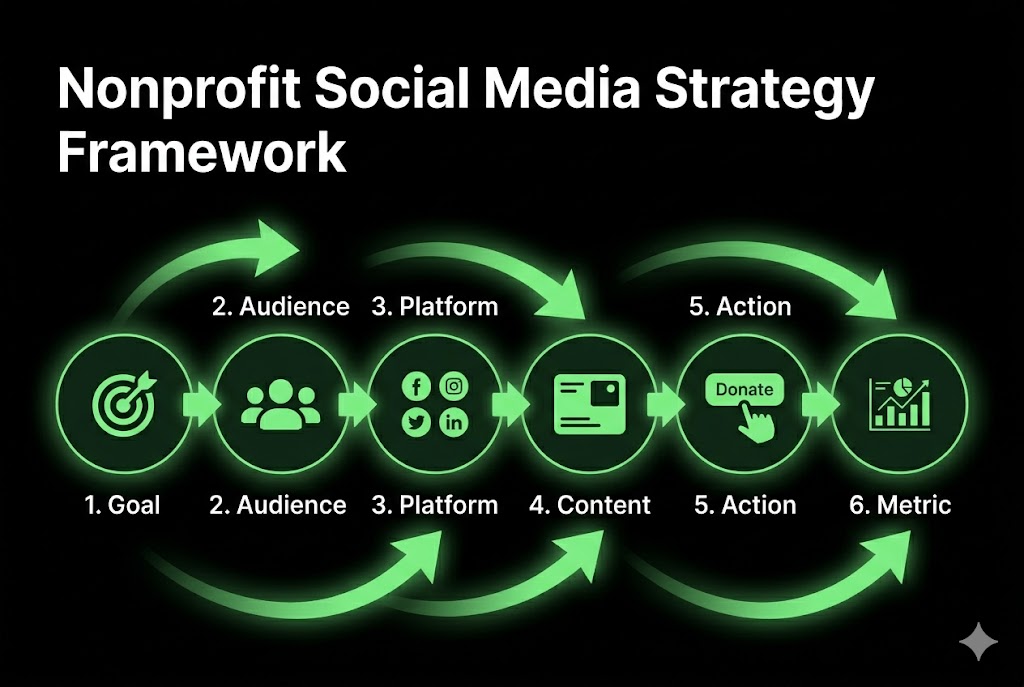
The strategy has 4 parts: goals, audience, content, and measurement. It tells the team what to post, where to post, who to reach, what action to ask for, and how success will be measured.
A nonprofit social media strategy prevents random posting. It connects every platform and content type to a real outcome, such as donations, signups, awareness, event attendance, or volunteer applications.
A simple strategy includes:
Goal: What result should social media support?
Audience: Who needs to see the content?
Platform: Where does that audience spend time?
Content: What story or message should be posted?
Action: What should the reader do next?
Metric: What number proves progress?
Example: A wildlife rescue can set one goal to recruit 30 foster homes in 90 days, then create weekly foster stories, FAQ posts, and application reminders.
How do you set social media goals aligned to a nonprofit’s mission?
Set social media goals by linking each social action to one mission outcome.
A goal must be clear and measurable. SMART means specific, measurable, achievable, relevant, and time-bound. In simple words, the goal says what will happen, how much, and by when.
The 5 steps are listed below.
Choose one mission outcome, such as donations, volunteers, awareness, events, or advocacy.
Match the outcome to one social action, such as clicks, forms, shares, or calls.
Set one number, such as 100 signups, 50 donations, or 20 volunteer leads.
Pick one time frame, such as 30 days, 60 days, or one campaign season.
Review the result and adjust content, platform, offer, or posting schedule.
Example: “Get 75 volunteer applications from Instagram and Facebook in 60 days” is stronger than “grow social media.”
What does audience persona development look like for nonprofits?
Audience persona development means defining the main groups a nonprofit needs to reach.
Donors, volunteers, and beneficiaries need different messages. A donor wants trust. A volunteer wants clear tasks. A beneficiary wants safe help. A sponsor wants proof. One post cannot serve all groups equally.
A nonprofit can build audience personas from Google Analytics, email lists, donor records, volunteer forms, surveys, event attendance, and social media analytics. Analytics means data about people’s actions, such as clicks, views, comments, and signups.
Monthly Donor
Age Range: 35–65
Main Motivation: Wants a trusted impact
Preferred Platform: Facebook, email, LinkedIn
Young Volunteer
Age Range: 18–30
Main Motivation: Wants hands-on service
Preferred Platform: Instagram, TikTok
Corporate Sponsor
Age Range: 30–60
Main Motivation: Wants community impact proof
Preferred Platform: LinkedIn
Program Beneficiary
Age Range: Any age
Main Motivation: Needs help or support
Preferred Platform: Facebook, Instagram, website
Local Advocate
Age Range: 25–70
Main Motivation: Wants policy or community change
Preferred Platform: Facebook, LinkedIn, X
Example: A refugee support nonprofit should write one message for donors and another message for families seeking services.
How do nonprofits build a social media content calendar?
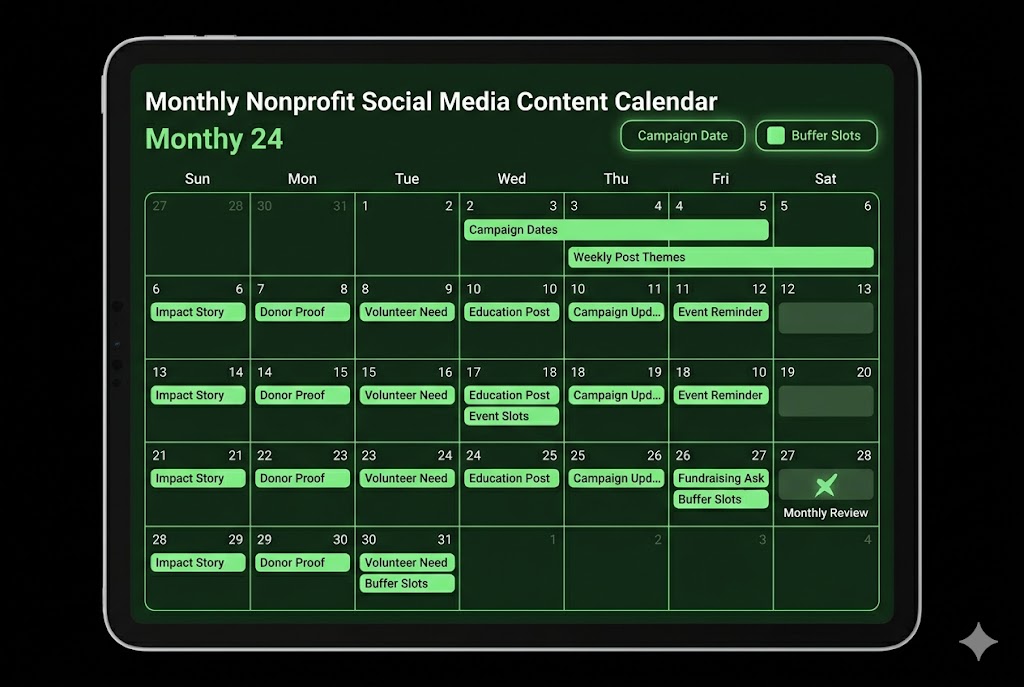
A nonprofit social media content calendar is built by planning posts around mission goals, campaign dates, events, and giving seasons.
A content calendar reduces daily stress. It helps a small team batch content, plan, avoid gaps, and connect each post to a campaign goal. Batch content means making many posts in one work session.
The 6 steps are listed below.
List major campaign dates, such as GivingTuesday, year-end giving, events, and awareness days.
Add weekly content themes, such as impact stories, donor proof, volunteer needs, and education.
Match each post to one goal, such as awareness, donation, signup, or event attendance.
Create captions, images, videos, and links before the posting week begins.
Schedule posts with a tool, such as Meta Business Suite, Buffer, Later, or Hootsuite.
Review results every month and repeat the content that drove real action.
Example: A senior care nonprofit can plan Monday education posts, Wednesday volunteer stories, and Friday donation posts.
What are the most effective content types for nonprofit social media?
The most effective content types for nonprofit social media are impact stories, volunteer spotlights, donor proof, education posts, campaign updates, user-generated content, and videos.
Content works when it shows proof. A nonprofit should show what the problem is, what the organization does, who benefits, and how supporters can help.
Impact story
Main Goal: Build trust and emotion
Best Platform: Instagram, Facebook, YouTube
Volunteer spotlight
Main Goal: Recruit helpers
Best Platform: Instagram, Facebook, TikTok
Donor proof
Main Goal: Increase giving trust
Best Platform: Facebook, LinkedIn, email
Education post
Main Goal: Explain the cause
Best Platform: YouTube, LinkedIn, Instagram
Campaign update
Main Goal: Drive action
Best Platform: Facebook, Instagram, LinkedIn
User-generated content
Main Goal: Build social proof
Best Platform: Instagram, Facebook, TikTok
Short video
Main Goal: Reach new people
Best Platform: TikTok, Reels, Shorts
Example: A school supply nonprofit can post a student story, a packing-day Reel, a donor thank-you post, and a final result update.
How does impactful storytelling increase nonprofit engagement on social media?
Impact storytelling increases nonprofit engagement by making the cause personal, clear, and easy to remember.
A story gives data a human face. Impact storytelling uses a person, a problem, a nonprofit action, a result, and a call to action. This structure helps people understand why the mission matters.
A strong nonprofit impact story follows 5 steps:
Person: Introduce one real person, family, animal, group, or community.
Problem: Explain the challenge in plain words.
Solution: Show what the nonprofit did.
Outcome: Share the result with one clear detail.
Action: Ask the reader to donate, volunteer, share, or learn more.
Example: “Maya missed school because she had no transport. Our volunteer drivers gave her 22 rides. She finished the term. Donate $30 to fund one week of rides.”
What role does user-generated content play in nonprofit social media?
User-generated content plays the role of social proof in nonprofit social media.
UGC means supporter-made content. It includes volunteer photos, donor posts, event videos, fundraiser screenshots, partner shoutouts, and beneficiary thank-you notes. Social proof means people trust a message more when they see others support it.
UGC helps nonprofits because it lowers content workload and builds community trust. A small team can repost approved content instead of creating every post from scratch.
Useful UGC tactics include:
Asking volunteers to share one photo after each event
Giving donors a simple caption they can post
Creating one campaign hashtag for supporter posts
Reposting event stories with permission
Saving strong donor comments for later proof posts
Asking partners to tag the nonprofit in their updates
Example: A beach cleanup nonprofit can ask every volunteer group to post one photo using the same campaign hashtag.
How can nonprofits use video content to drive donor action?
Nonprofits can use video content to drive donor action by showing real needs, real people, and clear next steps.
Video makes the action easier to feel. Short videos work for fast awareness. Mid-form videos work for simple education. Long-form videos work for trust and donor learning.
15–30 second Reel
Best Use: Quick awareness
Best Platform: Instagram, TikTok
Simple CTA: Share this post
30–60 second Short
Best Use: Simple story
Best Platform: YouTube Shorts, Reels
Simple CTA: Donate today
2–5 minute video
Best Use: Cause education
Best Platform: YouTube, Facebook
Simple CTA: Learn how to help
Live video
Best Use: Event fundraising
Best Platform: Facebook, YouTube
Simple CTA: Give during the event
Behind-the-scenes clip
Best Use: Trust building
Best Platform: Instagram, TikTok
Simple CTA: Volunteer with us
CTA means call to action. It is the next step you ask people to take.
Example: A shelter can post a 45-second video showing a bed, a meal, a support worker, and a donation link.
How do you measure nonprofit social media performance?
Measuring nonprofit social media performance involves tracking the numbers that connect social posts to mission results.
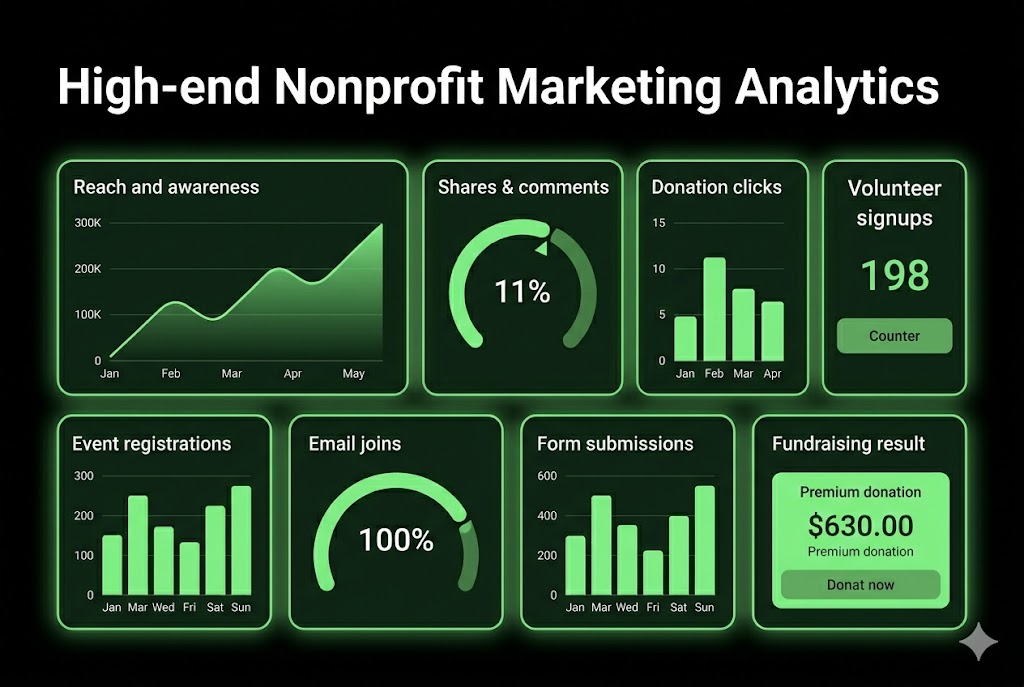
Mission metrics matter more than vanity metrics. Vanity metrics are likes and follower counts that look good but do not prove impact. Mission metrics include donations, volunteer signups, event registrations, email joins, calls, shares, and form submissions.
A nonprofit should review performance every month. Each report should answer 3 simple questions:
Did more people discover the cause?
Did more people take action?
Which content created the best result?
The best reports connect platform data with website data and donation data. Social analytics show reach and engagement. Website analytics show clicks and form visits. Donation tools show revenue and donor count.
Example: A post with 50 likes and 20 volunteer applications is better than a post with 1,000 likes and zero applications.
What KPIs should nonprofits track on social media?
Nonprofits should track KPIs that show awareness, growth, engagement, and conversion.
KPI means key performance indicator. It is a number that shows whether a goal is working. A nonprofit should track fewer metrics but connect each one to a clear mission result.
The key nonprofit social media KPIs are listed below.
Awareness: reach, impressions, video views, profile visits
Growth: follower growth, email list joins, group members
Engagement: shares, comments, saves, direct messages
Conversion: donations, volunteer forms, event signups, calls
Fundraising: donation clicks, donor count, cost per donor
Volunteer action: application rate, shift signups, training registrations
Advocacy: petition signs, call clicks, public comments, campaign shares
Example: A health nonprofit can track video views for awareness, link clicks for interest, and appointment request forms for action.
How do nonprofits report social media ROI to boards and funders?
Nonprofits report social media ROI by connecting social activity to mission outcomes.
ROI means return on investment. For nonprofits, ROI does not only mean money. It can also mean volunteer hours, event attendance, public reach, donor growth, service inquiries, or advocacy actions.
A board report should be simple. It should show what the nonprofit posted, what goal it supported, what happened, and what the team will change next. A funder report should connect social media work to grant goals when relevant.
Facebook
KPI: Donation clicks
Target: 300
Actual: 410
Notes: Year-end stories worked best
Instagram
KPI: Volunteer signups
Target: 50
Actual: 62
Notes: Reels drove most forms
LinkedIn
KPI: Sponsor leads
Target: 10
Actual: 8
Notes: Partner posts had the best reach
YouTube
KPI: Education views
Target: 1,000
Actual: 1,250
Notes: The FAQ video ranked in search
Example: A nonprofit can report that Instagram Reels brought 62 volunteer signups and saved 40 staff outreach hours.
What social media analytics tools are best suited for nonprofits?
The best social media analytics tools for nonprofits are native platform analytics, Google Analytics, Buffer, Hootsuite, Sprout Social, and Meta Business Suite.
Start with free tools first. Native analytics show platform-level data. Google Analytics shows what social visitors do on the website. Paid tools help teams schedule posts, compare results, and create reports faster.
Meta Business Suite
Cost Tier: Free
Best For: Facebook and Instagram scheduling
Nonprofit Note: Useful for small teams
Native analytics
Cost Tier: Free
Best For: Basic platform data
Nonprofit Note: Works inside each platform
Google Analytics
Cost Tier: Free
Best For: Website traffic from social
Nonprofit Note: Tracks clicks and conversions
Buffer
Cost Tier: Low-cost
Best For: Scheduling and simple reports
Nonprofit Note: Good for small teams
Hootsuite
Cost Tier: Paid
Best For: Scheduling, inbox, reporting
Nonprofit Note: Offers nonprofit discounts up to 60% on some plans
Sprout Social
Cost Tier: Paid
Best For: Larger reporting needs
Nonprofit Note: Better for bigger teams
Example: A 2-person nonprofit team can use Meta Business Suite, Google Analytics, and Canva before buying a paid reporting tool.
How does nonprofit social media management evolve with limited resources?
Nonprofit social media management evolves with limited resources by focusing on fewer platforms, reusable content, simple tools, volunteer support, and clear reporting.
Small teams need repeatable systems. A nonprofit with 1 or 2 staff members cannot post everywhere every day. It should choose the channels that match its audience, then build a weekly content rhythm.
Limited resources affect platform choice, posting frequency, design time, video production, reply speed, and reporting depth. A small nonprofit should not copy a large charity’s content plan. It should use a lean nonprofit marketing team model.
A simple limited-resource plan includes:
2 core platforms
3 weekly post themes
1 monthly campaign focus
1 shared content folder
1 simple reporting sheet
1 volunteer content helper
Example: A housing nonprofit can post 3 times per week: one education post, one impact story, and one donation or volunteer ask.
What tools support social media management for small nonprofits?
Tools that support social media management for small nonprofits include scheduling tools, design tools, analytics tools, writing tools, and storage tools.
The right tools save staff time. A small team needs tools that are easy to learn, low-cost, and useful for repeat tasks. These tasks include writing captions, designing graphics, scheduling posts, storing photos, and tracking results.
Useful tool groups include:
Scheduling tools: Meta Business Suite, Buffer, Later, Hootsuite
Design tools: Canva, Adobe Express
Analytics tools: Google Analytics, native analytics, Looker Studio
Writing tools: ChatGPT, Grammarly, built-in AI assistants
Storage tools: Google Drive, Dropbox, Airtable
Project tools: Trello, Asana, Notion
Canva for Nonprofits is free for eligible registered nonprofits, NGOs, and social impact groups with up to 50 users. (canva.com)
Example: A small animal shelter can store pet photos in Google Drive, design posts in Canva, schedule in Meta Business Suite, and track adoption clicks in Google Analytics.
How does AI help nonprofits manage social media more efficiently?
AI helps nonprofits manage social media by speeding up caption drafts, post ideas, content repurposing, design support, and reporting notes.
AI works best as an assistant, not a replacement. A staff member should still check facts, tone, privacy, consent, and donor language before posting. This matters more when the content includes children, patients, survivors, or sensitive stories.
AI can help small teams with:
Drafting 10 caption ideas from one campaign theme
Turning one blog post into 5 social posts
Rewriting a donor update in a simpler tone
Creating image text ideas for Canva designs
Summarizing monthly analytics into plain notes
Making video scripts for Reels, Shorts, and TikTok
Example: A nonprofit can paste a campaign summary into ChatGPT and ask for 5 Facebook captions, 3 Instagram Reel hooks, and 1 LinkedIn sponsor post.
Which free or low-cost scheduling tools are best for nonprofit teams?
The best free or low-cost scheduling tools for nonprofit teams are Meta Business Suite, Buffer, Later, Canva, and Hootsuite nonprofit plans.
Pick tools based on platform fit. A Facebook-heavy nonprofit can start with Meta Business Suite. A multi-platform team can use Buffer or Later. A larger team with inbox needs can review Hootsuite.
Meta Business Suite
Free Tier: Yes
Platforms Supported: Facebook, Instagram
Best Fit: Local nonprofits
Buffer
Free Tier: Yes, limited
Platforms Supported: Multiple platforms
Best Fit: Small teams
Later
Free Tier: Yes, limited
Platforms Supported: Visual platforms
Best Fit: Instagram-heavy teams
Canva
Free Tier: Free for eligible nonprofits
Platforms Supported: Design and scheduling features
Best Fit: Design support
Hootsuite
Free Tier: Paid with a nonprofit discount
Platforms Supported: Multiple platforms
Best Fit: Larger teams
Hootsuite says eligible nonprofits can get education and discounts of up to 60% off selected tools. (hootsuite.com)
Example: A new nonprofit can use Meta Business Suite for 90 days before adding a paid scheduler.
How can volunteers amplify a nonprofit’s social media reach?
Volunteers amplify a nonprofit’s social media reach by sharing posts, creating content, joining campaigns, inviting friends, and adding trusted voices.
Volunteer sharing expands organic reach. Organic reach means unpaid visibility. A volunteer post can feel more personal than an official nonprofit post because it comes from a real supporter.
A nonprofit should not ask volunteers to post without guidance. It should give them simple captions, images, campaign links, hashtags, and privacy rules. This keeps the message clear and safe.
Volunteer amplification works best for:
Event promotion
Fundraising campaigns
Awareness days
Recruitment drives
Local service needs
Petition campaigns
Emergency appeals
Example: A food bank can ask 25 volunteers to share the same pantry need post during a 7-day donation drive.
What is a nonprofit social media ambassador program?
A nonprofit social media ambassador program is a group of trained supporters who share approved posts and campaign messages.
Ambassadors act as trusted digital advocates. They help spread nonprofit content through their own networks. They can be volunteers, donors, board members, alumni, staff, partners, or community leaders.
A simple ambassador program has 4 steps:
Recruit 10–25 trusted people who already care about the mission.
Give them clear roles, such as sharing posts, posting stories, or inviting friends.
Provide approved captions, images, campaign links, and privacy rules.
Track shares, clicks, signups, and donations from each campaign.
Example: A children’s literacy nonprofit can ask 20 ambassadors to share one reading campaign post every Tuesday for 6 weeks.
How do you train staff and volunteers for a consistent social media voice?
Train staff and volunteers by giving them a clear brand voice guide, post examples, approval rules, and escalation steps.
A consistent voice protects trust. Nonprofits talk about sensitive topics, such as health, poverty, children, disasters, abuse, housing, or legal aid. Staff and volunteers need simple rules before posting.
Training should include:
Explain the mission voice in plain words.
Show approved post examples for donors, volunteers, and beneficiaries.
List words, claims, and photos that require approval.
Teach privacy and consent rules for images and stories.
Set a crisis path for complaints, misinformation, and media questions.
Respectful
Example Post: “Your gift helps families access safe meals.”
Avoid: “These poor families need you.”
Clear
Example Post: “$25 funds one hygiene kit.”
Avoid: “Support our big campaign today.”
Hopeful
Example Post: “Together, 180 students received books.”
Avoid: “Everything is getting worse.”
Honest
Example Post: “We need 40 more winter coats by Friday.”
Avoid: “We can solve the whole issue alone.”
Example: A volunteer should know when to reply, when to ignore, and when to send a comment to staff.
Should nonprofits use paid social media advertising?
Yes, nonprofits should use paid social media advertising when the campaign has a clear goal, audience, message, and landing page.
Paid ads work best for focused campaigns. A nonprofit can use ads to promote donation pages, events, volunteer forms, petitions, reports, and awareness campaigns. Paid social should not replace organic trust-building. It should support it.
Organic reach builds community. Paid promotion expands selected messages to new people. A small budget can help a strong post reach the right audience, but weak messaging wastes money.
A nonprofit should run paid ads when:
The goal is clear
The landing page is ready
The audience is defined
The message is tested organically
The result can be tracked
Example: A foster care nonprofit can boost a strong volunteer recruitment post to adults within 20 miles of its service area.
How does Google Ad Grants support nonprofit social media campaigns?
Google Ad Grants supports nonprofit social media campaigns by sending search traffic to campaign pages, donation pages, and volunteer pages.
Google Ad Grants gives eligible nonprofits up to $10,000 per month in search ads. These ads appear on Google Search and help people find nonprofit pages when they search for related terms. (google.com)
This is not social media advertising, but it supports social campaigns. A nonprofit can send social users to the same landing page that Google Ads promotes. This keeps the message clear across channels.
Eligibility and setup require a Google for Nonprofits account. Google says eligible organizations can activate products after verification. (google.com)
Basic checklist:
Confirm nonprofit eligibility
Create a strong website
Set up Google for Nonprofits
Apply for Google Ad Grants
Build campaign landing pages
Track donations, forms, and signups
Example: A crisis hotline can use social posts and Google Ad Grants to promote the same “Get Help Now” page.
What are Meta Ads' best practices for nonprofit donor acquisition?
Meta Ads best practices for nonprofit donor acquisition include clear audiences, tested stories, strong landing pages, and retargeting.
Donor ads need trust before the ask. A person gives when they understand the problem, believe the nonprofit, and see a clear next step. Meta Ads can support this path on Facebook and Instagram.
Use these 6 best practices:
Test organic posts first, then promote the posts that already earned comments and shares.
Retarget website visitors who viewed donation, event, or campaign pages.
Segment past donors, new prospects, volunteers, and local supporters.
Use one clear donation ask, such as “$25 funds one meal kit.”
Send traffic to a fast, mobile-friendly donation page.
Track donation clicks, completed gifts, cost per donor, and donor value.
Example: A food relief nonprofit can retarget people who watched 50% of a pantry video with a donation ad.
Should nonprofits prioritize organic reach or paid promotion?
Yes, nonprofits should prioritize both, but each one has a different role.
Organic reach builds trust; paid promotion expands reach. Organic posts help supporters learn the mission, see updates, and build a habit of engagement. Paid ads help the nonprofit reach new donors, event guests, volunteers, or petition supporters.
A small nonprofit can use this simple budget model:
70% organic effort for stories, updates, education, and community replies
20% paid budget for major campaigns, events, or year-end giving
10% testing budget for new audiences, creatives, and platforms
Example: A nonprofit can post 4 organic stories during a campaign, then promote the best-performing one to a local donor audience.
What legal and compliance rules govern nonprofit social media?
The legal and compliance rules that govern nonprofit social media include FTC disclosure rules, IRS rules, charitable solicitation rules, privacy rules, and platform fundraising policies.
Compliance protects trust and status. Compliance means following legal and platform rules. A nonprofit should not treat social media casually when posts involve donations, endorsements, sponsors, children, health, politics, or paid partnerships.
Key compliance areas include the following:
FTC disclosure rules for endorsements, influencers, sponsors, and partnerships
IRS rules for unrelated business income and tax-exempt activity
State charitable solicitation rules for fundraising appeals
Platform rules for donation tools and paid ads
Privacy and consent rules for photos, names, and sensitive stories
Internal approval rules for crisis posts and public claims
Example: A nonprofit should disclose when a creator is paid to promote a cause campaign.
How do FTC disclosure rules apply to nonprofit social media content?
FTC disclosure rules apply when a nonprofit uses endorsements, sponsored posts, influencer partnerships, paid creators, gifts, or partner promotions.
Material connections must be clear. A material connection means a relationship that can affect trust, such as money, free products, employment, family ties, or business partnerships. The FTC provides guidance for endorsements, influencers, reviews, and social media disclosures. (ftc.gov)
A disclosure should appear where people can see it. It should not be buried in a long caption or hidden after many hashtags. Simple words work best.
Examples of clear disclosure language:
“Paid partnership with [Organization].”
“Thanks to [Sponsor] for funding this campaign.”
“I volunteer with this nonprofit and support this fundraiser.”
“Ad: This post is part of a sponsored cause campaign.”
Example: If a local creator receives payment to promote a nonprofit gala, the post should clearly disclose the paid relationship.
What are IRS guidelines for nonprofit social media fundraising?
IRS guidelines affect nonprofit social media fundraising when posts involve unrelated business income, taxable activity, political limits, and reporting duties.
Tax-exempt status does not remove every tax duty. The IRS says exempt organizations with $1,000 or more in gross income from unrelated business activity must file Form 990-T. (irs.gov)
UBIT means unrelated business income tax. It can apply when income comes from a regular trade or business that is not closely tied to the nonprofit’s exempt purpose.
Social media fundraising can also raise state charitable solicitation questions. Rules vary by state, so a nonprofit should check requirements before running donation campaigns across state lines.
Basic compliance checklist:
Keep donation language clear and honest
Track campaign income and expenses
Review sponsor posts for UBIT risk
Check state charitable solicitation rules
Avoid political campaign activity for 501(c)(3) organizations
Ask a nonprofit tax professional before selling products at scale
Example: A museum can sell mission-related event tickets, but regular, unrelated product sales need tax review.
How should nonprofits handle a social media crisis?
Nonprofits should handle a social media crisis by monitoring mentions, checking facts, responding fast, and protecting the people affected.
A crisis plan prevents rushed mistakes. A social media crisis can include misinformation, donor complaints, staff misconduct claims, service errors, data concerns, offensive posts, or negative press.
A nonprofit crisis response should have 4 parts: prevention, detection, response, and recovery. Prevention means having rules before a problem. Detection means watching comments and mentions. Response means saying what the nonprofit knows and what it is doing. Recovery means rebuilding trust after the issue.
Example: If a donor says funds were misused, the nonprofit should not argue in comments. It should acknowledge the concern, move private details to a secure channel, and publish a clear update when facts are confirmed.
What steps make up a nonprofit social media crisis communication plan?
A nonprofit social media crisis communication plan includes monitoring, assessing, notifying, drafting, publishing, and following up.
Speed and accuracy both matter. A nonprofit should acknowledge a serious issue fast, but it should not publish unverified claims. For urgent cases, many teams use a 1-hour acknowledgment goal and a 4-hour fuller update goal.
The 6 crisis communication steps are listed below.
Monitor comments, messages, tags, reviews, Google Alerts, and media mentions each day.
Assess the issue by checking facts, severity, people affected, and legal risk.
Notify leadership, communications staff, program leads, and legal support when needed.
Draft a clear response that states known facts and next steps.
Publish the response on the right channel with calm, respectful language.
Follow up with updates, corrections, actions taken, and internal lessons.
Example: A health nonprofit should pause scheduled posts during a major safety complaint until staff reviews the facts.
How do nonprofits manage misinformation or negative press on social media?
Nonprofits manage misinformation or negative press by listening, checking facts, correcting false claims, and choosing the right response level.
Not every comment needs a reply. Some comments are honest questions. Some posts spread false claims. Some comments are abusive. A nonprofit needs a response path for each type.
Use this simple decision flow:
Engage when the comment is a real question.
Correct when the post includes a false claim.
Escalate when the issue includes legal, safety, media, or privacy risk.
Ignore or hide when the comment is spam, abuse, or hate speech under platform rules.
Tools that help include Google Alerts, Meta Business Suite inbox, platform reporting tools, and social listening tools.
Example: If someone falsely claims an event was canceled, the nonprofit should post a direct correction with the date, time, location, and official registration link.
FAQs
What is the best social media platform for nonprofits?
The best social media platform for nonprofits depends on the goal. Facebook works well for community and fundraising. Instagram works well for visual impact stories. LinkedIn works well for sponsors and advocacy. TikTok works well for younger audiences. YouTube works well for cause education.
Example: A local food bank can start with Facebook and Instagram before adding LinkedIn.
How often should nonprofits post on social media?
Nonprofits should post 3 to 5 times per week when staff time is limited. A larger team can post more often, but quality matters more than volume. Each post should support one goal, such as awareness, donations, volunteers, or event attendance.
Example: A small nonprofit can post on Monday, Wednesday, and Friday with one theme per day.
What should nonprofits avoid on social media?
Nonprofits should avoid vague donation asks, unapproved beneficiary photos, hidden sponsor relationships, political campaign activity for 501(c)(3) organizations, and unverified claims. They should also avoid posting without a goal or measuring only likes.
Example: Do not post a child’s story without proper consent and privacy review.
Can nonprofits use AI for social media posts?
Yes, nonprofits can use AI for social media posts, but staff should review every draft before publishing. AI can help with captions, ideas, summaries, and content repurposing. Humans must check facts, tone, consent, privacy, and mission fit.
Example: AI can draft 10 captions, but staff should choose and edit the best 3.
How can nonprofits get more engagement on social media?
Nonprofits can get more engagement by posting clear stories, using real photos with consent, asking direct questions, replying to comments, sharing volunteer content, and showing proof of impact. Engagement grows when people understand the cause and see a clear way to help.
Example: “Which shift can you volunteer for this Saturday?” gets clearer action than “Support us.”
Conclusion
Social media management for nonprofits works best when every platform, post, story, tool, and report supports the mission.
The strongest nonprofit social media strategy connects content to action. It uses the right platforms, mission-driven content, clear goals, donor trust, volunteer support, simple tools, and safe compliance practices.
A nonprofit does not need to post everywhere. It needs a clear social media plan, a steady content calendar, strong impact stories, simple performance tracking, and a team that knows what action each post should create.
Example: Start with 2 platforms, 3 weekly post themes, 1 monthly campaign, and 1 simple report. Then improve the system every month based on donations, signups, shares, and real community results.