
Blogs & Resources
Expert insights, growth strategies, and industry trends to help your brand achieve escape velocity.
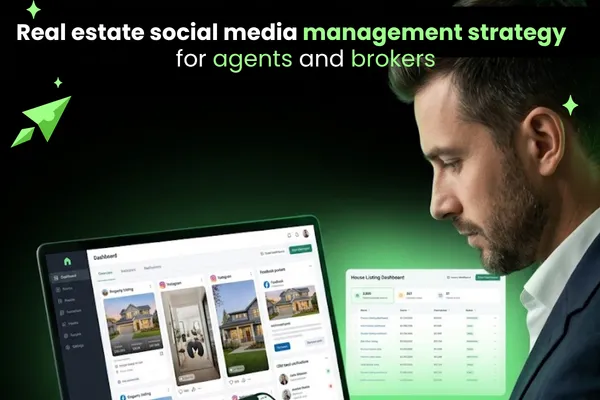
Social Media Management for Real Estate Agents and Brokers
52% of REALTORS ranked social media as their top source of quality leads in 2023, according to the National Association of REALTORS Technology Survey [site: NAR, 2023 Technology Survey]. By 2026, that number keeps climbing as buyers scroll Instagram listings and watch YouTube neighborhood tours before they ever call an agent.
Real estate social media management covers planning, content creation, scheduling, community management, lead routing, analytics, and compliance — all connected to your MLS, CRM, and brokerage rules. It ties listing promotion, buyer guides, seller guides, and neighborhood content directly to appointments, referrals, and closed deals.
This guide covers every layer: platforms, strategy, content, broker workflows, tools, and Fair Housing compliance. Each section connects back to one goal — more signed agreements and closed transactions.
What is social media management for real estate?
Social media management for real estate is the process of planning, creating, publishing, and measuring content across platforms to attract buyers, sellers, and referral partners. It covers platform management, content creation, listing promotion, audience engagement, lead capture, CRM routing, and reporting.
It differs from general social media management because every task connects to a real estate outcome — a buyer consultation, a listing inquiry, a seller appointment, or a referral. Posts do not exist for brand awareness alone. They move people to contact an agent, tour a property, or share a listing with someone they know.
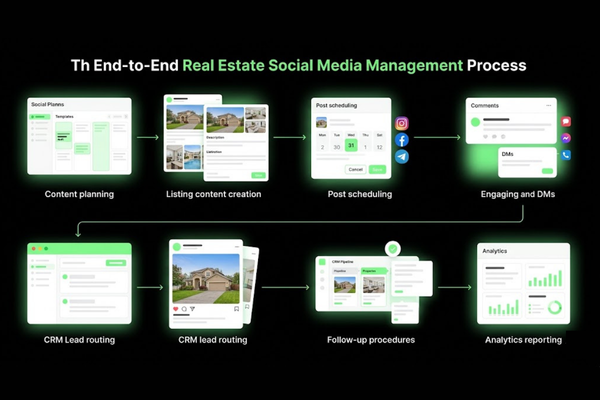
A complete real estate social media workflow covers:
Platform management — Facebook, Instagram, LinkedIn, TikTok, YouTube
Content creation — Listing posts, neighborhood content, buyer guides, seller guides, market updates
Scheduling — Publishing at planned times across platforms
Community management — Replying to comments, DMs, and questions promptly
Lead routing — Moving social inquiries into a CRM or follow-up system
Analytics — Tracking what drives appointments and signed agreements, not just likes
For brokerages, the workflow also includes brand governance, agent content review, and compliance checks before any post goes live.
How does it differ for agents, teams, and brokers?
Social media management differs for agents, teams, and brokers because each role has a different goal and approval need. A solo agent controls their own content. A team needs shared brand standards. A brokerage needs system-level controls across many agents at once.
Role: Solo Agent
Primary Goal: Personal leads and listings
Content Ownership: Agent-owned
Approval Need: Self-review
Lead Routing: Agent’s CRM
Role: Real Estate Team
Primary Goal: Shared leads and team brand
Content Ownership: Team lead approves
Approval Need: Team lead
Lead Routing: Shared CRM
Role: Broker / Brokerage
Primary Goal: Recruitment, listings, and brand
Content Ownership: Brokerage reviews
Approval Needed: Compliance review
Lead Routing: Agent or central CRM
Example: A solo agent posts a listing Reel and routes all DMs to their personal phone. A brokerage marketing director posts office-wide market updates and assigns each inquiry to the correct agent by zip code.
Brokers also manage content that serves agent recruitment — not just buyers or sellers. Posts about office culture, agent success stats, and local market commentary run alongside listing content.
Why does social media matter for real estate leads?
Social media matters for real estate leads because buyers and sellers research agents before making contact. They check posts, reviews, and videos to decide if an agent knows the local market before sending a message or booking a call.
Key reasons social media matters for real estate leads are listed below.
Buyer discovery — 97% of buyers used the internet in their home search in 2023 [site: NAR, 2023 Profile of Home Buyers and Sellers]. Many started on social platforms, not search engines.
Agent trust signals — Consistent posting builds credibility. An agent with 60 posts and clear local knowledge looks far more active than one with a blank profile.
Referral triggers — Past clients share listings, tag friends, and comment on posts. That activity expands reach at no extra cost.
DM inquiries — Many buyers send a direct message before filling out a lead form. Social platforms make that action frictionless.
Local authority — Regular neighborhood content positions an agent as the go-to person for a specific area, not just another name in a large market.
Listing traffic — Reels, Stories, and video tours push listing page views. More views produce more inquiries without paid ads.
What goals should real estate social media support?
Real estate social media should support lead generation, local authority, listing visibility, referrals, and client trust. Every post should connect to at least one of these goals.
Clear goals prevent random posting and make it easy to measure whether the effort is working.
Buyer leads — Attract first-time buyers, move-up buyers, and relocation clients through educational content and listings
Seller appointments — Generate CMA requests and listing consultations through market data and sold story posts
Open house attendance — Drive foot traffic through event posts, Reels, and Stories
Neighborhood authority — Own a zip code or specific neighborhood through consistent local content
Referral pipeline — Stay visible with past clients so they recommend you when a friend is ready to buy or sell
Agent recruitment (for brokers) — Show office culture, production numbers, and agent wins to attract new talent
Brand recall — Show up in someone's feed enough that they think of your name when they are ready to move
Which platforms work best for real estate?
The best social media platforms for real estate are Facebook, Instagram, LinkedIn, TikTok, and YouTube. Each platform serves a different audience, content format, and business outcome.
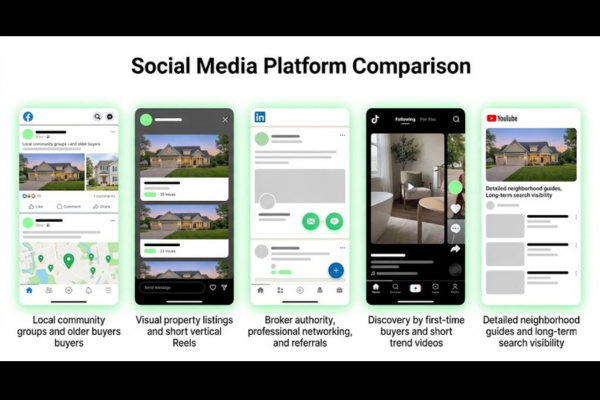
The best social media platforms for real estate are compared below.
Platform: Facebook
Best For: Local reach, groups, older buyers
Content Type: Posts, albums, events, lead ads
Primary Audience: Ages 35–65+
Lead Potential: High — Lead Ads and DMs
Platform: Instagram
Best For: Listings, Reels, visual content
Content Type: Photos, Reels, carousels, Stories
Primary Audience: Ages 25–44
Lead Potential: High — DMs and link in bio
Platform: LinkedIn
Best For: Broker authority, referral partners
Content Type: Articles, commentary, text posts
Primary Audience: Professionals, investors
Lead Potential: Medium — referrals, B2B
Platform: TikTok
Best For: Discovery, young buyers, education
Content Type: Short videos, walkthroughs, trends
Primary Audience: Ages 18–34
Lead Potential: Medium — builds over time
Platform: YouTube
Best For: Long-form search, suburb guides
Content Type: Tours, guides, buyer/seller education
Primary Audience: All ages, search-driven
Lead Potential: High — evergreen traffic
Most agents should start with one or two platforms and post consistently before adding more. A strong presence on Facebook and Instagram beats a thin presence across five.
How should Facebook support local real estate reach?
Facebook should support local real estate reach through community posts, listing albums, groups, events, and lead ads. It is the strongest platform for reaching homeowners and buyers aged 35 and older in a specific geographic area.
Ways to build local real estate reach on Facebook:
Join and post in local community groups: neighborhood news pages, buy-sell-trade groups, town event pages
Create listing albums with full photo sets, price, beds, baths, and a soft CTA
Post open house events with RSVP options so you can follow up with attendees
Run Facebook Lead Ads targeting by zip code, income range, and life events like "likely to move"
Share neighborhood spotlights and local business features to build community trust
Stay active in comments on local news pages to increase profile visibility
Tools that help: Meta Business Suite for free scheduling and analytics, Facebook Lead Ads for paid campaigns, and Canva for branded post graphics.
Example: An agent posts a "Just Listed" album in a neighborhood community group. The post gets 11 comments and 4 DMs within 48 hours. Two of those DMs turn into scheduled showings.
Facebook organic reach is lower than it was five years ago, but targeted local groups and modest paid boosts still deliver measurable real estate lead generation results.
How should Instagram support listings and Reels?
Instagram should support listings and Reels by turning property visuals into short, clear stories that move buyers from scroll to inquiry. It is the strongest platform for visual listing content in the 25–44 age range.
Content formats that work for real estate social media on Instagram:
Reels — 15 to 60-second property walkthroughs, neighborhood clips, and buyer or seller tips. Reels reach significantly more non-followers than static posts [site: Meta, 2023 performance benchmarks].
Carousels — Multi-image listing presentations with price, beds, baths, and key features spread across 5–10 slides
Stories — 24-hour content for open house reminders, quick market updates, and behind-the-scenes clips
Location tags — Tag the neighborhood, city, or nearby landmark to increase local discovery
Hashtags still help on Instagram. Use 5–10 specific ones per post: local neighborhood tags, property type tags, and buyer or seller intent tags. Avoid generic tags like #realestate with tens of millions of posts — too broad to drive meaningful reach.
Example: An agent posts a 30-second Reel of a renovated kitchen with text overlays on each key feature. The caption says "DM KITCHEN to get the full tour link." The post drives 22 DMs in 72 hours.
Agent personality content — short clips that introduce your process and local knowledge — also drives follower growth and trust faster than listing-only accounts.
How should LinkedIn support broker authority?
LinkedIn should support broker authority by showing market knowledge, professional trust, and referral relationships. It is where brokers connect with investors, referral partners, attorneys, mortgage lenders, and potential agent recruits.
Tactical LinkedIn actions for brokers:
Post market commentary on local price trends, days on market, and inventory changes
Share agent production milestones and office success stories (without revealing client details)
Publish short articles on buying or investing in your market for a business-owner audience
Connect with mortgage brokers, estate attorneys, CPAs, and commercial investors
Post office culture content to attract agent recruits looking for a better brokerage fit
Comment on posts from title companies, local news, and lender partners to stay visible
Example: A broker posts a 300-word LinkedIn article on cap rate trends in the local multifamily market. Three investors connect within one week. One books a call about listing a 12-unit building.
One to two quality LinkedIn posts per week outperforms daily low-effort updates. Broker authority building content compounds over months, not days — it is a referral pipeline strategy, not a lead generation sprint.
How should TikTok and YouTube support property discovery?
TikTok and YouTube should support property discovery through short videos, tours, neighborhood guides, and searchable education. Both platforms drive discovery, but they work through entirely different mechanisms.
TikTok runs on algorithmic discovery. A video about a $450,000 home in a specific suburb can reach 15,000 non-followers if the hook lands in the first three seconds. TikTok content gets consumed fast and works best for brand awareness and reaching first-time buyers under 35.
YouTube runs on search. A neighborhood guide titled "Living in [City Name] in 2026" can rank in both Google and YouTube search for years. YouTube Shorts (under 60 seconds) can drive quick discovery while building an evergreen long-form library over time.
Feature: Content length
TikTok: 15 sec – 3 min
YouTube: 3 min – 20+ min
Feature: Discovery type
TikTok: Algorithm-driven
YouTube: Search-driven
Feature: Shelf life
TikTok: Short — days
YouTube: Long — months or years
Feature: Best content
TikTok: Property clips, trends, agent personality
YouTube: Tours, suburb guides, buyer/seller education
Feature: SEO value
TikTok: Low
YouTube: High
Feature: Primary audience
TikTok: Ages 18–34
YouTube: All ages
Video SEO on YouTube means using the neighborhood name, city, and buyer or seller intent in titles, descriptions, and chapter markers. A video titled "3-Bedroom Homes in [Suburb] Under $500K — 2026 Full Tour" targets a specific buyer search query with high purchase intent.
Recommended Video: Search YouTube for "real estate TikTok and YouTube strategy for agents 2026" to watch a visual guide on setting up both channels from scratch.
What should a real estate social media strategy include?
A real estate social media strategy should include audience definition, platform selection, content pillars, posting cadence, lead routing, and measurement. Without all six elements, posting becomes random and results become unpredictable.
Every post in the strategy connects to a specific business outcome. The strategy also answers four core questions: Who am I posting for? What problem do I solve for them? Where do my buyers and sellers spend time online? How does a follower become a lead?
Strategy checklist:
[ ] Defined buyer persona: age, income, life stage, location, and search behavior
[ ] Defined seller persona: equity position, motivation, and timeline
[ ] Platform selection — start with 1–2, expand only after consistent execution
[ ] Content pillars — 5–6 recurring topics, not daily improvised posts
[ ] Posting calendar — mapped by week, month, and listing schedule
[ ] CTA plan — one specific action per post
[ ] CRM connection — every lead source tagged and followed up within 5 minutes
[ ] Analytics review — 30-day, 60-day, and 90-day business metric checks
[ ] Compliance review — Fair Housing language, MLS rules, and brokerage disclosures confirmed
Example: An agent serving first-time buyers in a mid-size market builds a strategy around Instagram and Facebook. Their content pillars are: listings, buyer education, neighborhood tours, market data, and client stories. They post five times per week and track appointment bookings every 30 days.
The strategy document does not need to be long. A one-page framework covering audience, platforms, pillars, calendar, and CRM connection is enough to produce consistent results.
How do agents define audience and market position?
Agents define audience and market position by choosing who they serve, where they work, and what problem they solve. Posting for everyone in a large metro consistently produces weaker results than owning a specific buyer or seller niche.
Start with three questions:
Who is my primary buyer or seller right now?
What neighborhoods or zip codes do I know best?
What do I do better than other agents in this exact area?
Audience Type: First-time buyers
Platform Focus: Instagram, TikTok
Content Focus: Buyer education, affordable listings, process guides
Audience Type: Move-up sellers
Platform Focus: Facebook, Instagram
Content Focus: Sold stories, equity updates, upgrade listings
Audience Type: Luxury buyers
Platform Focus: Instagram, YouTube
Content Focus: High-quality video tours, lifestyle content
Audience Type: Investors
Platform Focus: LinkedIn, YouTube
Content Focus: Deal analysis, cap rates, market data
Audience Type: Relocation clients
Platform Focus: YouTube, Facebook
Content Focus: Suburb guides, cost of living comparisons
Example: An agent in a college town focuses entirely on first-time buyer content on Instagram. Every post answers a question they hear in consultations: "How much do I need to put down?" or "What does a pre-approval actually mean?" That content positions them as the go-to agent for young buyers before any ad spend.
Real estate niche positioning determines content direction. Get the audience clear first. Content follows naturally.
What content pillars work for real estate accounts?
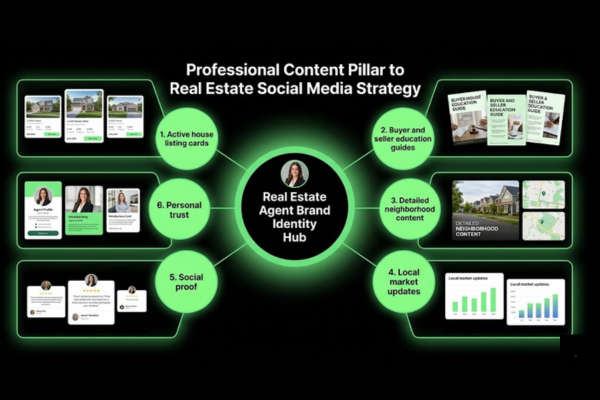
The best content pillars for real estate accounts are listings, education, neighborhood content, market updates, social proof, and personal trust. These six pillars cover every stage of the buyer and seller decision process.
Real estate content pillars are listed below.
Listings — Active listings, open houses, price reductions, and sold announcements with key property details
Education — Buyer guides covering pre-approval, inspection, and closing costs; seller guides covering pricing strategy, staging, and negotiation
Neighborhood content — Local business features, park posts, commute info, and suburb comparisons
Market updates — Monthly data on median prices, days on market, inventory levels, and list-to-sale ratios for your specific area
Social proof — Client testimonials, sold stories, referral shoutouts, and 5-star review screenshots
Personal trust — Behind-the-scenes clips, agent introduction videos, community involvement posts, and milestones that matter to clients
Use a 3:1 value-to-promotion ratio. For every listing post, publish three posts that educate, inform, or entertain without a direct sales ask. That balance keeps followers engaged without making every scroll feel like an ad.
How should agents build a content calendar?
Agents should build a content calendar by mapping weekly posts to listings, local expertise, buyer education, seller education, and lead offers. A calendar removes daily decision fatigue and turns posting into a repeatable system.
How to build a practical content calendar:
List listing events first — Launch dates, open houses, price changes, and sold announcements anchor the calendar
Add weekly education posts — One buyer tip and one seller tip per week covers education pillars without heavy production
Schedule monthly market updates — Pull MLS data once a month and turn it into one post per active platform
Block one batch day per week — Pick a set day to shoot, write, and schedule posts for the next 7–10 days
Add seasonal content — Spring market previews, end-of-year tax content, summer open house posts
Built-in approval time — If a brokerage requires review, submit posts 24–48 hours before the publish date
Example: An agent batches eight posts every Monday morning. They shoot two Reels, write three captions, and schedule everything through Meta Business Suite. The whole process takes 90 minutes. Content stays consistent without daily time pressure.
A simple Google Sheet or Notion table works as a starting calendar. Tools like Later or Buffer add scheduling automation on top once volume grows.
How often should real estate agents post?
Real estate agents should post often enough to stay visible without lowering content quality. Posting frequency depends on platform, listing volume, and whether the agent works alone or with a marketing assistant.
Audience Type: First-time buyers
Platform Focus: Instagram, TikTok
Content Focus: Buyer education, affordable listings, process guides
Audience Type: Move-up sellers
Platform Focus: Facebook, Instagram
Content Focus: Sold stories, equity updates, upgrade listings
Audience Type: Luxury buyers
Platform Focus: Instagram, YouTube
Content Focus: High-quality video tours, lifestyle content
Audience Type: Investors
Platform Focus: LinkedIn, YouTube
Content Focus: Deal analysis, cap rates, market data
Audience Type: Relocation clients
Platform Focus: YouTube, Facebook
Content Focus: Suburb guides, cost of living comparisons
One high-quality post beats five weak ones every time. An agent posting three well-produced Reels per week outperforms an agent posting blurry photos daily.
Posting frequency should increase during peak listing seasons (spring and fall) and drop slightly in slower months. Agents with higher listing volume have more natural content — use those moments to increase the calendar without forcing extra posts.
What content works best for real estate social media?
The best content for real estate social media includes listings, market updates, neighborhood posts, testimonials, video tours, and educational posts. Each content type serves a different buyer or seller stage.
High-performing real estate content types are compared below.
Content Type: Listing posts
Buyer Stage: Active search
Seller Stage: Awareness
Best Platform: Instagram, Facebook
Engagement Level: Medium
Content Type: Market updates
Buyer Stage: Research
Seller Stage: Pre-listing
Best Platform: LinkedIn, Instagram
Engagement Level: Medium-High
Content Type: Neighborhood posts
Buyer Stage: Research
Seller Stage: Awareness
Best Platform: Instagram, YouTube
Engagement Level: High
Content Type: Testimonials
Buyer Stage: Decision
Seller Stage: Decision
Best Platform: Facebook, Instagram
Engagement Level: High
Content Type: Video tours
Buyer Stage: Active search
Seller Stage: Active listing
Best Platform: YouTube, Instagram, TikTok
Engagement Level: Very High
Content Type: Buyer/Seller education
Buyer Stage: Awareness
Seller Stage: Pre-listing
Best Platform: All platforms
Engagement Level: High
Content Type: Behind-the-scenes
Buyer Stage: Awareness
Seller Stage: Awareness
Best Platform: Instagram Stories, TikTok
Engagement Level: High
Content that answers a real buyer or seller question consistently outperforms content that only promotes a listing. A post titled "Why homes in [Neighborhood] sell in under 7 days right now" gets more saves and shares than a plain listing photo.
How should listing posts avoid follower fatigue?
Listing posts avoid follower fatigue when agents balance promotion with education, context, and local value. A feed of nothing but listings looks like a property catalog, not a trusted advisor.
The 1:3 listing-to-value ratio works: for every one listing post, publish three posts that educate, inform, or entertain without a direct sales ask.
When posting listings, go beyond the MLS photo:
Lead with a buyer benefit, not a feature: "This kitchen fits a family of five — here's why" instead of "Open kitchen with granite countertops"
Add local context: "Walking distance to [park name] and three well-reviewed local restaurants"
Use soft CTAs: "Save this post" or "DM for the showing link" instead of "Call me now"
Avoid protected-class language: never describe school districts as a buying reason, suggest neighborhood demographics, or imply which type of buyer fits a property
Example: An agent posts a listing with the caption: "First-time buyers — this one checks every box under $350K. Two beds, updated bath, no HOA. DM me TOUR and I'll send the walkthrough video." The post stays promotional but adds real value through the keyword CTA format.
Open house posts, price reduction posts, and sold announcements break up listing-only content naturally. Each type serves a different purpose in the buyer decision process.
How do neighborhood posts build local authority?
Neighborhood posts build local authority by proving the agent understands streets, pricing, amenities, commute patterns, and buyer concerns in a specific area. A buyer relocating from another city trusts the agent who knows the neighborhood, not just the listings.
Neighborhood content ideas that build real estate local authority:
Feature a local business with a short recommendation and a tag
Post a "30-second commute test" video from the neighborhood to downtown
Share a market snapshot: last 10 sales, median price, and average days on market
Create a "Newcomer's Guide to [Neighborhood Name]" as a pinned post or Reel
Post walkability and transit info using factual distances, not demographic comparisons
Share seasonal local events: farmers markets, summer concerts, sports schedules
Compare two nearby neighborhoods by price range, lot size, and commute time
Example: An agent creates a monthly "Neighborhood Spotlight" Reel series. Each video covers one zip code: median sale price, what $400K buys, walk score, and one local business highlight. Local business owners and residents share the content, expanding reach without any ad spend.
Neighborhood content also creates searchable social posts tied to specific geographic entities — which supports long-term discovery across both social feeds and search results.
How do testimonials and sold stories build trust?
Testimonials and sold stories build trust by showing proof of client outcomes without making unsupported promises. Social proof is one of the strongest drivers of real estate referrals and new client inquiries.
Types of trust-building social proof content:
Testimonial screenshots — Screenshot of a Google or Zillow review with the client's first name and the key outcome stated
Sold case stories — A 4–6 slide carousel covering the challenge, the strategy, the result, and the client's reaction
Negotiation wins — "Listed at $420K, closed at $435K with three competing offers" tells a story that both buyers and sellers want to see
Referral shoutouts — Thank past clients who sent a referral by name (with their permission)
Client privacy checklist for social proof content:
[ ] Get written consent before using names, faces, or transaction details
[ ] Use anonymized versions when consent is not given: "A couple in their 30s, first home, North Phoenix"
[ ] Avoid claims that imply guaranteed results: "sold for top dollar" is acceptable; "I always get over asking" is not
[ ] Keep the story focused on the client outcome, not the agent's personal skill
Example: An agent posts a five-slide sold story carousel. Slide 1 — "They had 12 days to buy before their lease ended." Slides 2–4 — The timeline and the result. Slide 5 — A direct client quote (written consent obtained). The post gets 44 saves and 3 DMs from people describing the exact same situation.
How do video tours generate real estate inquiries?
Video tours generate real estate inquiries by making property details easier to see, compare, and act on. A 60-second walkthrough answers more buyer questions than 25 static photos and creates a direct path to a DM or showing request.
Video Type: Reel walkthrough
Platform: Instagram
Length: 30–60 sec
Best Use: Active listing promotion
CTA Format: DM keyword
Video Type: YouTube full tour
Platform: YouTube
Length: 3–8 min
Best Use: Search-driven buyer discovery
CTA Format: Link in description
Video Type: TikTok property clip
Platform: TikTok
Length: 15–45 sec
Best Use: Discovery, younger buyers
CTA Format: Comment to get link
Video Type: Live open house
Platform: Facebook, Instagram
Length: 15–30 min
Best Use: Real-time buyer engagement
CTA Format: DM or comment
Video Type: YouTube Short
Platform: YouTube
Length: Under 60 sec
Best Use: Quick feature highlight
CTA Format: Subscribe + full tour link
Every video needs a hook in the first three seconds. Open with the most compelling detail: "This $299,000 home has a $1,200/month mortgage. Here's what's inside."
Add captions to every video. 85% of social media videos are watched without sound [site: Meta, 2022 internal data]. Text overlays make the tour watchable in any environment — commuting, at work, in a waiting room.
DM keywords convert passive viewers into active leads. A caption like "Comment TOUR below and I'll DM you the full walkthrough link" creates a clear, low-friction action for interested buyers.
How does social media turn attention into leads?
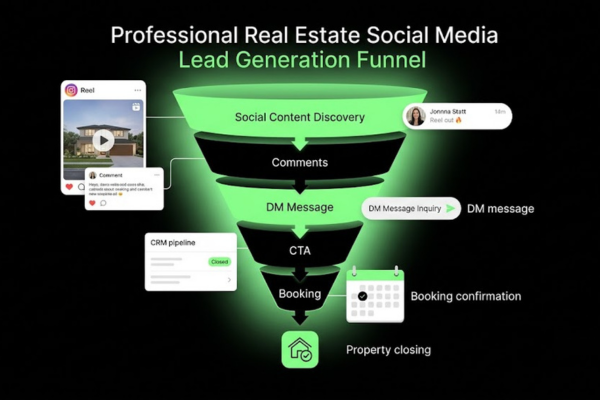
Social media turns attention into leads when content gives users a clear next step and routes every inquiry into a follow-up system. Without a lead routing process, attention disappears and the effort spent creating content produces no business outcome.
The conversion flow works in four stages:
Content creates discovery — A Reel, neighborhood post, or listing video reaches a new audience
Engagement signals intent — A save, comment, DM, or profile visit shows the viewer is paying attention
CTA creates a next step — A specific prompt moves the viewer from passive to active
Routing captures the lead — A DM, landing page, form, or calendar link sends the inquiry into a CRM
Lead capture tools that work for real estate social media:
Link-in-bio pages — A single landing page linking to active listings, buyer guide, seller home valuation, and calendar booking
Lead magnets — Free downloads: "2026 First-Time Buyer Checklist" or "What Your Home is Worth in [City] Right Now"
DM keyword automations — Reply triggers that send a link when someone comments a specific word like "HOMES" or "VALUE."
Calendar booking links — Direct appointment scheduling without phone tag (Calendly, Acuity Scheduling)
Text follow-up — After a form fill, a text sent within 5 minutes dramatically increases contact rates [site: MIT Lead Response Management Study]
One CTA per post. Do not give three choices in one caption. Pick one action, make it obvious, and connect it to a benefit the viewer cares about.
How should DMs and comments move into a CRM?
DMs and comments should move into a CRM through saved replies, source tags, lead notes, and follow-up tasks. Without a system, leads disappear inside notification stacks and never reach the sales pipeline.
Step-by-step social-to-CRM workflow:
Reply within 5 minutes — Speed matters. Reply with a saved opening message that asks one qualifying question
Ask for a phone number — "I can send you the full details — what's the best number to text you?"
Log the source — Tag every lead with the platform and content type: "Instagram Reel — kitchen listing"
Create a CRM contact — Add name, phone, email, source tag, and buyer or seller timeline
Set a follow-up task — Schedule a text or call within 24 hours if there is no response after the first exchange
Move through pipeline stages — New lead → Contacted → Qualified → Appointment Booked → Active Client
Example: A buyer DMs "I love that kitchen." The agent replies: "Glad you love it! Are you looking to buy in the next 90 days or just starting to explore?" The answer tells the agent how to tag and prioritize the contact in their real estate CRM workflow.
Use comment-to-DM automations through Meta-approved tools like ManyChat to scale this process without missing inquiries during busy weeks.
What CTAs work for buyers and sellers?
CTAs work best when they match buyer or seller intent exactly. A generic "Call me today" performs far worse than a specific offer tied to the viewer's current stage in the decision process.
Audience: First-time buyer
Intent: Education
CTA Example: “DM BUYER to get the free 2026 First-Time Buyer Guide”
Audience: Move-up seller
Intent: Valuation
CTA Example: “Comment VALUE and I’ll send a free CMA for your zip code”
Audience: Active buyer
Intent: Listing tour
CTA Example: “DM TOUR for the full walkthrough video and address”
Audience: Investor
Intent: Deal list
CTA Example: “DM ROI for a list of current investment properties under $300K”
Audience: Relocating buyer
Intent: Research
CTA Example: “Save this post — link in bio has the full suburb comparison guide”
Audience: Open house prospect
Intent: Attendance
CTA Example: “RSVP in the comments to hold your spot for Sunday’s open house”
The best CTAs share three qualities:
They ask for one specific action only
They give a clear benefit for taking that action
They match where the viewer is emotionally in the buyer or seller process
A first-time buyer seeing a listing for the first time is not ready for "Book a consultation today." A free guide or tour request fits the stage far better.
How should agents measure lead quality?
Agents should measure lead quality by tracking source, intent, response speed, appointment rate, signed agreements, and closed volume. Platform metrics like likes, reach, and follower count do not produce commissions. Business metrics do.
Real estate social lead quality metrics are listed below.
Source attribution — Which platform and post type produced each lead? Instagram Reels and Facebook group posts will have very different conversion rates
Response speed — Leads contacted within 5 minutes convert at significantly higher rates than those reached after 24 hours [site: MIT Lead Response Management Study]
Appointment rate — What percentage of DM conversations turned into scheduled consultations?
Signed agreement rate — Of consultations held, how many resulted in a buyer representation or listing agreement?
Closed volume — How many transactions traced back to social media in a 90-day window?
Cost per lead — For paid campaigns, divide ad spend by qualified leads, not all clicks or form fills
Review these metrics at 30, 60, and 90-day intervals. Social media ROI in real estate builds over time but grows with consistent execution.
How should brokers manage social media across agents?
Brokers should manage social media across agents with shared brand rules, approval workflows, content libraries, and lead ownership rules. Without these systems, a 20-agent office produces 20 inconsistent brand voices, multiple compliance risks, and missed lead follow-up.
This section addresses broker-level operations — not individual agent execution. The core challenge for multi-agent brokerages is maintaining brokerage brand consistency while giving agents enough creative space to show their own personality and local expertise.
Key broker social media management responsibilities:
Define brokerage brand standards: logo use, color palette, required tone, and disclosure language
Build a shared content library with listing templates, market report formats, and design assets
Create an approval process for listing posts, paid ad campaigns, and market data claims
Set clear lead ownership rules when inquiries come through brokerage pages
Train agents on Fair Housing language and MLS photo rules before they post independently
Track agent posting activity and connect social performance to production results
Example: A 35-agent brokerage creates a shared Canva workspace with 40 branded templates. Every agent uses the same listing card format, color palette, and required disclosure footer. The marketing director reviews all paid ads before launch. Agents still write their own captions and add personal commentary on top.
Broker-level social media workflow also covers recruitment content on LinkedIn, office culture posts, award announcements, and market authority content — types of content individual agents rarely manage on their own profiles.
How can brokerages keep brand voice consistent?
Brokerages keep brand voice consistent by giving agents clear templates, tone rules, design assets, and required disclosure language. Consistency is not about making every agent sound identical — it is about keeping the brokerage visually recognizable and legally protected across every post.
Brand consistency steps for real estate brokerages:
Write a one-page brand voice guide: professional, approachable, and locally grounded — not corporate or overly casual
Provide 10–15 branded Canva templates: listing cards, open house graphics, market update slides, sold announcements
Define logo use rules: minimum size, approved color versions, and required placement on listing posts
Write required disclosure language: brokerage name, license number, and equal housing language where state law requires it
Set tone limits: never make unsupported market predictions, always include a data source and date, avoid superlatives like "best" or "fastest" without evidence
Run quarterly content training sessions to align agents on new platform rules and compliance updates
Example: A brokerage posts a brand voice guide in their agent portal. It includes three Instagram caption examples: one too casual, one too corporate, and one approved version. Agents use it as a reference when writing listing captions.
What approval workflow protects listings and disclosures?
An approval workflow protects listings and disclosures by reviewing content before it reaches public platforms. Posts with inaccurate MLS data, missing brokerage disclosures, or Fair Housing language issues create legal and regulatory exposure for both the agent and the brokerage.
Listing post approval checklist:
Listing accuracy — Price, beds, baths, square footage, and MLS status all match current listing data
MLS photo rights — Only photos the brokerage or agent holds rights to are included
Brokerage disclosure — Brokerage name and license number appear where state rules require it
Fair Housing review — No protected-class language in captions, hashtags, or paid ad targeting settings
Client privacy — No client names, faces, or transaction details used without written consent
Escalation path — A clear process for who reviews flagged content and within what timeframe
Tools that support this workflow: Google Forms for post submission, Slack or email for quick review, and shared Canva workspaces for design approval. Brokerages with higher volume use platforms like Sprout Social or Loomly for formal multi-step approval workflows.
Approval turnaround should be 24 hours or less for listing posts. Longer delays cause agents to skip the process entirely.
How can agents repurpose brokerage content naturally?
Agents can repurpose brokerage content naturally by adding local insight, personal context, and client-specific next steps. Reposting brokerage content without changes creates identical posts across the office — which reduces credibility and hurts organic reach on every platform.
Repurposing methods that work for real estate agents:
Add agent commentary — Take a brokerage market report and add two sentences: "Here's what this means for buyers in [Neighborhood]" and a personal CTA
Localize the data — Use the neighborhood-specific numbers from a market report instead of the city-wide version
Open with a client question — "A buyer asked me this week whether it's still a good time to buy. Here's what the data actually shows."
Change the format — Turn a brokerage PDF into a carousel post or a 45-second Reel summary
Credit the brokerage — Tag the office while adding your own local expertise on top
Example: The brokerage posts a Q1 2026 market report. An agent pulls three data points from it — median price, days on market, and list-to-sale ratio — and records a 45-second Reel: "Three numbers that tell you everything about buying in [City] right now." The video tags the brokerage and links to the full report in bio. Every agent at the office could do this with the same source data and produce completely different content.
What tools support real estate social media management?
Tools that support real estate social media management include scheduling, design, analytics, CRM, AI writing, and automation tools. The right stack saves time, keeps branding consistent, and connects social activity to pipeline results.
No single tool does everything. Most agents use 3–5 tools to cover a full real estate social media management workflow.
Tool Category: Scheduling
Purpose: Plan and auto-publish posts
Example Tools: Meta Business Suite, Buffer, Later, Hootsuite
Tool Category: Design
Purpose: Create branded graphics and videos
Example Tools: Canva, Adobe Express
Tool Category: CRM
Purpose: Track leads, pipeline stages, and follow-up
Example Tools: Follow Up Boss, KvCORE, HubSpot
Tool Category: Analytics
Purpose: Measure reach, engagement, and lead source
Example Tools: Meta Insights, Sprout Social, Google Analytics
Tool Category: AI writing
Purpose: Draft captions, listing descriptions, hooks
Example Tools: ChatGPT, Claude, Jasper
Tool Category: Link-in-bio
Purpose: Single landing page for all CTAs
Example Tools: Linktree, Stan Store, Milkshake
Tool Category: Automation
Purpose: Connect listing data to social posts
Example Tools: Zapier, ManyChat, MLS feed tools
Start with free tools first. Meta Business Suite, Canva's free tier, and a basic CRM cover most needs for solo agents. Upgrade only when posting volume or team size demands it.
Which scheduling and design tools help agents?
Scheduling and design tools help agents plan posts, keep branding consistent, and save production time. These two categories handle the most repetitive parts of the real estate social media workflow.
Tool: Meta Business Suite
Type: Scheduling
Best For: Facebook and Instagram scheduling, analytics
Cost: Free
Tool: Canva
Type: Design
Best For: Branded templates, Reel covers, listing cards
Cost: Free / $16.99/mo Pro
Tool: Buffer
Type: Scheduling
Best For: Multi-platform scheduling and link tracking
Cost: Free / $6/mo per channel
Tool: Later
Type: Scheduling
Best For: Visual grid planning, Instagram-first workflow
Cost: Free / $18/mo Starter
Tool: Hootsuite
Type: Scheduling
Best For: Multi-agent teams, enterprise workflows
Cost: $99/mo+
Tool: Adobe Express
Type: Design
Best For: Quick graphics and short video edits
Cost: Free / $9.99/mo
For most solo agents, Meta Business Suite for scheduling and Canva for design covers 80% of the real estate social media workflow at zero cost.
Teams and brokerages with multiple agents benefit from Hootsuite or Sprout Social, which support content approval workflows, multi-user access, and centralized reporting across agent accounts.
How can AI support captions and listing content?
AI can support captions and listing content by drafting ideas, rewriting copy, creating opening hooks, and repurposing long-form content. It does not replace human judgment — it speeds up the first draft so agents spend time editing rather than writing from a blank page.
AI use cases for real estate social media content:
Caption drafts — Paste property details into a prompt and receive 3 caption options in seconds, then edit for accuracy and tone
Hook writing — Ask AI to generate 5 opening lines for a listing Reel based on the property's strongest feature
Content repurposing — Turn a market report or long blog post into 5 short social captions
FAQ posts — Generate buyer or seller education post ideas based on the most common client questions you hear in consultations
Listing descriptions — Draft MLS remarks and social captions from a feature list (always verify against actual MLS data before publishing)
Rules for using AI in real estate content:
Always review for Fair Housing compliance — AI tools do not automatically remove protected-class language
Check all facts against MLS data — AI makes errors on prices, square footage, and listing details
Match brokerage tone requirements — AI-generated content may not include required disclosure language
Never post without a human review — Especially for any content that includes prices, statistics, or client references
Example: An agent pastes this prompt into Claude or ChatGPT: "Write 3 Instagram captions for a 3-bed, 2-bath home at $389K in Tempe, AZ. Audience: first-time buyers. Use a soft CTA. No price guarantees." Three usable drafts come back in 15 seconds. The agent picks the strongest one, adjusts the details, and publishes.
What automation connects listings with social posts?
Automation connects listings with social posts by turning property data into approved graphics, captions, landing pages, and follow-up tasks. Manual listing post creation for 15 to 30 active listings per month is not a sustainable workflow.
Listing automation workflow:
MLS feed pulls new listing data — Price, photos, address, beds, baths, and remarks are imported through an IDX or MLS integration
Template populates automatically — A design tool fills a branded listing card with the pulled property data
Draft queues for review — The agent or marketing director reviews the auto-generated caption and graphic before approving
Post schedules across platforms — After approval, the post publishes at set times on Facebook, Instagram, and any other connected platforms
Open house reminder triggers — 72 hours before an open house date, an automated reminder post drafts and queues for review
CRM trigger fires — When someone clicks a listing landing page or fills a form, a CRM contact is created automatically, and a follow-up task is assigned
Tools that support this workflow include Zapier for process automation, ManyChat for DM automation, and MLS-integrated platforms such as Propertybase or kvCORE.
Example: A high-volume agent with 30 active listings connects their MLS feed to Canva and then to Buffer through a Zapier workflow. When a new listing goes live in MLS, a draft post appears in Buffer within 10 minutes. The agent adds one personal caption line, approves, and publishes. What used to take 20 minutes per listing now takes 90 seconds.
Should agents DIY or hire social media management?
Agents should choose DIY or managed social media based on time available, skill level, listing volume, budget, and growth goals. Neither option fits everyone — the decision depends on what the agent will actually execute consistently over 12 months.
Option: DIY (self-managed)
Best For: New agents, low volume, tight budget
Monthly Cost Range: $0–$50, tools only
Time Required: 5–10 hours/week
Option: VA / Part-time assistant
Best For: Growing agents, basic content needs
Monthly Cost Range: $200–$600/month
Time Required: 1–2 hours/week oversight
Option: Freelancer
Best For: Mid-volume agents, defined content needs
Monthly Cost Range: $500–$1,500/month
Time Required: 2–3 hours/week
Option: Agency
Best For: High-volume agents, brokerages
Monthly Cost Range: $1,500–$5,000+/month
Time Required: 1–2 hours/week oversight
Option: Brokerage-provided
Best For: Supported brokerage members
Monthly Cost Range: Included or subsidized
Time Required: Minimal
The core question is not "Can I manage it myself?" It is "Will I actually do it consistently for 12 months?" Inconsistent self-management produces worse results than consistent outsourced management every time.
When does DIY social media work for agents?
DIY social media works for agents when the agent has dedicated time, clear content pillars, and a simple repeatable posting system. It is the right starting point for most agents before investing in outside help.
DIY works when:
[ ] The agent can commit 5–10 hours per week to content creation and comment management
[ ] Listing volume stays under 10 active listings per month
[ ] The agent is comfortable on camera or actively building that skill
[ ] A basic tool stack (Canva and Meta Business Suite) covers the content format needed
[ ] Total marketing budget is under $500/month
[ ] The agent has deep enough local knowledge to fill neighborhood content without extra research
Example: A new agent in their first year uses Instagram and Facebook. They post four times per week: one listing (when active), one neighborhood tip, one buyer or seller education post, and one personal trust post. They batch content every Sunday in two hours. This simple real estate social media system produces consistent output at near-zero cost.
DIY stops working when listing volume increases, when lead follow-up starts slipping, or when the agent skips posting weeks due to workload pressure.
When should brokers use managed social media services?
Brokers should use managed social media services when consistency, compliance review, agent support, and lead tracking become too difficult to handle manually. Multi-agent operations scale past what one person can manage in-house without dedicated support.
Signs a brokerage needs managed services:
More than 10 agents posting independently with no shared brand standards
Fair Housing or disclosure errors appearing in agent posts without a review process in place
No system for tracking which social posts produced leads, appointments, or signed agreements
Recruitment marketing is falling behind competitors in the same local market
Agent onboarding should include social media training but no one has time to deliver it
Paid ad campaigns are running without a defined audience, set budget, or performance reporting
Managed social media services for brokerages typically include: content creation, scheduling, compliance review, ad management, monthly reporting, and agent training. The right provider understands MLS rules, Fair Housing compliance, and real estate CRM workflows — not just general marketing tactics.
How much does real estate social media management cost?
Real estate social media management cost depends on posting volume, platforms covered, video needs, ad management, design work, and reporting depth. Costs range from $0 for full DIY to over $5,000 per month for full-service agency management.
Service Level: DIY (tools only)
What’s Included: Canva, Meta Business Suite, Buffer
Monthly Cost Range: $0–$50
Service Level: Virtual assistant
What’s Included: Caption drafting, scheduling, basic design
Monthly Cost Range: $200–$600
Service Level: Freelancer
What’s Included: Strategy, content creation, scheduling, reporting
Monthly Cost Range: $500–$1,500
Service Level: Boutique agency
What’s Included: Strategy, content, design, video, reporting
Monthly Cost Range: $1,500–$3,500
Service Level: Full-service agency
What’s Included: All above + paid ads, CRM integration, lead tracking
Monthly Cost Range: $3,500–$5,000+
Service Level: Brokerage package
What’s Included: Shared service across agent roster
Monthly Cost Range: $100–$400/agent/month
Paid ad budgets are separate from management fees. A standard Facebook and Instagram real estate ad campaign for a solo agent runs between $300 and $1,000 per month depending on market size and audience scope [site: Meta Ads, industry benchmarks 2024].
Most mid-volume agents find the $500–$1,500 freelancer range delivers the best return — professional content creation without the overhead of a full agency retainer.
What compliance risks affect real estate social media?
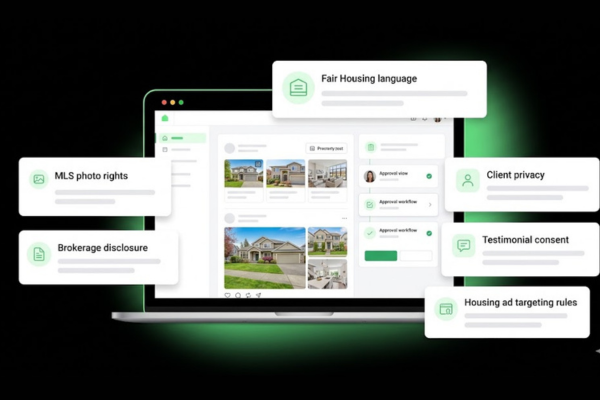
Compliance risks that affect real estate social media include Fair Housing language, MLS rules, brokerage disclosures, ad targeting restrictions, privacy requirements, and testimonial consent rules. These rules apply to posts, Stories, paid ads, captions, hashtags, images, videos, and comments.
Non-compliance exposes agents and brokerages to state licensing board complaints, HUD investigations, MLS violations, and civil liability. REALTORS have faced disciplinary action for social media posts that violated Fair Housing language standards or included inaccurate listing data [site: NAR Code of Ethics enforcement records].
Compliance risk areas to manage:
Fair Housing Act — Prohibits discriminatory language targeting protected classes in housing advertising [site: HUD, Title VIII, Fair Housing Act]
MLS photo and data rules — Restricts use of listing photos, remarks, and sold data without proper authorization
State brokerage disclosure rules — Require brokerage name and license number on advertising materials
Meta Special Ad Category restrictions — Prohibit certain targeting options for housing ads, including age, gender, and narrow zip code targeting
Client privacy laws — Restrict use of client names, images, and transaction data in marketing without consent
Testimonial consent — Using sold stories or client reviews without written consent creates legal exposure
How do Fair Housing rules affect social media posts?
Fair Housing rules affect social media posts by limiting discriminatory language, ad targeting, images, captions, hashtags, and comments. The Fair Housing Act prohibits discrimination in housing advertising based on race, color, national origin, religion, sex, familial status, and disability [site: HUD, Fair Housing Act, Title VIII].
Do: Describe property features
Example: Beds, baths, layout, yard
Don’t: Mention neighborhood demographics or resident characteristics
Do: Use income-neutral terms
Example: “Priced under $350K”
Don’t: Suggest which types of buyers “fit” a neighborhood
Do: Include the Equal Housing Opportunity logo or statement
Don’t: Use hashtags that reference protected-class characteristics
Do: State commute times and distances as factual data
Don’t: Present school districts as a reason a buyer should choose a property
Do: Target by homeownership intent, geography, and interest
Don’t: Target housing ads by age, gender, or household composition on Meta
Do: Let buyers self-select their own search criteria
Don’t: Imply which type of person should or should not consider a listing
On Meta platforms, all housing-related ads must be placed under the Special Ad Category: Housing. This removes the ability to target by age, gender, zip code radius under 15 miles, and similar attributes that could serve as proxies for protected-class characteristics [site: Meta, Special Ad Categories policy].
Agents should also reference the NAR Fair Housing guidelines and their state real estate commission's advertising rules, which may add requirements beyond federal law.
What MLS and brokerage disclosures apply?
MLS and brokerage disclosures apply when agents post listing photos, property remarks, sold data, open house details, and brokerage identifiers on social media. Every state has slightly different requirements, but the core obligations apply broadly.
Disclosure checklist for real estate social media listing posts:
[ ] Brokerage name appears on the post or in the profile bio where state advertising rules require it
[ ] License number included where state law mandates it in advertising materials
[ ] MLS photos are used only with rights granted through the listing agreement or MLS rules
[ ] Property remarks pulled from MLS are accurate and unedited for claims not approved by the seller
[ ] Sold data is shared only where MLS rules permit public posting of closed transaction information
[ ] Open house details match current MLS status and have seller confirmation
[ ] Equal Housing Opportunity logo or statement included on display advertising where required
Agents operating in multiple states must follow the disclosure rules for each state individually. Requirements in Texas differ from those in California and New York [site: state real estate commission websites]. A standard Canva footer template that includes brokerage name, license number, and EHO language solves most disclosure issues at no cost.
How should agents protect client privacy?
Agents should protect client privacy by getting explicit consent before sharing names, faces, addresses, negotiation details, and client stories. Privacy protection is both a legal obligation and a trust signal that referral clients notice and value.
Client privacy checklist:
[ ] Get written consent before using client names in testimonials, sold stories, or any public content
[ ] Never post images of children without explicit parental permission
[ ] Avoid sharing full property addresses publicly before the transaction closes, especially for occupied homes
[ ] Keep negotiation details, offer amounts, and personal financial information entirely off social media
[ ] Use anonymized versions when consent is not given: "A couple in their 30s, first home, North Phoenix"
[ ] Never reveal that a client is selling due to divorce, death, financial hardship, or job relocation without their approval
[ ] Keep transaction documents, email screenshots, and text conversations completely off social media
Example: An agent wants to post a sold story about a couple who relocated from Chicago. They get written consent by text message before using first names and city of origin. The post reads: "Ryan and Jess moved from Chicago and found their first Austin home in under 30 days." No last names, no address, no financial details included.
Privacy-first practices also build the referral pipeline directly. Past clients who know their information is protected are far more likely to recommend you to friends and family.
Real Estate Social Media Management FAQs
Real estate social media management FAQs answer the most common short questions agents and brokers ask before starting or scaling their presence. Each answer below is direct and self-contained.
What should real estate agents post on social media?
Real estate agents should post listings, neighborhood insights, market updates, buyer tips, seller tips, testimonials, and video tours. A balanced real estate content strategy uses the 3:1 value-to-promotion ratio: three educational or local posts for every one listing post. Example: Monday — buyer tip. Wednesday — neighborhood spotlight. Friday — listing Reel. Sunday — sold story. This rotation keeps content varied, builds consistent trust, and prevents the account from looking like a property catalog.
Which platform is best for real estate leads?
The best platform for real estate leads depends on audience, market, and content format. Facebook produces strong results for buyers and sellers aged 35 and older through community groups and lead ads. Instagram drives listing inquiries through Reels and DMs. LinkedIn builds referral pipelines for brokers and luxury agents. TikTok reaches first-time buyers under 35 through discovery-driven short video. YouTube generates long-term search-based leads through neighborhood guides and buyer education. Most agents should start with Facebook and Instagram before adding other platforms.
Is social media management worth it for real estate agents?
Yes, social media management is worth it for real estate agents when it produces consistent visibility, trust, inquiries, appointments, and referrals over time. Results depend on posting consistency, lead routing speed, and follow-up execution — not content quality alone. An agent who posts well but ignores DMs will not see meaningful ROI. Track appointments booked and signed agreements attributed to social sources at 30, 60, and 90-day intervals to measure actual return on the effort.
How long does social media management take to work?
Social media management shows early signals — saves, DMs, and profile visits — within the first 30 days of consistent posting. Lead quality and appointment bookings typically build over 60 to 90 days as an audience develops trust in the agent's content and local expertise. Review platform engagement metrics at 30 days, business metrics (appointments and signed agreements) at 60 days, and closed volume attribution at 90 days. Agents who post consistently and follow up on every inquiry see measurable results within one quarter.

We’re Here to Support Your Growth
Have a Member of Our Team Contact You
FAQS
Frequently Asked Questions
How many platforms are included in each package?
Each Social Lift-Off package includes full management for one social media platform of your choice (e.g., Instagram, Facebook, LinkedIn, etc.). This covers content planning, design, copywriting, scheduling, revisions, and performance tracking. Additional platforms can be added for $10 per platform per month.
Do I need to provide any content?
You are not required to provide content for static posts. For video posts, you must either:
- Approve the use of stock footage, or
- Provide your own business video footage (recommended for best performance)
We also collect brand assets and messaging during onboarding.
What is the Express Brand Refresh and who is it for?
The Express Brand Refresh ($375 one-time) is ideal for businesses that:
- Lack a consistent visual identity
- Are rebranding or launching
- Want professional, cohesive social visuals
It includes:
- Logo and icon set (10)
- Social banners and icons
- Full brand kit (colors, fonts, visual system)
This is strongly recommended for new brands or businesses with outdated design
How do I get started after choosing my package?
Once you sign up, you will receive immediate access to the Social Portal along with an onboarding form. This form collects key information about your business, brand voice, target audience, goals, competitors, and any existing brand assets.
After submission, your dedicated social manager will begin content planning and creation.
What type of content is included in the packages?
All plans include a mix of:
Static posts (graphics, carousels, branded visuals)
Video posts (either stock footage or client-provided business videos)
We handle the full content lifecycle: strategy, creation, copywriting, and scheduling.
How does the approval and revision process work?
All content is uploaded to the Social Portal for review. You can request unlimited revisions. Nothing is published until you explicitly approve the content.
This ensures full brand control while removing the operational burden from your team.
Can I cancel or change plans?
Yes. All Social Lift-Off packages are month-to-month with no contracts. You can cancel, upgrade, or downgrade at any time based on your needs.
Can I customize my Social Lift-Off package?
Yes. While the Social Lift-Off packages are structured for simplicity and affordability, they are fully customizable. You can add additional platforms, adjust posting frequency, increase video volume, or combine your plan with services like the Express Brand Refresh.
For more advanced needs including multi-brand accounts, campaign-based content, community management, or paid social integration, we offer custom social management plans outside of our standard packages.
Social media managed your way. Increase your online visibility and credibility with smart social media strategy and optimized outreach.
Powered by:

About
Features
Strategy
Create
Optimize
Connect
© 2026 High Point Marketing Group - All Rights Reserved.